PLC programming · Free online course
Omron PLC with CX-Programmer
Omron from first principles: automation, the PLC, CX-Programmer, every instruction family, and the worked programs that make it stick.
- 16 modules
- 10h 8m of video
- Beginner
- English
- ₹0, free

₹0Free for good
Worth ₹5,999 by length and depth against classroom training. It has always been free; that is not a former price.
No card. Checkout takes a minute and gives you a receipt.
Overview
About Omron PLC with CX-Programmer
Omron from first principles: automation, the PLC, CX-Programmer, every instruction family, and the worked programs that make it stick.
Omron PLC with CX-Programmer is a free, self-paced online course from EDWartens for engineering students, ITI and diploma holders, and working engineers in automation, electrical and instrumentation. It has 16 modules and 10h 8m of video lessons by Instrumentation Tools, with written notes and worked problems, a practical project with a document pack and a 15-question final assessment (pass mark 60%). Learning is free with an account; an optional certificate with a public verification code is issued when you pass. Last updated 27 September 2026.
Who it is for: Engineering students, ITI and diploma holders, and working engineers in automation, electrical and instrumentation
This course includes
- 10h 8m of video lessons
- 16 modules with written notes and diagrams
- One final assessment: 15 questions, pass mark 60%
- Ask-an-engineer support from practising engineers
- Lifetime access, the course does not expire
- Optional verifiable certificate when you finish
- Step 1 of 3
Learn the 16 modules
10h 8m of video lessons, written notes and a practice task per module, at your own pace.
- Step 2 of 3
Pass the final assessment
15 questions drawn from every module, pass mark 60%, 3 attempts.
- Step 3 of 3
Take the certificate, if you want it
Optional, paid once, only if you choose it. The course stays free either way.
See the certificate and its price
A look inside


From the lessons

Automation, Control Systems and the PLC
by Instrumentation Tools
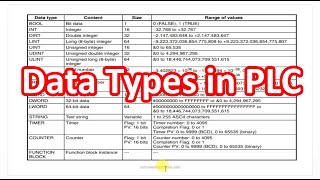
Data Types, Addressing and Operating Modes
by Instrumentation Tools

Bit Logic and Logic Gates
by Instrumentation Tools

Interlocks: IL and ILC
by Instrumentation Tools

Counters: CNT, CNTR and Reset
by Instrumentation Tools

Move, Block Set, Data Exchange and Transfer
by Instrumentation Tools
Lesson frames belong to the creators named in the Credits and are shown from YouTube.
What you learn
What you will be able to do
Explain what a control system and a PLC do, install CX-Programmer and create a project, use Omron addressing and data types, write ladder with contacts, coils, KEEP, SET/RSET, DIFU/DIFD, interlocks, timers and counters, do arithmetic and comparisons, move and manipulate data, use shift registers, jumps and subroutines, scale an analog input, and solve the classic worked problems.
- Explain automation, control systems and the PLC from scratch
- Use Omron addressing: CIO, W, H, D, T, C and bit-of-word notation
- Latch with a seal-in, SET/RSET or KEEP, and know which input dominates
- Use IL/ILC interlocks and know what timers do inside them
- Use TIM, TIMX, TIMH, TMMH and TTIM, and CNT and CNTR
- Do arithmetic, comparison, block compare and area range compare
- Move, block-set, transfer, shift and rotate data
- Solve the conveyor, car park and tank programs from a specification
Syllabus
Course content, module by module
In order, at whatever pace suits you. Each module ends with a practice task that builds on the last.
- Modules
- 16
- Video lessons
- 67
- Of video
- 10h 8m
- Final questions
- 15
- 01
Automation, Control Systems and the PLC
4 lessons · 50m - 02
Omron PLCs and CX-Programmer
4 lessons · 31m - 03
Data Types, Addressing and Operating Modes
3 lessons · 18m - 04
First Project and the Simulator
2 lessons · 11m - 05
Bit Logic and Logic Gates
5 lessons · 49m - 06
Latching, Set/Reset, KEEP and Edges
6 lessons · 41m - 07
Interlocks: IL and ILC
2 lessons · 13m - 08
Timers: TIM, TIMX, TIMH, TMHH and TTIM
6 lessons · 43m Final assessment · 15 questions, pass mark 60%
Project
The course project
Optional practice that ends in the kind of job the course prepares you for, with the documents that go with it.
About 16 hours
Tunnel oven line OV-1: zone temperatures, band speed and a witnessed FAT on a CP1E
Design, program, test and document the control panel for a three-zone electric tunnel oven and its wire-mesh band: a start-up sequence that purges, runs the band and brings the zones up in a stagger, on-off zone control from 4-20 mA temperature transmitters through a CP1W-AD041, band speed to an MX2 drive through a CP1W-DA021, bake recipes moved with XFER, and an NB7W operator screen. You deliver the CX-Programmer project, your own I/O list and FAT record, and the operator note. The sample pack shows what a system integrator hands over for the same oven.
Sample document pack, 9 documents, filled in for the scenario
- FDSFunctional Design Specification: Tunnel Oven OV-1 Control System
- I/O listI/O List: Panel CP-201
- Panel GAControl Panel CP-201: General Arrangement
- BOMBill of Materials: Panel CP-201 and Field Devices
- Tag listPLC Symbol List and Naming Convention
- Alarm listAlarm List: Oven OV-1
- FATFactory Acceptance Test Record: Panel CP-201
- O&M manualOperation and Maintenance Manual: Oven OV-1 (Operation section)
- Handover certificateSite Acceptance and Handover Certificate: Oven OV-1
Read inside the course and download as a workbook. The project is optional practice, marked when you submit it; the certificate needs only the modules and the final assessment.
Tools
Software, hardware and lessons
Software
CX-Programmer (part of CX-One; trial from Omron) with CX-Simulator
Hardware
None. CX-Simulator runs every exercise.
Who it is for
Absolute beginner. The first module explains what industrial automation is.
Software you need
What to download, where from, what it costs and how to install it. Every link goes to the maker's own site, never a mirror.
Required
- 01Free trial: 30 days
CX-One (CX-Programmer, CX-Simulator)
Omron
- Runs on
- Windows 7, 8.1, 10 or 11 (Windows 11 is 64-bit only)
- Account
- Registration with Omron through the trial download form (name, email, company, country)
- Size
- about 2.7 GB download (CX-One v4.61 trial ZIP)
Omron sends a download link and a licence key for a 30-day trial after you register. CX-One includes CX-Programmer and CX-Simulator; after the trial you need to buy a licence.
Steps
- 1.Open the Omron CX-One trial download form.
- 2.Fill in your details and accept the Omron privacy policy.
- 3.Open the email from Omron and download the trial installer.
- 4.Unzip the download and run the setup as administrator.
- 5.Enter the 30-day trial licence key from the email when the installer asks.
- Keep the email: it holds the trial licence key.
- Use CX-Simulator inside CX-One to run programs on a virtual PLC.
Official download pageindustrial.omron.eu
Checked against each maker's own page on 27 September 2026. Trial lengths and editions change; the maker's page is the final word.
What you walk away with
Your certificate for Omron PLC with CX-Programmer
Finish the course, pass the final, and this is the document with your name on it.

Verifiable by anyone
Adds to LinkedIn in one click
QR code on the certificate
Names what you can do
A permanent link
Earned, not attended
Learning is free. The certificate is optional.
Add it now and pay only when you have finished the course, or come back for it later. One-off, US$23.99, with a receipt.
Issued by Wartens Ltd (England and Wales, company no. 15262249) through the EDWartens training portal, as a Certificate of Completion for this self-paced course. Sold in India by Wartens Automation Private Limited. It is not a vendor certification, a university award or a CPD-accredited activity, and it does not certify competence on live equipment. Delivered electronically; see the refund policy.
FAQ
Common questions
Do I need CX-Programmer?
For the exercises, yes. It ships in CX-One, for which Omron offers a trial. CX-Simulator, included, runs every exercise without a PLC.
Do I need an Omron PLC?
No. CX-Simulator stands in for it throughout.
Which Omron PLCs does this cover?
The instruction set is common to the CP1, CJ1 and CJ2 families, which is most of the Omron installed base. Sysmac Studio and the NJ/NX series are a different tool and not covered here.
Some lessons in the source series are members-only. Are they in the course?
No. Four members-only lessons were deliberately left out so you never hit a paywall. Their topics are covered by the public lessons that remain.
What computer do I need for the Omron PLC with CX-Programmer course?
A 64-bit Windows 10 machine with 8 GB of RAM. CX-One is Windows-only.
Is the Omron PLC with CX-Programmer course really free?
Yes. Every module, practice task and assessment. You create an account so your progress is saved and the assessments can be marked. The certificate is the only paid item, and only if you want it.
What certificate do I get, and is it a Omron qualification?
An EDWartens Certificate of Completion, issued when you pass the final assessment, with a verification code anyone can check. It is not a Omron credential and is never described as one.
Who made the video lessons in the Omron PLC with CX-Programmer course?
The creators named in the Credits block at the foot of this page, on their own YouTube channels. EDWartens did not make the videos and the creators are not affiliated with EDWartens. What EDWartens wrote is the study plan, the notes, the practice tasks and the assessments.
Is the Omron PLC with CX-Programmer course free in India, and what does the certificate cost?
Yes. Learning costs ₹0 in India: every module, the written notes, the practice tasks and the final assessment, with no card and no trial period. The only paid item is the optional EDWartens Certificate of Completion, ₹499 including GST for this beginner course, paid in rupees through Razorpay, and only if you want it after passing the final assessment.
Is there classroom PLC training in India as well?
Yes. EDWartens India runs the Automation Engineer Program (AEP), a classroom programme at its Electronic City centre in Bangalore. The Automation Engineer Program (AEP) teaches Omron PLC programming in person at our Electronic City centre, alongside the other PLC brands it covers. This free course is separate and fully online; it is a good way to try the subject before deciding on classroom training. Details are at edwartens.co.in/omron-plc-training-bangalore, and the programme itself at edwartens.co.in/courses/aep.
All course factsHide course facts
- Price
- ₹0, free for good. No trial, no card. Comparable classroom training of this length costs about ₹5,999.
- Who it is for
- Engineering students, ITI and diploma holders, and working engineers in automation, electrical and instrumentation
- Format
- 16 self-paced modules, 10h 8m of video, written notes, a practice task per module and one final assessment.
- Level
- Beginner. Absolute beginner. The first module explains what industrial automation is.
- Brand
- OMRON
- Software
- CX-Programmer (part of CX-One; trial from Omron) with CX-Simulator
- Hardware
- None. CX-Simulator runs every exercise.
- Certificate
- Optional EDWartens Certificate of Completion, ₹499 inclusive of GST for learners in India, verifiable by code. Not a vendor credential.
- Video lessons by
- Instrumentation Tools (independent creators, credited below)
- Language
- English
- Last updated
- 27 September 2026
Pairs well with
 PLC programming · FreeOmron Sysmac Studio: NX and NJ Machine Controllers
 PLC programming · FreeSiemens TIA Portal
 PLC programming · FreeSiemens TIA Portal in Three Hours
 PLC programming · FreeTIA Portal: Build a Machine
More free courses: Free Omron PLC course · Free PLC programming courses
Learning paths with this course
- Machine-builder PLCs · 4 courses
- Japanese PLC platforms · 4 courses
Classroom course, Bangalore
Omron PLC training in Bangalore
The Automation Engineer Program (AEP) teaches Omron PLC programming in person at our Electronic City centre, alongside the other PLC brands it covers.
Credits
Who made the video lessons
The video lessons in this course were created by the people below, not by EDWartens. Every lesson streams from its creator's own YouTube channel; EDWartens neither hosts nor sells that footage, and the creators are not affiliated with EDWartens and do not endorse this course. What EDWartens wrote is the study plan, the notes, the practice tasks and the assessments.
- Instrumentation Toolsthe entire Omron PLC course series
If you are one of these creators and would like a lesson removed or credited differently, write to info@wartens.com.