SCADA · Free online course
Wonderware InTouch SCADA
Build a working plant screen, tags, animation, alarms, trends and a live PLC link, on the SCADA still running on most Indian plant floors.
- 11 modules
- 14h 32m of video
- Beginner
- English
- ₹0, free

₹0Free for good
Worth ₹6,999 by length and depth against classroom training. It has always been free; that is not a former price.
No card. Checkout takes a minute and gives you a receipt.
Overview
About Wonderware InTouch SCADA
Build a working plant screen, tags, animation, alarms, trends and a live PLC link, on the SCADA still running on most Indian plant floors.
Wonderware InTouch SCADA is a free, self-paced online course from EDWartens for engineering students, ITI and diploma holders, and working engineers in automation and control. It has 11 modules and 14h 32m of video lessons by Instrumentation Tools, Industrial Automation Maven (Louis Wyn), AVEVA Select California, with written notes and worked problems, a practical project with a document pack and a 15-question final assessment (pass mark 60%). Learning is free with an account; an optional certificate with a public verification code is issued when you pass. Last updated 27 September 2026.
Who it is for: Engineering students, ITI and diploma holders, and working engineers in automation and control
This course includes
- 14h 32m of video lessons
- 11 modules with written notes and diagrams
- One final assessment: 15 questions, pass mark 60%
- Ask-an-engineer support from practising engineers
- Lifetime access, the course does not expire
- Optional verifiable certificate when you finish
- Step 1 of 3
Learn the 11 modules
14h 32m of video lessons, written notes and a practice task per module, at your own pace.
- Step 2 of 3
Pass the final assessment
15 questions drawn from every module, pass mark 60%, 3 attempts.
- Step 3 of 3
Take the certificate, if you want it
Optional, paid once, only if you choose it. The course stays free either way.
See the certificate and its price
A look inside


From the lessons

What SCADA Is, and Where It Sits
by Instrumentation Tools

Installing InTouch and Finding Your Way Around
by Instrumentation Tools

The Tag Database
by Instrumentation Tools

Drawing the Plant, Graphics and Navigation
by Instrumentation Tools

Making It Move, Animation Links
by Instrumentation Tools

Colour as Information
by Instrumentation Tools
Lesson frames belong to the creators named in the Credits and are shown from YouTube.
What you learn
What you will be able to do
Create an InTouch application from scratch: build a tag database, draw and animate a plant mimic, wire up operator input, raise and acknowledge alarms, log and trend process values, script behaviour, and connect the whole thing to a PLC.
- Build an InTouch tag database that will not fall over at 500 tags
- Draw a plant mimic and animate it from live process values
- Take safe operator input without letting a typo reach the plant
- Configure alarms that an operator will act on rather than silence
- Log and trend process data, and read a trend to find a problem
- Script behaviour that the animation wizards cannot express
- Connect InTouch to a PLC and diagnose the link when it drops
- Hand over an application someone else can maintain
Syllabus
Course content, module by module
In order, at whatever pace suits you. Each module ends with a practice task that builds on the last.
- Modules
- 11
- Video lessons
- 42
- Of video
- 14h 32m
- Final questions
- 15
- 01
What SCADA Is, and Where It Sits
1 lesson · 17m - 02
Installing InTouch and Finding Your Way Around
4 lessons · 22m - 03
The Tag Database
4 lessons · 42m - 04
Drawing the Plant, Graphics and Navigation
2 lessons · 18m - 05
Making It Move, Animation Links
10 lessons · 1h 30m - 06
Colour as Information
3 lessons · 22m - 07
Operator Input
3 lessons · 29m - 08
Alarms and Trends
4 lessons · 51m Final assessment · 15 questions, pass mark 60%
Project
The course project
Optional practice that ends in the kind of job the course prepares you for, with the documents that go with it.
About 16 hours
Pharma purified-water loop on InTouch: Tagname Dictionary, alarm groups, USP conductivity scripts and an audit-ready FAT
Design, build, test and document an InTouch application for a pharmaceutical purified-water generation and distribution loop: a Tagname Dictionary against a CompactLogix over an OI Server, a plant mimic on the ISA-101 pattern, alarm groups with ISA-18.2 priorities, tag logging of conductivity and temperature, QuickScripts that apply the USP <645> Stage 1 limit and time the hot-water sanitisation, and the security and event logging a 21 CFR Part 11 audit expects. You deliver the application, your own tag list and FAT record, and the operator's hand-over note. The sample pack shows what an integrator hands a regulated plant.
Sample document pack, 8 documents, filled in for the scenario
- URSUser Requirements: Purified Water System PW-1 Supervisory Control
- Network architectureSystem and Network Architecture: PW-1 SCADA
- HMI specHMI Specification: Window Hierarchy and Window Specification, PW-1
- Tag listTagname Dictionary and Naming Convention: PW-1
- Alarm listAlarm List: PW-1
- SDSSoftware Design Specification: Scripts, Logging, Security and Event Logging
- FATFactory Acceptance Test Record: PW-1 SCADA Application
- O&M manualOperation and Maintenance Manual: PW-1 SCADA (Operation and Backup sections)
Read inside the course and download as a workbook. The project is optional practice, marked when you submit it; the certificate needs only the modules and the final assessment.
Tools
Software, hardware and lessons
Software
AVEVA/Wonderware InTouch (trial)
Hardware
None, the PLC link is done against a simulator
Who it is for
Beginner. Some PLC familiarity helps but is not assumed: module 1 covers what a SCADA talks to.
Video lessons by
- Instrumentation Tools
- Industrial Automation Maven (Louis Wyn)
- AVEVA Select California
Independent creators, credited in full under Credits.
Software you need
What to download, where from, what it costs and how to install it. Every link goes to the maker's own site, never a mirror.
Required
- 01Free trial
AVEVA InTouch HMI
AVEVA
- Runs on
- Windows (check the vendor system requirements)
- Account
- Registration on the AVEVA trial form (name, work email, company, phone, job title, country)
AVEVA offers a fully functional InTouch HMI trial after you register and accept the EULA. WindowViewer can also run in demo mode with no tag or window limit, but it times out after two hours and must be restarted.
Steps
- 1.Open the AVEVA InTouch HMI trial page.
- 2.Fill in the form and accept the EULA.
- 3.Download the trial from the link AVEVA provides.
- 4.Install InTouch HMI as administrator.
- 5.Build screens in WindowMaker and test them in WindowViewer.
- In demo mode WindowViewer stops after two hours; save your work and restart it.
Official download pageengage.aveva.com
Checked against each maker's own page on 27 September 2026. Trial lengths and editions change; the maker's page is the final word.
What you walk away with
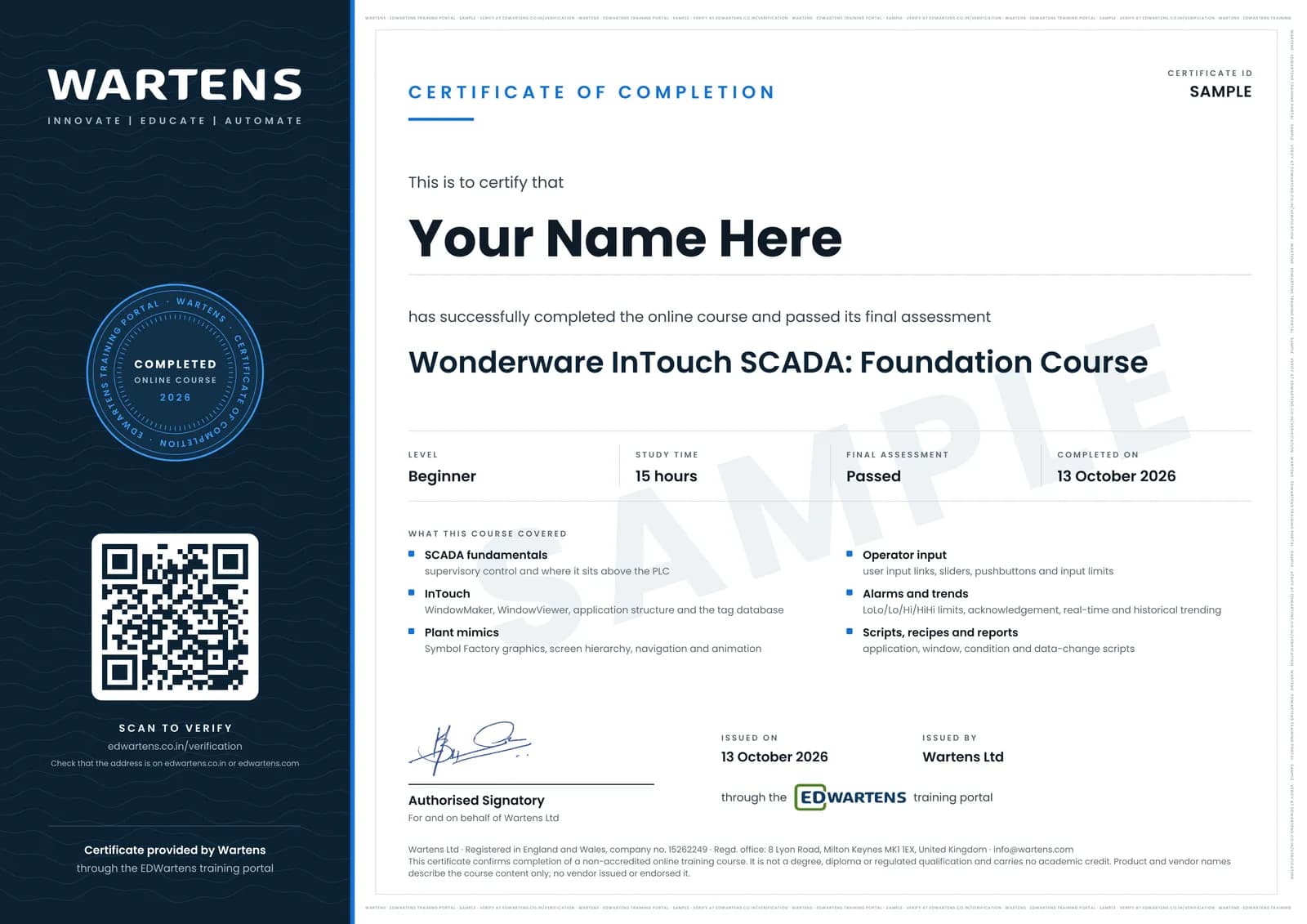
Your certificate for Wonderware InTouch SCADA
Finish the course, pass the final, and this is the document with your name on it.
Verifiable by anyone
Adds to LinkedIn in one click
QR code on the certificate
Names what you can do
A permanent link
Earned, not attended
Learning is free. The certificate is optional.
Add it now and pay only when you have finished the course, or come back for it later. One-off, US$23.99, with a receipt.
Issued by Wartens Ltd (England and Wales, company no. 15262249) through the EDWartens training portal, as a Certificate of Completion for this self-paced course. Sold in India by Wartens Automation Private Limited. It is not a vendor certification, a university award or a CPD-accredited activity, and it does not certify competence on live equipment. Delivered electronically; see the refund policy.
FAQ
Common questions
Which InTouch version does the course use?
AVEVA InTouch HMI, the product still widely known by its old name, Wonderware. The lessons were recorded on a recent version, and the things the course teaches, tags, animation links, alarm groups, historical logging and scripting, work the same way across the versions you will meet on an Indian plant floor.
How do I get InTouch, and what happens when the trial ends?
AVEVA publishes a free trial through its own site; you register with an email address and download it. When the trial expires you are not stuck: an installed copy still runs in demo mode, which gives you unlimited tags and windows in sessions of about two hours. You restart WindowViewer and carry on. It is not suitable for a real plant, but it is fine for finishing this course and for practising afterwards.
Do I need a PLC to do the exercises?
No. The connectivity module works against a simulator, so you can build the tag database, drive the animation from live values and watch the link drop and recover, all on one machine.
What kind of computer do I need?
A 64-bit Windows machine with 8 GB of RAM and a few tens of gigabytes free, plus administrator rights to install. InTouch is Windows-only; a Windows virtual machine works if you give it enough memory.
Should I do the PLC course first?
It helps but it is not required. Module 1 covers what a SCADA actually talks to, so you can start here. Most people find the two together make more sense than either alone, and both are free, so there is nothing to lose by doing the Siemens course alongside this one.
Why teach Wonderware rather than a newer SCADA?
Because it is what is running. InTouch sits on a very large number of Indian plant floors, and the person maintaining it is often the person who gets hired. Newer platforms are worth learning next; this is the one most likely to appear in a job advert you can actually answer today.
Is the Wonderware InTouch SCADA course really free?
Yes. All eleven modules, every practice task and every assessment. You create an account so your progress is saved and the assessments can be marked. The certificate is the only paid item, and only if you want it.
What certificate do I get, and is it an AVEVA qualification?
An EDWartens Certificate of Completion, issued when you pass the final assessment and carrying a number anyone can verify on our site. It is not an AVEVA or Wonderware credential and we will never describe it as one. Those come from AVEVA and no third party can award them.
Is the Wonderware InTouch SCADA course free in India, and what does the certificate cost?
Yes. Learning costs ₹0 in India: every module, the written notes, the practice tasks and the final assessment, with no card and no trial period. The only paid item is the optional EDWartens Certificate of Completion, ₹499 including GST for this beginner course, paid in rupees through Razorpay, and only if you want it after passing the final assessment.
Is there classroom SCADA training in India as well?
Yes. EDWartens India runs the Automation Engineer Program (AEP), a classroom programme at its Electronic City centre in Bangalore. The Automation Engineer Program (AEP) teaches PLC, SCADA and HMI work together, in person at our Electronic City centre. This free course is separate and fully online; it is a good way to try the subject before deciding on classroom training. Details are at edwartens.co.in/plc-scada-training-bangalore, and the programme itself at edwartens.co.in/courses/aep.
All course factsHide course facts
- Price
- ₹0, free for good. No trial, no card. Comparable classroom training of this length costs about ₹6,999.
- Who it is for
- Engineering students, ITI and diploma holders, and working engineers in automation and control
- Format
- 11 self-paced modules, 14h 32m of video, written notes, a practice task per module and one final assessment.
- Level
- Beginner. Beginner. Some PLC familiarity helps but is not assumed: module 1 covers what a SCADA talks to.
- Brand
- AVEVA
- Software
- AVEVA/Wonderware InTouch (trial)
- Hardware
- None, the PLC link is done against a simulator
- Certificate
- Optional EDWartens Certificate of Completion, ₹499 inclusive of GST for learners in India, verifiable by code. Not a vendor credential.
- Video lessons by
- Instrumentation Tools, Industrial Automation Maven (Louis Wyn), AVEVA Select California (independent creators, credited below)
- Language
- English
- Last updated
- 27 September 2026
Pairs well with
 SCADA · FreeCitect SCADA and AVEVA Plant SCADA
 SCADA · FreeIgnition SCADA by Inductive Automation
 SCADA · FreeSiemens WinCC SCADA: V7, Unified and Advanced
 SCADA · FreeFactoryTalk View Site Edition SCADA
More free courses: Free SCADA courses
Learning paths with this course
- SCADA specialist · 4 courses
Classroom course, Bangalore
PLC SCADA training in Bangalore
The Automation Engineer Program (AEP) teaches PLC, SCADA and HMI work together, in person at our Electronic City centre.
Credits
Who made the video lessons
The video lessons in this course were created by the people below, not by EDWartens. Every lesson streams from its creator's own YouTube channel; EDWartens neither hosts nor sells that footage, and the creators are not affiliated with EDWartens and do not endorse this course. What EDWartens wrote is the study plan, the notes, the practice tasks and the assessments.
- Instrumentation Toolsthe Wonderware InTouch SCADA tutorial series
- Industrial Automation Maven (Louis Wyn)two InTouch HMI 2023 alarm lessons in "Alarms and Trends": a live alarm display, and alarms with Industrial Graphics
- AVEVA Select Californiathe lesson on data logging and historization in InTouch 2023, in "Alarms and Trends"
If you are one of these creators and would like a lesson removed or credited differently, write to info@wartens.com.