AI and machine learning · Free online course
AI for Industrial Automation
The hub of the industrial track: where AI actually sits beside PLC, SCADA, MES and the historian; which of the seven use cases pay and what data each needs; OPC UA, MQTT and the unified namespace; edge against cloud; predictive maintenance as a business case; vision, digital twins, copilots and agents; the vendor landscape; safety, security and governance — ending with a readiness audit of a real process.
- 13 modules
- 6h 38m of video
- Intermediate
- English
- ₹0, free
- Lab practice in your browser

₹0Free for good
Worth ₹4,499 by length and depth against classroom training. It has always been free; that is not a former price.
No card. Checkout takes a minute and gives you a receipt.
Overview
About AI for Industrial Automation
See where AI fits beside PLC, SCADA, MES and the historian, and finish by auditing a real process for AI readiness.
AI for Industrial Automation is a free, self-paced online course from EDWartens for engineers, developers and students applying AI to real work. It has 13 modules and 6h 38m of video lessons by RealPars, NVIDIA, IBM Technology and others, with written notes and worked problems, a practical project with a document pack and a 15-question final assessment (pass mark 60%). Learning is free with an account; an optional certificate with a public verification code is issued when you pass. Last updated 27 September 2026.
Who it is for: Engineers, developers and students applying AI to real work
This course includes
- 6h 38m of video lessons
- 13 modules with written notes and diagrams
- One final assessment: 15 questions, pass mark 60%
- Ask-an-engineer support from practising engineers
- Lifetime access, the course does not expire
- Optional verifiable certificate when you finish
- Step 1 of 3
Learn the 13 modules
6h 38m of video lessons, written notes and a practice task per module, at your own pace.
- Step 2 of 3
Pass the final assessment
15 questions drawn from every module, pass mark 60%, 3 attempts.
- Step 3 of 3
Take the certificate, if you want it
Optional, paid once, only if you choose it. The course stays free either way.
See the certificate and its price
A look inside


From the lessons

Where AI sits in a plant
by NVIDIA

The data a plant already has
by 4.0 Solutions

Edge or cloud
by RealPars
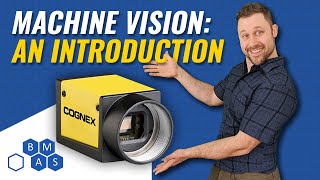
Machine vision and AI inspection
by Breen Machine Automation Services LLC

Copilots and agents for the engineering office
by Charbax
Safety, security and governance
by International Society of Automation - ISA
Lesson frames belong to the creators named in the Credits and are shown from YouTube.
What you learn
What you will be able to do
By the end you will be able to:
- Place any AI proposal on the control hierarchy
- Inventory a plant's data and its quality problems
- Choose OPC UA, MQTT or a unified namespace to feed a model
- Decide between edge and cloud
- Build a predictive maintenance business case
How it works
How this course works
Watch the lessons
Short video lessons, one module at a time, at your own pace.
Read the notes
Open the Reading tab for the written notes and diagrams of the module.
Practise in the 3D labOptional
Try the module in the free 3D lab, in your browser.
Check yourself
Answer the questions to see what stuck before you move on.
Final assessment
Pass the final once you have been through the modules.
Certificate, if you want oneOptional
Optional, with a page anyone can use to verify it.
Syllabus
Course content, module by module
In order, at whatever pace suits you. Each module ends with a practice task that builds on the last.
- Modules
- 13
- Video lessons
- 39
- Of video
- 6h 38m
- Final questions
- 15
- 01
Where AI sits in a plant
3 lessons · 25m - 02
The use-case map
2 lessons · 17m - 03
The data a plant already has, with lab practice:
1 lesson · 22m - 04
Getting data out: OPC UA, MQTT and the unified namespace, with lab practice:
5 lessons · 1h 2m - 05
Edge or cloud
4 lessons · 52m - 06
Predictive maintenance as a business case
4 lessons · 27m - 07
Machine vision and AI inspection, with lab practice:
6 lessons · 21m - 08
Digital twins and simulation
4 lessons · 27m Final assessment · 15 questions, pass mark 60%
3D lab
Practise in the 3D lab
Practise the data and inspection skills behind plant AI in the AI Workbench: check data quality, tune a vision inspection and keep a tool-using agent from obeying planted text.
- Data health checkAI Workbench, about 20 minOpen in the lab (opens in a new tab): Data health check
- Vision inspection on the conveyorAI Workbench, about 25 minOpen in the lab (opens in a new tab): Vision inspection on the conveyor
- A safe agentAI Workbench, about 30 minOpen in the lab (opens in a new tab): A safe agent
Optional. Skip it whenever you like: it never blocks your progress or your certificate.
Project
The course project
Optional practice that ends in the kind of job the course prepares you for, with the documents that go with it.
About 6 hours
An AI readiness audit of one real process, written for the plant manager
Pick one process you know. It could be your plant's, your college lab's, or a plant you have visited. Write the eight-section readiness audit: process and history, cost of the problem, data inventory, use-case shortlist, a six-week first project, architecture, governance, budget. It is a document, not code, and the hardest deliverable in the track.
- 8documents in the pack
- 7steps to follow
- 5things to hand in
- 6 hof work, at your pace
Sample document pack, 8 documents, filled in for the scenario
- ReportAI readiness audit: Bang Pu Cotton Spinning, utilities and spinning
- RegisterCost of the problem, with sources
- RegisterData inventory with gaps stated
- RegisterUse-case shortlist, scored
- PlanFirst project: instrument signal-health monitor, six weeks
- Network architectureArchitecture: data path for the instrument monitor
- ProcedureGovernance page for AI and analytics at Bang Pu
- Risk registerRisk register: first AI project
Read inside the course and download as a workbook. The project is optional practice, marked when you submit it; the certificate needs only the modules and the final assessment.
About 4 hours
A quantified business case for predictive maintenance on the stand-in plant
Using the maintenance history and motor-fleet datasets, build the business case for a predictive-maintenance pilot on the three worst assets. Cover downtime cost, catch rate, sensor and integration cost, payback and the success metric. You deliver a spreadsheet and a two-page proposal.
- 7documents in the pack
- 5steps to follow
- 4things to hand in
- 4 hof work, at your pace
Sample document pack, 7 documents, filled in for the scenario
- RegisterAvoidable downtime by rotating asset
- ReportCost, pilot price and payback model
- BOMPilot bill of materials and services, priced
- PlanPilot plan and success metric
- Risk registerPilot risks and mitigations
- Test reportCheck of the business-case arithmetic
- ReportTwo-page proposal: vibration monitoring pilot on CT-2, P-7 and L-118
Read inside the course and download as a workbook. The project is optional practice, marked when you submit it; the certificate needs only the modules and the final assessment.
Tools
Software, hardware and lessons
Software
None required. Pandas on the track's datasets for the optional business-case project.
Hardware
None.
Who it is for
Intermediate. Best after any PLC or SCADA course in the automation track and the Generative AI foundations; no coding required for most modules.
Video lessons by
- RealPars
- NVIDIA
- IBM Technology
- Siemens Knowledge Hub
- Cognex
- MATLAB
- ADASH
- 4.0 Solutions
- Opto Video
- Inductive Automation
- Enuda
- edureka!
- Future in the Making
- Automatedo
- Charbax
- Retrocausal AI
- Microsoft Developer
- IT and Automation Academy
- Breen Machine Automation Services LLC
- International Society of Automation - ISA
- Patrick Byrne - AI & Manufacturing
Independent creators, credited in full under Credits.
Software you need
What to download, where from, what it costs and how to install it. Every link goes to the maker's own site, never a mirror.
Nothing is required
Colab is only for the optional business-case project.
Optional
Useful, not needed to finish the course.
- 01Free, GPU time not guaranteed
Google Colab
Google, in the browser
- Runs on
- Any modern web browser
- Account
- A free Google account
Colab is free to use. In the free version GPUs and TPUs are heavily restricted and not guaranteed, sessions can run for at most 12 hours, and idle sessions are stopped. Paid plans give more reliable access.
Steps
- 1.Open colab.research.google.com and sign in with your Google account.
- 2.Click New notebook (or open the notebook your course links to).
- 3.For a GPU, choose Runtime, then Change runtime type, then pick a GPU if one is offered.
- 4.Type code in a cell and press Shift and Enter to run it.
- Save a copy to your Google Drive so your changes are kept.
- Files on the runtime are deleted when the session ends. Save outputs to Drive.
Open Google Colabcolab.research.google.com
Checked against each maker's own page on 27 September 2026. Trial lengths and editions change; the maker's page is the final word.
What you walk away with
Your certificate for AI for Industrial Automation
Finish the course, pass the final, and this is the document with your name on it.
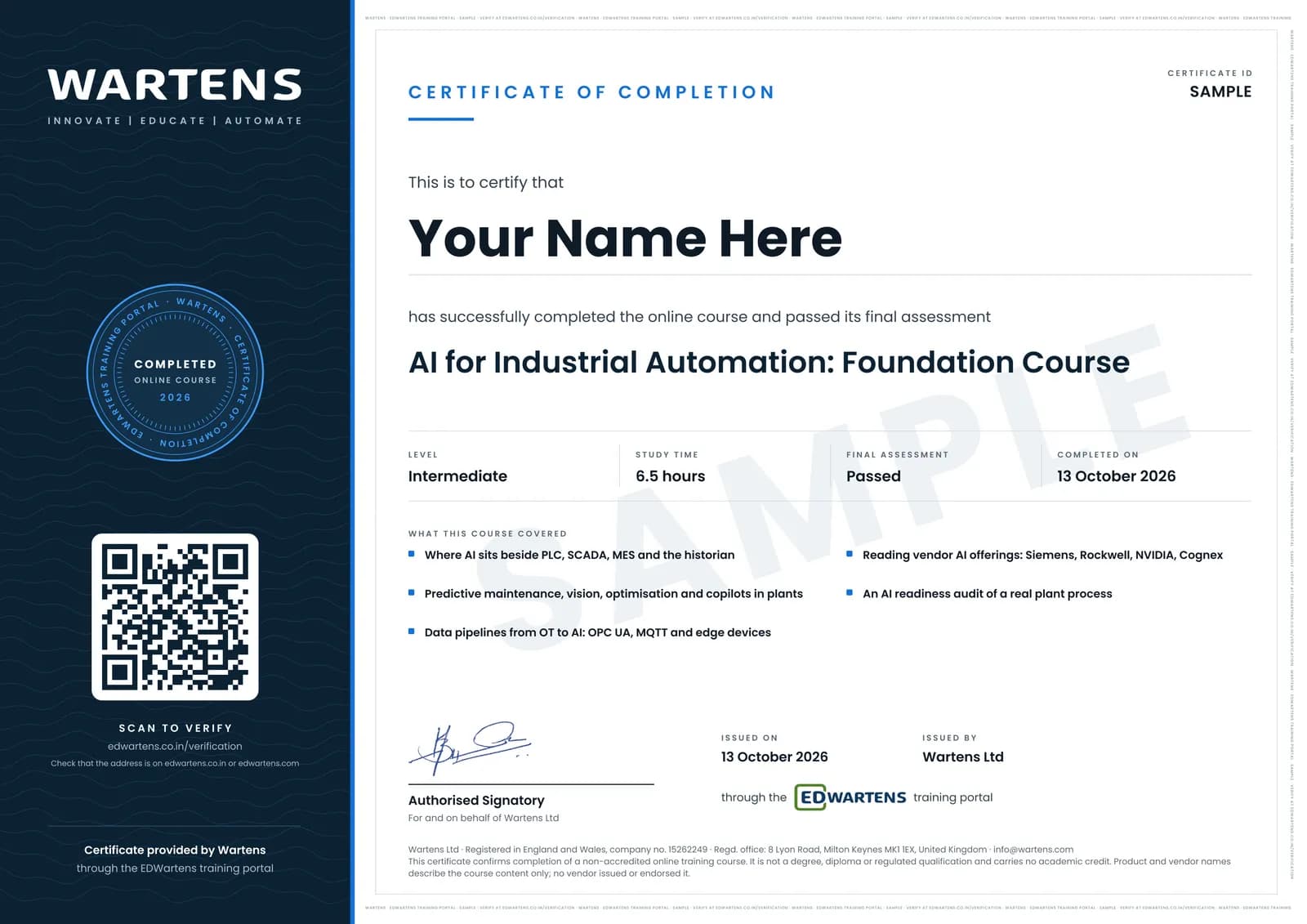
Verifiable by anyone
Adds to LinkedIn in one click
QR code on the certificate
Names what you can do
A permanent link
Earned, not attended
Learning is free. The certificate is optional.
Add it now and pay only when you have finished the course, or come back for it later. One-off, US$28.99, with a receipt.
Issued by Wartens Ltd (England and Wales, company no. 15262249) through the EDWartens training portal, as a Certificate of Completion for this self-paced course. Sold in India by Wartens Automation Private Limited. It is not a vendor certification, a university award or a CPD-accredited activity, and it does not certify competence on live equipment. Delivered electronically; see the refund policy.
Practise what you learn in the free 3D lab
Technical work is judged on what you can do: wiring, commissioning, finding a fault. Doing a task yourself teaches more than watching it a second time, and a lab lets you try it safely before you meet real equipment. It does not replace working on real hardware.
- Practise safely, so a mistake costs nothing.
- The lab checks your work like a site test, so you know when it is right.
- Free, in your browser, with nothing to install.
Why learn with EDWartens
What you get with this course.
- Free from the first lesson to the final assessment.
- Practice in a free 3D lab in your browser, with nothing to install.
- Video lessons with written notes and a project.
- An optional certificate that anyone can verify online.
FAQ
Common questions
Is this a coding course?
No. It is the decision course: what to do first, with what data, on which box, under which rules. The Predictive Maintenance, Machine Vision and Industrial Data courses are where you then build it.
Who is the AI for Industrial Automation course for?
Automation, electrical and instrumentation engineers who are being asked about AI by their managers or customers. They want to answer with a plan rather than a vendor's brochure.
What are the projects in the AI for Industrial Automation course?
There are two options. One is a readiness audit of one real process. It covers the cost of the problem, a data inventory, a use-case shortlist, a six-week first project, architecture, governance and the ask. The other is a quantified predictive-maintenance business case on the track's datasets, for learners without a plant of their own.
Is the AI for Industrial Automation course really free?
Yes. Every module, practice task, project and assessment. You create an account so your progress is saved and the assessments can be marked. The certificate is the only paid item, and only if you want it.
What certificate does the AI for Industrial Automation course give?
An EDWartens Certificate of Completion, issued when you have finished the modules and passed the final assessment (the project is optional practice), with a verification code anyone can check. It is not a vendor credential and is never described as one.
Who made the video lessons in the AI for Industrial Automation course?
The creators named in the Credits block at the foot of this page, on their own YouTube channels. EDWartens did not make the videos and the creators are not affiliated with EDWartens. What EDWartens wrote is the study plan, the notes, the practice tasks, the projects and the assessments.
How long does the AI for Industrial Automation course take?
Plan on about 12 hours in all, including the video lessons, notes and practice tasks. It is self-paced, so you work through the thirteen modules at your own speed.
Do I have to use the lab?
No. The lab is optional practice. You can skip it whenever you like, and it never blocks your progress, the final assessment or your certificate.
Is the lab free?
Yes. Every lab level for this course opens in your browser, free, with nothing to install.
Is the AI for Industrial Automation course free in India, and what does the certificate cost?
Yes. Learning costs ₹0 in India: every module, the written notes, the practice tasks and the final assessment, with no card and no trial period. The only paid item is the optional EDWartens Certificate of Completion, ₹599 including GST for this intermediate course, paid in rupees through Razorpay, and only if you want it after passing the final assessment.
All course factsHide course facts
- Price
- ₹0, free for good. No trial, no card. Comparable classroom training of this length costs about ₹4,499.
- Who it is for
- Engineers, developers and students applying AI to real work
- Format
- 13 self-paced modules, 6h 38m of video, written notes, a practice task per module and one final assessment.
- Level
- Intermediate. Intermediate. Best after any PLC or SCADA course in the automation track and the Generative AI foundations; no coding required for most modules.
- Brand
- Vendor-neutral
- Software
- None required. Pandas on the track's datasets for the optional business-case project.
- Hardware
- None.
- Certificate
- Optional EDWartens Certificate of Completion, ₹599 inclusive of GST for learners in India, verifiable by code. Not a vendor credential.
- Video lessons by
- RealPars, NVIDIA, IBM Technology, Siemens Knowledge Hub, Cognex, MATLAB, ADASH, 4.0 Solutions, Opto Video, Inductive Automation, Enuda, edureka!, Future in the Making, Automatedo, Charbax, Retrocausal AI, Microsoft Developer, IT and Automation Academy, Breen Machine Automation Services LLC, International Society of Automation - ISA, Patrick Byrne - AI & Manufacturing (independent creators, credited below)
- Language
- English
- Last updated
- 27 September 2026
Pairs well with
 PLC programming · FreeSiemens TIA Portal
 PLC programming · FreeSiemens TIA Portal in Three Hours
 PLC programming · FreeTIA Portal: Build a Machine
 Instrumentation · FreeInstrumentation for PLC Engineers
More free courses: Free AI courses for engineers
Learning paths with this course
- Industrial AI engineer · 4 courses
Classroom course, Bangalore
PLC training in Bangalore
The Automation Engineer Program (AEP) is our classroom course in PLC programming and industrial automation, taught in person at our Electronic City centre.
Credits
Who made the video lessons
The video lessons in this course were created by the people below, not by EDWartens. Every lesson streams from its creator's own YouTube channel; EDWartens neither hosts nor sells that footage, and the creators are not affiliated with EDWartens and do not endorse this course. What EDWartens wrote is the study plan, the notes, the practice tasks and the assessments.
- RealParsthe OPC UA, edge computing, predictive maintenance and Ignition explainers
- NVIDIAHow AI is transforming manufacturing end to end
- IBM Technologythe edge computing, digital twin and AI agents use-case explainers
- Siemens Knowledge HubIndustrial Edge explained, the edge AI tutorials and the digital twin clip
- Cognexthe AI for factory automation explainers
- MATLABGetting started with predictive maintenance and the digital twin explainer
- ADASHvibration analysis for beginners
- 4.0 Solutionsthe unified namespace and Sparkplug B explainers
- Opto Videothe introduction to MQTT and Sparkplug B
- Inductive Automationthe machine learning demo with Ignition
- Enudaa low-cost open-source machine learning solution beside Ignition
- edureka!AI in manufacturing
- Future in the MakingHow AI is changing manufacturing
- AutomatedoWhat is a digital twin
- Charbaxthe Siemens Engineering Copilot for TIA Portal demo
- Retrocausal AIan AI copilot for assembly
- Microsoft Developersecuring generative AI applications
- IT and Automation Academya lesson in "Getting data out: OPC UA, MQTT and the unified namespace"
- Breen Machine Automation Services LLCa lesson in "Machine vision and AI inspection"
- International Society of Automation - ISAa lesson in "Safety, security and governance"
- Patrick Byrne - AI & Manufacturinga lesson in "The AI readiness audit"
If you are one of these creators and would like a lesson removed or credited differently, write to info@wartens.com.