PLC programming · Free online course
OpenPLC: IEC 61131-3 on Arduino, ESP32 and Raspberry Pi
A real PLC for the price of a microcontroller: OpenPLC Editor and Runtime, ladder from contacts to arithmetic, timers and counters, two dozen worked programs, Arduino, ESP32 and Raspberry Pi hardware, Modbus, MQTT, Python, ScadaBR and Fuxa HMIs, Factory I/O projects, and the FOSSEE OpenPLC board (an open-hardware project from IIT Bombay) with LDmicro.
- 13 modules
- 21h 30m of video
- Beginner
- English
- ₹0, free

₹0Free for good
Worth ₹9,999 by length and depth against classroom training. It has always been free; that is not a former price.
No card. Checkout takes a minute and gives you a receipt.
Overview
About OpenPLC: IEC 61131-3 on Arduino, ESP32 and Raspberry Pi
A real PLC for the price of a microcontroller: OpenPLC Editor and Runtime, ladder from contacts to arithmetic, timers and counters, two dozen worked programs, Arduino, ESP32 and Raspberry Pi hardware, Modbus, MQTT, Python, ScadaBR and Fuxa HMIs, Factory I/O projects, and the FOSSEE OpenPLC board (an open-hardware project from IIT Bombay) with LDmicro.
OpenPLC: IEC 61131-3 on Arduino, ESP32 and Raspberry Pi is a free, self-paced online course from EDWartens for engineering students, ITI and diploma holders, and working engineers in automation, electrical and instrumentation. It has 13 modules and 21h 30m of video lessons by Instrumentation Tools, OpenPLC, Yaser Ali Husen and others, with written notes and worked problems, a practical project with a document pack and a 15-question final assessment (pass mark 60%). Learning is free with an account; an optional certificate with a public verification code is issued when you pass. Last updated 27 September 2026.
Who it is for: Engineering students, ITI and diploma holders, and working engineers in automation, electrical and instrumentation
This course includes
- 21h 30m of video lessons
- 13 modules with written notes and diagrams
- One final assessment: 15 questions, pass mark 60%
- Ask-an-engineer support from practising engineers
- Lifetime access, the course does not expire
- Optional verifiable certificate when you finish
- Step 1 of 3
Learn the 13 modules
21h 30m of video lessons, written notes and a practice task per module, at your own pace.
- Step 2 of 3
Pass the final assessment
15 questions drawn from every module, pass mark 60%, 3 attempts.
- Step 3 of 3
Take the certificate, if you want it
Optional, paid once, only if you choose it. The course stays free either way.
See the certificate and its price
A look inside


From the lessons

What OpenPLC Is: Editor, Runtime and the Scan
by Instrumentation Tools

Memory Bits, Set/Reset, Edges and First Programs
by Instrumentation Tools

Counters and Comparison
by Instrumentation Tools
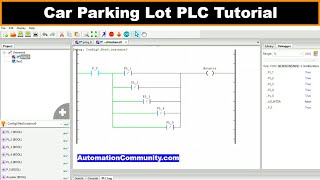
Worked Examples I
by Instrumentation Tools

Hardware: Arduino, ESP32, ESP8266, Raspberry Pi
by OpenPLC

Factory I/O Projects and SFC
by seafox c
Lesson frames belong to the creators named in the Credits and are shown from YouTube.
What you learn
What you will be able to do
Install OpenPLC Editor and Runtime, write IEC 61131-3 ladder with contacts, coils, memory bits, set/reset, edges, timers, counters, comparison and arithmetic, solve two dozen worked problems, run programs on Arduino, ESP32 and Raspberry Pi, communicate over Modbus, MQTT and Python, build ScadaBR and Fuxa HMIs, drive Factory I/O scenes with SFC, and program the FOSSEE OpenPLC with LDmicro.
- Install the Editor and Runtime and simulate programs
- Write ladder with contacts, coils, memory bits, SR/RS and edge triggers
- Use TON, TOF, TP, CTU, CTD, CTUD, comparison and arithmetic blocks
- Solve two dozen worked automation problems
- Run OpenPLC on Arduino, ESP32, ESP8266 and Raspberry Pi with slave devices
- Communicate over Modbus, MQTT and Python; build ScadaBR and Fuxa HMIs
- Drive Factory I/O scenes and use SFC
- Program the FOSSEE OpenPLC board with LDmicro
Syllabus
Course content, module by module
In order, at whatever pace suits you. Each module ends with a practice task that builds on the last.
- Modules
- 13
- Video lessons
- 114
- Of video
- 21h 30m
- Final questions
- 15
- 01
What OpenPLC Is: Editor, Runtime and the Scan
3 lessons · 51m - 02
Hands-on Install; Contacts, Coils and Logic Gates
8 lessons · 1h 43m - 03
Memory Bits, Set/Reset, Edges and First Programs
7 lessons · 1h 26m - 04
Timers
5 lessons · 1h 0m - 05
Counters and Comparison
9 lessons · 1h 42m - 06
Arithmetic
6 lessons · 59m - 07
Worked Examples I
9 lessons · 1h 25m - 08
Worked Examples II
14 lessons · 2h 49m Final assessment · 15 questions, pass mark 60%
Project
The course project
Optional practice that ends in the kind of job the course prepares you for, with the documents that go with it.
About 18 hours
Conveyor sorting trainer on OpenPLC: Arduino Mega machine control, Raspberry Pi supervisor over Modbus TCP, Fuxa HMI
Design, program, test and document a bench conveyor trainer for a polytechnic automation lab in Nairobi: an Arduino Mega running an OpenPLC ladder program that starts and stops the belt, sets its speed, detects metal and over-height parts, fires a reject gate at the right moment, counts good parts and stops on a jam; and a Raspberry Pi running OpenPLC Runtime that polls the Mega over Modbus TCP, holds the batch target and totals, drives a stack light, and hosts the Fuxa HMI the students use. You deliver both programs, your own I/O list, narrative and FAT record. The sample pack shows that a rig costing 31,000 deserves the same documents as a line costing 3.1 million.
Sample document pack, 6 documents, filled in for the scenario
- Control narrativeSequence of Operations: Conveyor Sorting Trainer CT-1
- I/O listI/O List: Rig CT-1, Arduino Mega and Raspberry Pi
- BOMBill of Materials: Rig CT-1 and Panel CT1-CP1
- IP planIP Address Plan and Device List: Rig CT-1 Network
- FATAcceptance Test Record: Rig CT-1
- O&M manualOperation and Maintenance Manual: Rig CT-1, with the Student Exercise Sheet
Read inside the course and download as a workbook. The project is optional practice, marked when you submit it; the certificate needs only the modules and the final assessment.
Tools
Software, hardware and lessons
Software
OpenPLC Editor v4 and Runtime (open source; many videos show v3), optional Factory I/O 30-day trial, ScadaBR or FUXA
Hardware
Optional Arduino, ESP32 or Raspberry Pi; everything runs in simulation without them.
Who it is for
Beginner. No PLC or electronics experience needed.
Video lessons by
- Instrumentation Tools
- OpenPLC
- Yaser Ali Husen
- Engineering made Easy (Ing ME)
- OnosTech
- seafox c
- Spoken-Tutorial, IIT Bombay
Independent creators, credited in full under Credits.
Software you need
What to download, where from, what it costs and how to install it. Every link goes to the maker's own site, never a mirror.
Required
- 01Free
OpenPLC Editor and OpenPLC Runtime
Autonomy Logic (OpenPLC project)
- Runs on
- Editor: Windows 10 or 11 (x64), macOS (Apple silicon or Intel), Linux x64. Runtime: Linux or Docker
- Account
- None needed
OpenPLC is free and open source. The Runtime v4 is MIT licensed and the Editor source is on GitHub under GPL-3.0.
Steps
- 1.Open the OpenPLC download page and download the Editor for your system.
- 2.Install and open the OpenPLC Editor.
- 3.Install OpenPLC Runtime v4 on a Linux PC, Raspberry Pi or in Docker, following the GitHub instructions.
- 4.In the Editor, set the runtime IP address and log in to it.
- 5.Write a ladder or structured text program and upload it to the runtime.
- Runtime v4 has no web page at port 8443; connect to it from the Editor instead.
- The old OpenPLC_v3 runtime has been replaced by Runtime v4.
Official download pageautonomylogic.com
Optional
Useful, not needed to finish the course.
- 02Free trial: 30 days
Factory I/O
Real Games
- Runs on
- Windows 7 SP1 or newer, with a graphics card from 2006 (NVIDIA, AMD) or 2012 (Intel) onwards
- Account
- Your name and email on the Factory I/O trial form
The 30-day trial includes the full Ultimate Edition. After that you need a paid edition; the Siemens, Allen-Bradley, Modbus and OPC, MHJ, Automgen and Starter editions each support different PLCs.
Steps
- 1.Open the Factory I/O start trial page.
- 2.Enter your name and email and start the trial.
- 3.Download and install Factory I/O.
- 4.Open a sample scene and connect it to your PLC or PLC simulator.
- 5.Before the trial ends, choose the edition that matches your PLC.
- Choose the edition by the PLC you will use: for example the Siemens edition works with S7-PLCSIM.
- The Starter edition has its own built-in PLC simulator if you have no PLC software.
Official download pagefactoryio.com - 03Free
FUXA
Frangoteam (open-source project)
- Runs on
- Windows, macOS, Linux, Raspberry Pi or Docker (needs Node.js 18 LTS if installed with npm)
- Account
- None needed
FUXA is open-source web SCADA and HMI software under the MIT licence, free for any use.
Steps
- 1.Open the FUXA GitHub page and read the install section.
- 2.Install Node.js 18 LTS, or install Docker.
- 3.Install FUXA with npm, or pull and run the FUXA Docker image.
- 4.Open http://localhost:1881 in your browser.
- 5.Add a device (for example Modbus TCP or OPC UA) and draw your first screen.
- Docker is the quickest way to try FUXA without installing Node.js.
Official download pagegithub.com
Checked against each maker's own page on 27 September 2026. Trial lengths and editions change; the maker's page is the final word.
What you walk away with
Your certificate for OpenPLC: IEC 61131-3 on Arduino, ESP32 and Raspberry Pi
Finish the course, pass the final, and this is the document with your name on it.

Verifiable by anyone
Adds to LinkedIn in one click
QR code on the certificate
Names what you can do
A permanent link
Earned, not attended
Learning is free. The certificate is optional.
Add it now and pay only when you have finished the course, or come back for it later. One-off, US$23.99, with a receipt.
Issued by Wartens Ltd (England and Wales, company no. 15262249) through the EDWartens training portal, as a Certificate of Completion for this self-paced course. Sold in India by Wartens Automation Private Limited. It is not a vendor certification, a university award or a CPD-accredited activity, and it does not certify competence on live equipment. Delivered electronically; see the refund policy.
FAQ
Common questions
Is OpenPLC a real PLC?
It is a real IEC 61131-3 runtime used in research, education and small projects. It is not a certified industrial controller; the skills transfer directly to Siemens, Rockwell and CODESYS.
Do I need an Arduino?
No. Simulation covers the programming modules; an Arduino Uno or ESP32 is inexpensive and makes the hardware modules real.
What is the FOSSEE OpenPLC?
An open-hardware PLC from IIT Bombay's FOSSEE project, programmed with LDmicro. It is a different product from the OpenPLC Editor/Runtime and is covered in its own module.
Is the OpenPLC: IEC 61131-3 on Arduino, ESP32 and Raspberry Pi course really free?
Yes. Every module, practice task and assessment. You create an account so your progress is saved and the assessments can be marked. The certificate is the only paid item, and only if you want it.
What certificate does the OpenPLC: IEC 61131-3 on Arduino, ESP32 and Raspberry Pi course give?
An EDWartens Certificate of Completion, issued when you pass the final assessment, with a verification code anyone can check. It is not an OpenPLC project or IIT Bombay credential and is never described as one.
Who made the video lessons in the OpenPLC: IEC 61131-3 on Arduino, ESP32 and Raspberry Pi course?
The creators named in the Credits block at the foot of this page, on their own YouTube channels. EDWartens did not make the videos and the creators are not affiliated with EDWartens. What EDWartens wrote is the study plan, the notes, the practice tasks and the assessments.
How long does the OpenPLC: IEC 61131-3 on Arduino, ESP32 and Raspberry Pi course take?
Plan on about 28 hours in all, including the video lessons, notes and practice tasks. It is self-paced, so you work through the thirteen modules at your own speed.
Is the OpenPLC: IEC 61131-3 on Arduino, ESP32 and Raspberry Pi course free in India, and what does the certificate cost?
Yes. Learning costs ₹0 in India: every module, the written notes, the practice tasks and the final assessment, with no card and no trial period. The only paid item is the optional EDWartens Certificate of Completion, ₹499 including GST for this beginner course, paid in rupees through Razorpay, and only if you want it after passing the final assessment.
Is there classroom PLC training in India as well?
Yes. EDWartens India runs the Automation Engineer Program (AEP), a classroom programme at its Electronic City centre in Bangalore. In the Automation Engineer Program (AEP) you write and test PLC programs on wired PLC panels, taught in person at our Electronic City centre. This free course is separate and fully online; it is a good way to try the subject before deciding on classroom training. Details are at edwartens.co.in/plc-training-bangalore, and the programme itself at edwartens.co.in/courses/aep.
All course factsHide course facts
- Price
- ₹0, free for good. No trial, no card. Comparable classroom training of this length costs about ₹9,999.
- Who it is for
- Engineering students, ITI and diploma holders, and working engineers in automation, electrical and instrumentation
- Format
- 13 self-paced modules, 21h 30m of video, written notes, a practice task per module and one final assessment.
- Level
- Beginner. Beginner. No PLC or electronics experience needed.
- Brand
- Vendor-neutral
- Software
- OpenPLC Editor v4 and Runtime (open source; many videos show v3), optional Factory I/O 30-day trial, ScadaBR or FUXA
- Hardware
- Optional Arduino, ESP32 or Raspberry Pi; everything runs in simulation without them.
- Certificate
- Optional EDWartens Certificate of Completion, ₹499 inclusive of GST for learners in India, verifiable by code. Not a vendor credential.
- Video lessons by
- Instrumentation Tools, OpenPLC, Yaser Ali Husen, Engineering made Easy (Ing ME), OnosTech, seafox c, Spoken-Tutorial, IIT Bombay (independent creators, credited below)
- Language
- English
- Last updated
- 27 September 2026
Pairs well with
 PLC programming · FreeSiemens TIA Portal
 PLC programming · FreeSiemens TIA Portal in Three Hours
 PLC programming · FreeTIA Portal: Build a Machine
 PLC programming · FreeSiemens S7-1200 with TIA Portal: The Tutorial Series
More free courses: Free PLC programming courses
Classroom course, Bangalore
Learn PLC programming on wired panels in Bangalore
In the Automation Engineer Program (AEP) you write and test PLC programs on wired PLC panels, taught in person at our Electronic City centre.
Credits
Who made the video lessons
The video lessons in this course were created by the people below, not by EDWartens. Every lesson streams from its creator's own YouTube channel; EDWartens neither hosts nor sells that footage, and the creators are not affiliated with EDWartens and do not endorse this course. What EDWartens wrote is the study plan, the notes, the practice tasks and the assessments.
- Instrumentation Toolsthe OpenPLC tutorial and worked-example series
- Eric Rominea playlist of the official OpenPLC Basics series (Arduino, Raspberry Pi, Python, ScadaBR), published on the OpenPLC channel
- Igor Arta playlist of OpenPLC v4, ESP32 and MQTT videos by several creators, credited above
- OnosTechthe OpenPLC on ESP32 series
- seafox cthe Factory I/O, SFC, ScadaBR and Fuxa projects
- Spoken-Tutorial, IIT Bombaythe FOSSEE OpenPLC with LDmicro series
If you are one of these creators and would like a lesson removed or credited differently, write to info@wartens.com.