Ignition SCADA for Beginners: Why It Is Winning, What It Costs, and How to Learn It Free

What Ignition is
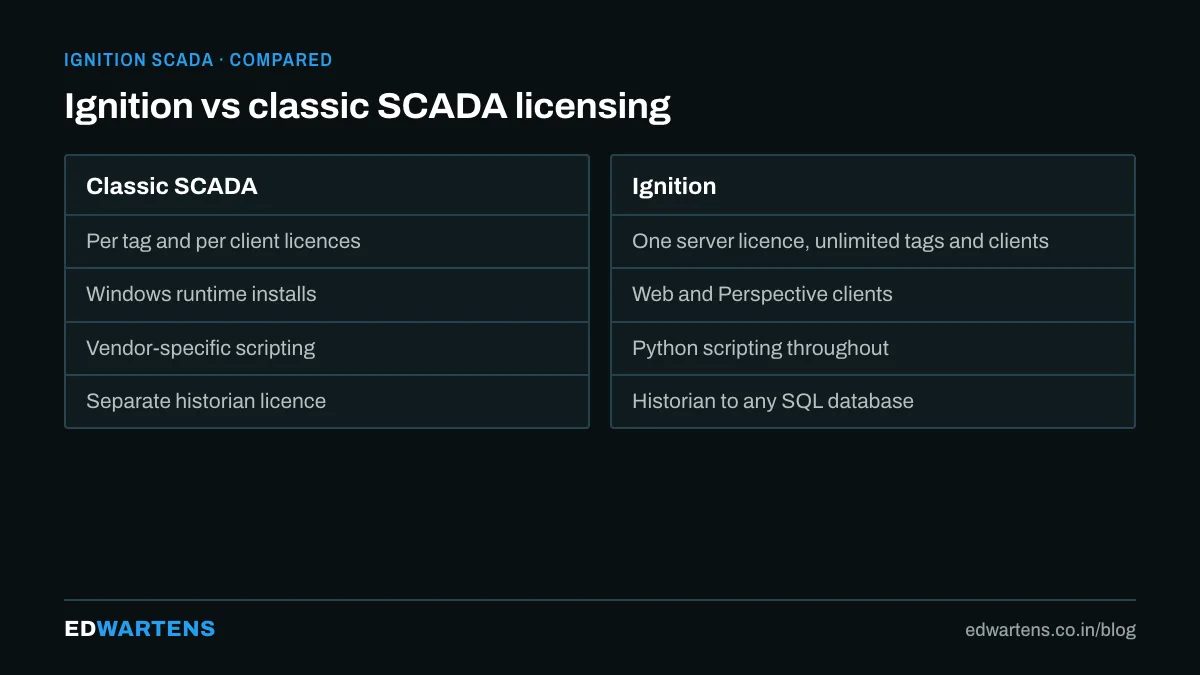
Ignition is a SCADA, HMI and IIoT platform from Inductive Automation, a Californian company that took a different route from the older vendors. Instead of licensing by tag count, client count and screen, Ignition is licensed per server, unlimited: unlimited tags, unlimited clients, unlimited screens, unlimited PLC connections. It runs on Windows or Linux, is built on Java and SQL databases, and is installed from a single download in a few minutes.
That pricing model is why it keeps appearing in tenders for pharma, food, water and discrete plants across India. A project that would need a licence recount every time a client is added simply does not, and the integrator can quote a fixed cost.
The parts, in the order you meet them
- Gateway. The server. Everything runs here: tag engine, connections to PLCs, database connections, the web server that hosts clients. You configure it from a browser at port 8088.
- Designer. The engineering tool, launched from the gateway. Screens, tags, scripts, reports and alarms are all built here.
- Tags. OPC tags (read from the PLC through the built-in OPC UA server or drivers for Siemens, Allen-Bradley, Modbus and more), memory tags, expression tags and query tags. Tags carry quality, timestamp, engineering units and history settings.
- Vision and Perspective. The two visualisation modules. Vision is the older Java client for plant-floor HMI stations. Perspective is the newer HTML5 module: screens run in any browser and on phones, and are responsive by design.
- Alarming, Historian, Reporting, SQL Bridge. Modules for alarms with pipelines, history to a SQL database, scheduled PDF reports and transaction groups that move data between PLC and database.
- MQTT modules. Cirrus Link's MQTT Engine and Transmission make Ignition a natural hub for Sparkplug B.
Vision or Perspective?
New projects in 2026 almost always start in Perspective. It runs in a browser, scales to a phone, uses a component model with Flex containers rather than fixed pixels, and scripts in Python (Jython) the same way Vision does. Vision still matters because thousands of installed systems run it and because a dedicated HMI station with a big fixed screen is sometimes better served by a native client.
Learn Perspective first; read Vision well enough to maintain it.
What it costs, honestly
Ignition is not free for production. The standard platform with the common modules is a five-figure US dollar licence per server, plus annual support. What is free:
- The trial mode. The full platform runs in two-hour resets, forever, with no feature limits. This is how every engineer learns it.
- Maker Edition. Free for personal, non-commercial use on a home project.
- Inductive University. Free video courses and the free Core certification test.
For an Indian integrator the arithmetic usually favours Ignition once a project needs more than a few clients or more than a few thousand tags, which is most of them.
How to learn it, step by step
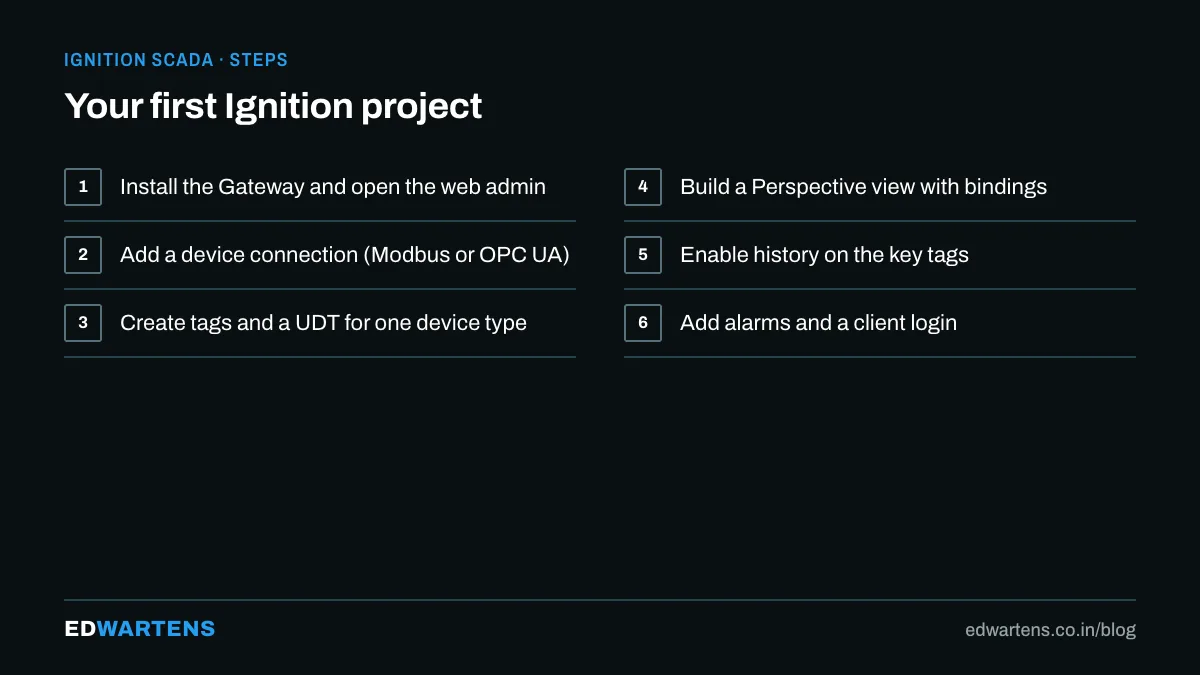
The route we recommend, and which the free Ignition SCADA course follows:
- Install the gateway on your laptop and connect it to a PLC simulator (PLCSIM or the Ignition generic simulator device).
- Build a tag structure with UDTs. A UDT for a pump or a valve, instantiated fifty times, is the habit that separates maintainable projects from spaghetti.
- Build one Perspective view properly: a Flex container, bindings to tags, a numeric label with units, an indicator, a button with a confirmation.
- Add history to a few tags and put them on a trend.
- Configure an alarm with a pipeline that emails you.
- Write one transaction group into a SQL table and one report that reads it back.
- Sit the free Inductive University Core test.
Where Ignition sits against WinCC and FactoryTalk
Siemens WinCC and Rockwell FactoryTalk View are tied to their PLC ecosystems and sold by tag and client. They remain the default where the plant is single-vendor and the OEM demands it. Ignition is vendor-neutral: one gateway can talk to Siemens, Rockwell, Mitsubishi and Modbus devices at once, which is exactly the situation in a typical Indian plant that has grown by acquisition. Our comparison of WinCC, FactoryTalk and Ignition goes deeper.
For how PLC, SCADA and DCS differ and what you build in our classroom, see PLC vs SCADA vs DCS in Bangalore.
Frequently asked questions
Is Ignition hard to learn? Easier than most. The Designer is consistent, the documentation is good, and Python scripting is friendlier than VBScript.
Do I need to know SQL? Enough to write a SELECT and a JOIN. The historian and reporting modules do most of it for you, but a query tag or a report will need a query.
Will Ignition skills get me a job in India? Increasingly yes. Integrators serving pharma and FMCG list it in job descriptions, and the free certification is a recognisable line on a CV.
Learn this, free
The courses that teach this
Every lesson, the written notes and the practice are free with an account. Only the certificate is optional and paid.


