Wazuh Threat Hunting Tutorial: A Hands-On Lab Guide

The short answer
Wazuh threat hunting means using the free, open source Wazuh SIEM and Sysmon telemetry to go looking for attacker behaviour that no alert has flagged: you write a hypothesis tied to a MITRE ATT&CK technique, check the data exists, search and stack-count the events in the Wazuh dashboard, and end every hunt with a written outcome, either an incident, a new or tuned detection rule, or a documented clean result. This tutorial walks through that loop in a home lab you own: one Wazuh 4.14 server, a Windows VM with Sysmon and an Ubuntu VM, with a worked hunt and the numbers checked.
Facts about Wazuh, Sysmon, ATT&CK and NIST were checked on their official pages on 11 October 2026 (October 2026). Wazuh, Sysmon and ATT&CK belong to their owners.
Step 1: build a lab that is legal and isolated
Everything here runs on virtual machines you own, on a host-only or NAT network with no route into your employer's or anyone else's systems. Snapshot every VM before a test and note the UTC time, because you will need both later.
Lab machine | RAM | Disk | Role |
|---|---|---|---|
Wazuh server (Ubuntu 24.04) | 8 GB | 50 GB | Indexer, server and dashboard, all in one |
Windows 11 evaluation VM | 4 GB | 40 GB | Agent plus Sysmon |
Ubuntu endpoint | 2 GB | 25 GB | Agent, sshd, auditd |
On a 16 GB laptop that is 14 GB of RAM for the VMs, leaving 2 GB for the host, and 115 GB of disk, or 138 GB with 20% for snapshots. The Wazuh quickstart sizes an all-in-one server for 1 to 25 agents at 4 vCPU, 8 GiB of RAM and 50 GB of storage for 90 days of indexed alerts, so the lab fits.
Know the ports before anything breaks. The Wazuh architecture page lists 1514/TCP for agent events, 1515/TCP for enrolment, 55000/TCP for the server API, 9200/TCP for the indexer API and 443 for the dashboard. If new agents fail to enrol while old ones keep reporting, check 1515 first.
Step 2: give Wazuh something worth hunting
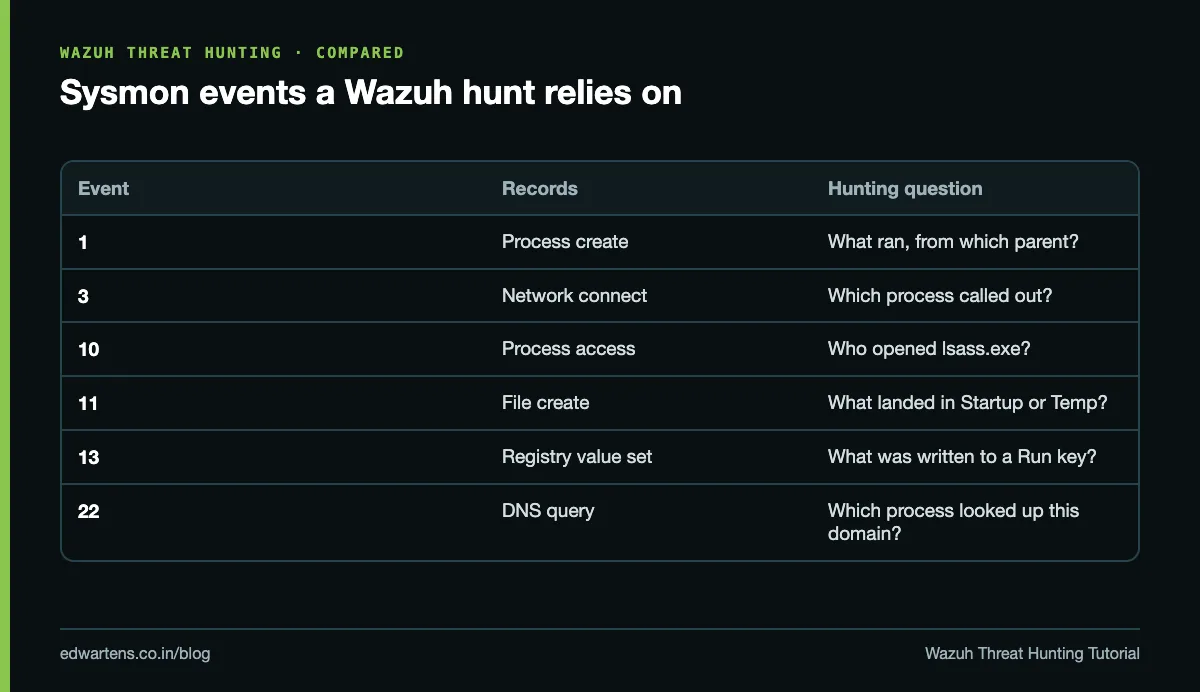
Wazuh agents collect logs, but Windows' default logging misses most of what a hunter needs. Install Sysmon, Microsoft's free Sysinternals service and driver, with a maintained community configuration, and add the Sysmon/Operational channel to the agent's configuration (best done in a windows group's shared agent.conf). Microsoft's Sysmon page states plainly that Sysmon does not analyse its own events: Wazuh does that.
Sysmon event | What it records | Hunting question |
|---|---|---|
1 | Process create | What ran, with which command line, from which parent? |
3 | Network connect | Which process talked to which address and port? |
10 | Process access | Who opened lsass.exe, and with what rights? |
11 | File create | What was dropped in Startup, Temp or Downloads? |
13 | Registry value set | What was written to a Run key? |
22 | DNS query | Which process looked up this domain? |
Wazuh's base Sysmon rules, such as 61603 for event 1, are level 0: they decode and classify events but do not alert. So turn on the archives (logall_json) in the lab, or your hunts will only see the small slice of events that already matched an alert rule.
Step 3: write a hypothesis, not a wish
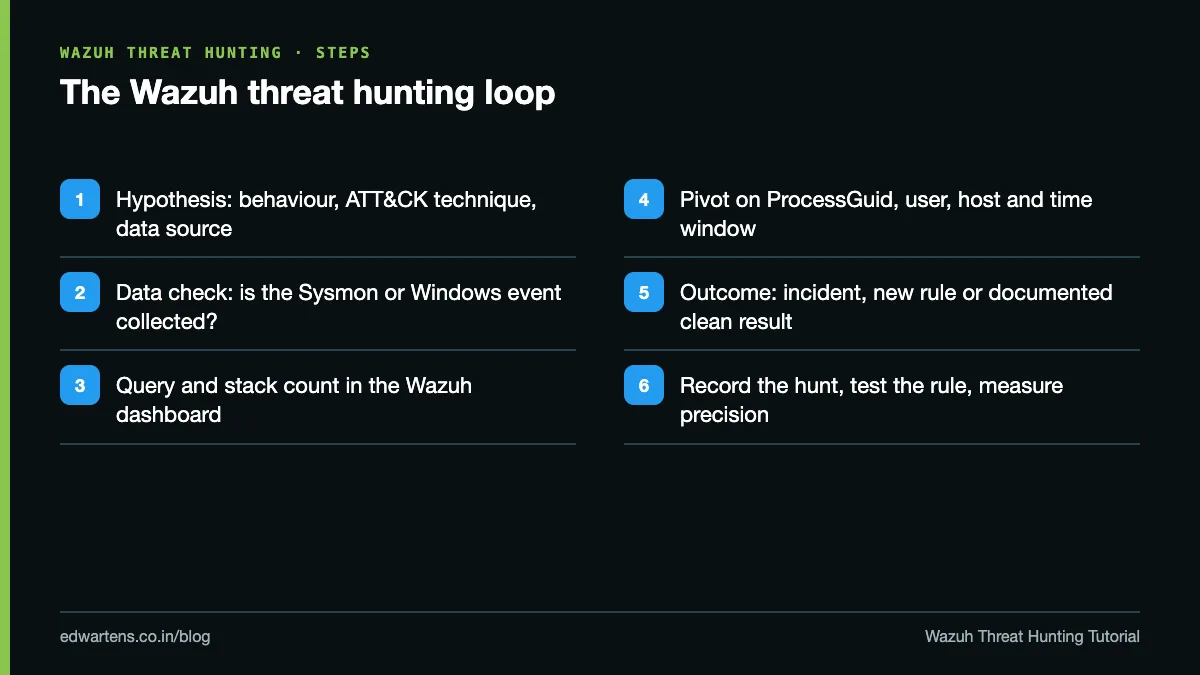
A hunt starts from a question: if an attacker were doing this here, where would it show, and would we see it? A good hypothesis names a behaviour, ties it to an ATT&CK technique, names the data source and says what you expect to find. "Look for bad things" is not a hypothesis. "Office documents on finance laptops spawning PowerShell (T1204.002 then T1059.001) would appear as Sysmon event 1 with winword.exe as the parent" is.
Then check the data exists before you conclude anything. No Sysmon event 10 means you cannot hunt LSASS access, and a clean result only holds for the data and time range you actually searched.
Worked example: a stack count of parent and child processes
Stacking counts how often each value appears across many hosts and sorts from rarest to commonest. In the Wazuh dashboard, build a data table on the Sysmon process-creation events (rule.groups sysmon_event1), split by data.win.eventdata.parentImage and image, for the last seven days. A typical lab example returns five pairs:
- services.exe to svchost.exe: 4,100
- explorer.exe to chrome.exe: 1,850
- wmiprvse.exe to powershell.exe: 11
- cmd.exe to whoami.exe: 3
- winword.exe to powershell.exe: 2
Total: 4,100 + 1,850 + 11 + 3 + 2 = 5,966 events. The three rare pairs are 11 / 5,966 = 0.18%, 3 / 5,966 = 0.05% and 2 / 5,966 = 0.03%. Read winword.exe launching PowerShell first, because a document starting a script interpreter is a classic phishing chain. wmiprvse.exe launching PowerShell can be remote WMI execution or a management tool, so check the account and source host. whoami from cmd is often a quick discovery step after access.
Rare is a lead, not a verdict. Pivot on the ProcessGuid, the user and a few minutes either side, then decide.
Step 4: turn the finding into a rule, then measure it
Every hunt should leave the SOC better than it found it. Wazuh's custom rules documentation says to use IDs from 100000 to 120000 and to put small changes in local_rules.xml, so upgrades never overwrite your work. Hang the detection on the Sysmon group (if_group sysmon_event1), match the parent and child images, add an ATT&CK tag in a mitre block, and test it with wazuh-logtest before you restart the manager.
Then measure it honestly. Suppose the new rule raises 300 alerts a day and a review of 50 sampled alerts finds 2 true positives: precision is 2 / 50 = 4%, about 12 true positives a day. A level 0 child rule that excludes one approved management tool by its exact path cuts the volume to 45 a day. The same 12 true positives now sit among 45 alerts, so precision rises to 12 / 45 = 26.7%, and analysts read 255 fewer false alerts a day. Exclude exact, known-good paths, never whole folders such as C:\Windows, where attackers like to hide.
Map it to ATT&CK v19
Tag every custom rule. ATT&CK v19 split the old Defense Evasion tactic into Stealth (TA0005) and Defense Impairment (TA0112), so older videos show 14 Enterprise tactics and some shipped rules still cite retired IDs. Open the technique page on attack.mitre.org when you write a report; moved entries point to where the content went. Count only tested rules as coverage: a rule mapped to a technique may still miss real variants until an attack simulation in your lab proves it fires.
Safety rules that keep you employable
- Test only systems you own or have written permission to test.
- Run attack simulations such as Atomic Red Team only inside the isolated lab, from a snapshot you revert afterwards.
- Never copy real work logs, customer data or credentials into the lab.
- Use active response (automatic blocking) only with narrow rules, an allow list for your own admin hosts and a timeout, so a false positive lifts by itself.
Where this leads in India
Managed security providers, banks, telecoms and IT services firms in India run 24x7 SOCs, and some managed providers run Wazuh for their clients. A hunt record, a tested rule and a coverage score from your own lab are far stronger interview evidence than a list of tools. If you are preparing for a certification too, our ISC2 CC exam prep study plan covers the foundations and our SC-200 study guide shows the same hunting ideas in KQL.
Learn it hands-on, free
The free SOC Analyst Level 2: Threat Hunting with Wazuh course builds this lab step by step: Wazuh 4.14 install, agents and Sysmon, decoders, rules and tuning, ATT&CK v19 mapping, hunts for persistence, LSASS access and lateral movement, FIM and active response, incident handling on NIST SP 800-61 Rev. 3, and a scored Atomic Red Team capstone. NIST published SP 800-61 Rev. 3 in April 2025, replacing the 2012 Rev. 2.
It is a free course with a verifiable certificate of completion, and anyone can check a certificate on our verification page. It is not affiliated with Wazuh Inc., MITRE or NIST. Start the Wazuh threat hunting course today.
If you would rather practise this on PLC training panels with an instructor, see our PLC course in Bangalore for the syllabus and duration.
Frequently asked questions
Q: What is Wazuh threat hunting?
A: It is the proactive search for attacker behaviour in Wazuh data, usually Sysmon and Windows events, that no rule has alerted on. A hunt starts from a hypothesis tied to an ATT&CK technique and ends with an incident, a new or tuned rule, or a documented clean result.
Q: Is Wazuh free?
A: Yes. Wazuh is free and open source, and so is Sysmon from Microsoft. A lab needs only virtual machines, for example a Wazuh server with 8 GB of RAM plus a Windows and an Ubuntu VM.
Q: Why do Sysmon events reach Wazuh but raise no alerts?
A: Wazuh's base Sysmon rules, such as 61603 for process creation, are level 0. They classify events without alerting, so detection comes from higher-level child rules you write, and hunting needs the archives turned on.
Q: Which rule IDs should custom Wazuh rules use?
A: Wazuh's documentation says to use IDs between 100000 and 120000 for custom rules, kept in local_rules.xml or your own files in the rules folder, so they never clash with shipped rules and survive upgrades.
Q: What changed in MITRE ATT&CK v19?
A: ATT&CK v19 split Defense Evasion into two tactics, Stealth (TA0005) and Defense Impairment (TA0112), giving 15 Enterprise tactics. Check technique IDs on attack.mitre.org before you tag a rule.
Q: Is there a free Wazuh threat hunting course with a certificate?
A: Yes. EDWartens' SOC Analyst Level 2: Threat Hunting with Wazuh is a free course with a verifiable certificate of completion, issued after the modules and a 15-question final passed at 60 percent.
Learn this, free
The courses that teach this
Every lesson, the written notes and the practice are free with an account. Only the certificate is optional and paid.