Mitsubishi PLC Programming Software: GX Works2 vs GX Works3

The short answer
Mitsubishi Electric's PLC programming software today is GX Works3 for the MELSEC iQ-F (FX5U, FX5UJ, FX5S), iQ-R and MX Controller families, and GX Works2 for the older MELSEC-Q, MELSEC-L and FX3 series (FX3S, FX3G, FX3U, FX3UC). GX Developer is the legacy tool that GX Works2 replaced. GX Works3 cannot program an FX3U, and GX Works2 cannot program an FX5U. GX Works3 can open a GX Works2 project and convert it for an FX5 or iQ-R CPU, but parameters must be re-entered and the program checked. If you are starting in India in 2026, learn GX Works3 first and keep GX Works2 for maintenance work.
Watch: GX Works3 compared with the older Mitsubishi software
The video above is Mitsubishi Gx Works 3: Software Comparison by The Tech Guy, embedded with thanks. EDWartens is not affiliated with the creator. It runs about 6 minutes and gives a quick visual sense of how GX Works3 differs from the earlier Mitsubishi tools. We also use it in our free course Mitsubishi FX with GX Works2. The written guide below adds what a short video cannot: which CPU each tool supports, the exact conversion menu path from Mitsubishi's manual, the cables Mitsubishi lists, and where to get the software legally.
Which Mitsubishi PLC software programs which PLC?
The rule is simple: the CPU family decides the software, not your preference. Mitsubishi describes GX Works3 on its GX Works3 product page as programming and maintenance software designed for the MELSEC MX Controller, MELSEC iQ-R and MELSEC iQ-F series. The GX Works2 product page presents GX Works2 as the successor to GX Developer, able to use existing GX Developer programs without modification.
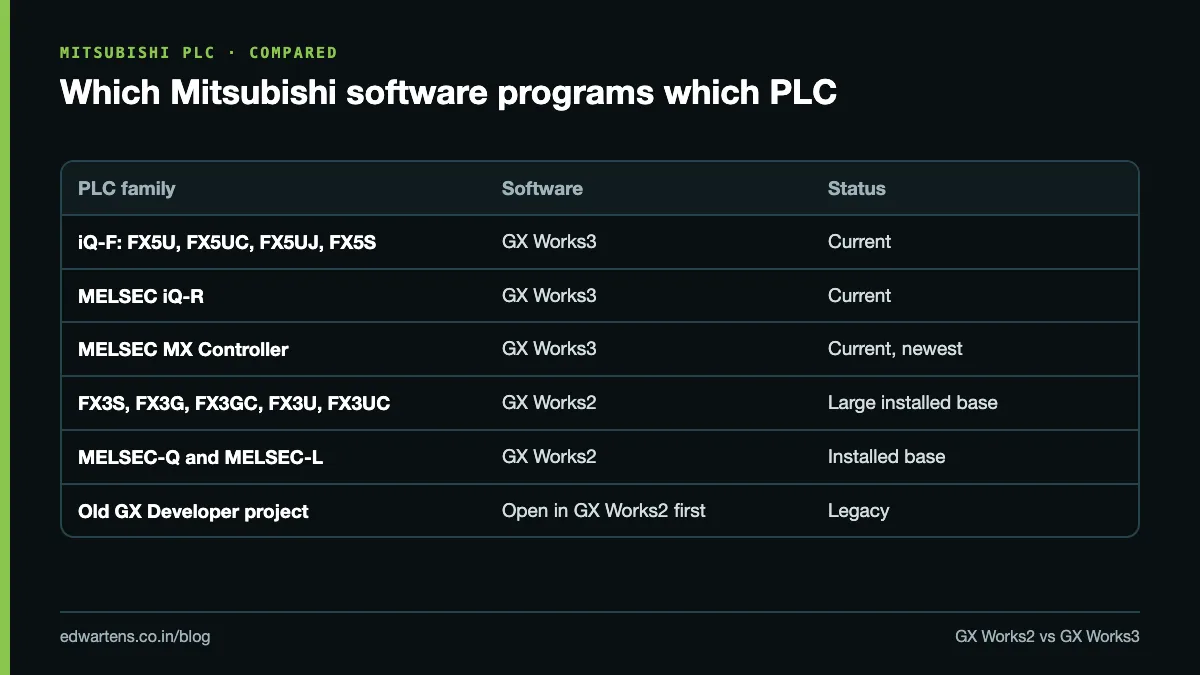
PLC you have in front of you | Software to use | Notes |
|---|---|---|
FX5U, FX5UC, FX5UJ, FX5S (MELSEC iQ-F) | GX Works3 | Current compact range |
MELSEC iQ-R (R04CPU, R08CPU and so on) | GX Works3 | Modular, high end |
MELSEC MX Controller | GX Works3 | Newest family |
FX3S, FX3G, FX3GC, FX3U, FX3UC | GX Works2 | Very large installed base in Indian plants |
MELSEC-Q and MELSEC-L | GX Works2 | Still common on older special-purpose machines |
An old project file from GX Developer | Open it in GX Works2 first | GX Developer itself is legacy |
Two practical points follow from this table. First, a maintenance engineer in a Japanese-owned auto component plant can easily meet both generations on the same shop floor, so knowing only one tool is a handicap. Second, when someone asks "which Mitsubishi PLC software should I download?", the honest answer is "whichever matches the CPU model printed on the front of the unit".
Where do GX Developer and iQ Works fit?
GX Developer is the older tool for the A, Q and early FX series. Mitsubishi's FAQ on opening GX Developer projects in GX Works2 says the project is read through "Open other project" in GX Works2, with the caution that function-block programs do not compile to an identical result. Going the other way, another Mitsubishi FAQ explains that GX Works2 can export to GX Developer format through Project, Export to GX Developer Format File, which helps when a site laptop still runs GX Developer.
MELSOFT iQ Works is not a separate PLC editor. Mitsubishi describes MELSOFT iQ Works as a suite of GX Works3, MT Works2 (motion), GT Works3 (HMI), RT ToolBox3 mini (robots) and FR Configurator2 (drives), tied together by MELSOFT Navigator. Buy iQ Works when one machine has a Mitsubishi PLC, HMI and servo; buy GX Works3 alone when you only program PLCs.
GX Works2 vs GX Works3: what actually changes?
GX Works3 is a newer design built around a graphical module configuration, labels and the MELSOFT Library of module function blocks. GX Works2 is closer to the GX Developer way of working. Here is the comparison an engineer cares about.
Point | GX Works2 | GX Works3 |
|---|---|---|
PLC families | FX3, Q, L | iQ-F (FX5), iQ-R, MX Controller |
Project types | Simple project (device-based) or Structured project (labels, FBs) | One project type, labels encouraged |
Languages | Ladder, SFC, ST, structured ladder/FBD | Ladder, ST, FBD/LD, SFC |
Hardware setup | Parameter dialogs | Drag-and-drop module configuration diagram |
Simulator | Built-in simulation (GX Simulator2) | GX Simulator3, started from Debug, Simulation |
Opens the other's projects | No | Yes, via Open Other Format File |
File extension | .gxw (compressed .gwz) | .gx3 |
The language row comes from the manuals. The GX Works3 Operating Manual (SH-081215ENG), revision AU dated July 2026, has separate chapters for creating ladder, ST, FBD/LD and SFC programs. GX Works2's product page says SFC, ST and ladder can be combined in one program. One trap: the FX5S does not support SFC programs, according to Mitsubishi's FX3-to-iQ-F handbook, so a step-ladder program from an FX3G needs rework if the replacement CPU is an FX5S.
Labels vs devices: why GX Works3 feels different
A device is a fixed memory address such as X0, Y10, M100 or D200. A label is a named variable (for example Conveyor_Run) that the software maps to memory for you, or that you assign to a device. Mitsubishi's GX Works3 page pitches this directly: assign convenient label names to internal devices rather than typing a device name every time.
In practice, GX Works3 still accepts plain device programming, so an FX3U engineer can write X0, Y0 ladder on day one. The gain comes later: global labels, structured data types and module labels make an FX5U program readable and reusable across machines. If you are comparing addressing styles across brands, our post on PLC data types and addressing across brands puts Mitsubishi devices next to Siemens and Rockwell tags.
Can GX Works3 open a GX Works2 project?
Yes, for specific CPU types. The GX Works3 Operating Manual states that a GX Works2 project can be opened only if it was made for a Universal model QCPU, High-speed Universal QCPU, Universal process CPU, Redundant CPU, LCPU, or an FX3S, FX3U, FX3UC, FX3G or FX3GC. The CPU type changes during the conversion: an FX3 project becomes an FX5S, FX5U, FX5UC or FX5UJ project (an FX3U or FX3UC cannot be changed to an FX5S), and a Universal QCPU project becomes an R120CPU project.
The menu path is Project, Open Other Format File, GX Works2 Format, Open Project. The manual also says the latest GX Works2 must be installed on the same PC, and the FX3 to iQ-F transition handbook (JY997D66201) names the versions: GX Works3 1.080J or higher and GX Works2 1.519R or higher, with GX Works2 supplied with GX Works3.
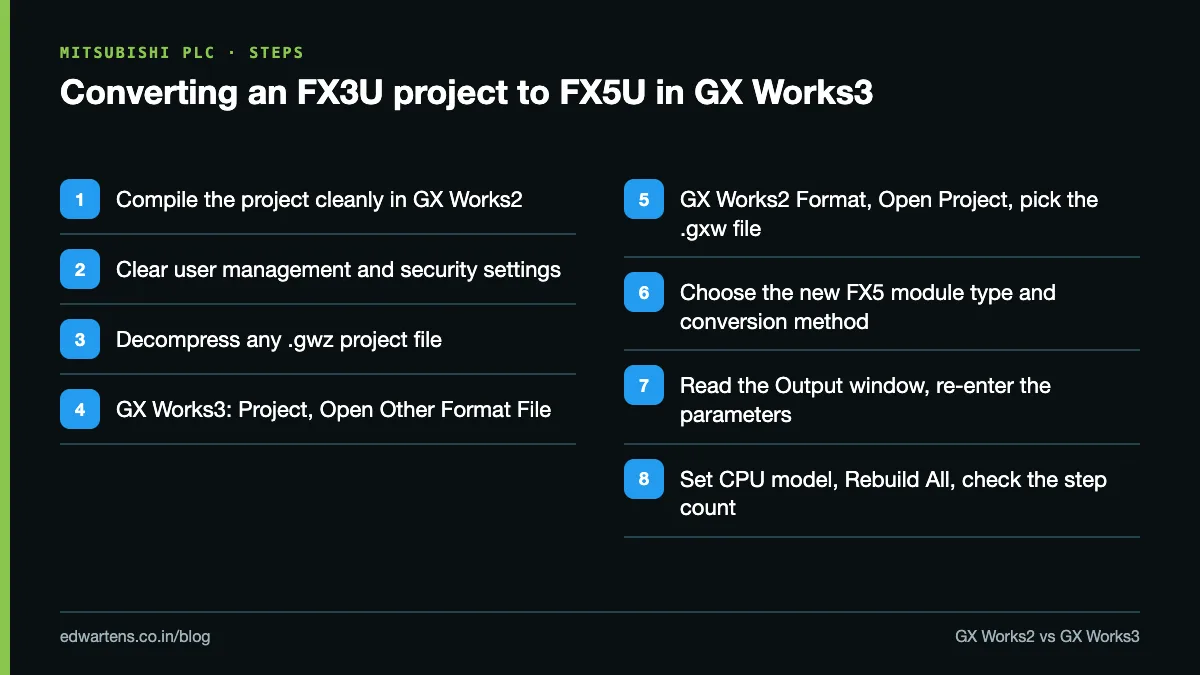
- In GX Works2, compile the project. GX Works3 refuses a project whose program has compile errors.
- Clear user management and access authority settings in GX Works2. A secured project will not open.
- If the file is a compressed .gwz, decompress it first.
- Open GX Works3 and select Project, Open Other Format File, GX Works2 Format, Open Project, then pick the .gxw file.
- On the "Select the New Module Type/Conversion Method" screen, choose the FX5 CPU and conversion method.
- Read the Output window: it lists every instruction and device that was changed.
- Re-enter parameters. The handbook warns that when an FX3U project is converted, PLC and network parameters and special-module settings are deleted (CC-Link settings are an exception).
- Set the CPU model name under System Parameter, I/O Assignment Setting, run Convert, Rebuild All, and check the step count, because converted programs can grow too large for the target.
Two more cautions from Mitsubishi's documents. Label names valid in GX Works2 can clash with reserved words in GX Works3, and FX3 intelligent modules used through a bus conversion module cannot be drawn in the GX Works3 module configuration diagram, per Mitsubishi FAQ 39331. SFC conversion also had version limits: technical bulletin FA-A-0192 advises GX Works3 1.020W or later for SFC blocks with multiple initial steps or jumps. Treat any converted program as a first draft, not a finished migration.
For an old GX Developer FX project, the route is two hops: open it in GX Works2 with Open other project, save it as a GX Works2 project, then convert it in GX Works3. GX Works3 opens GX Developer format directly only for QSCPU safety projects.
Mitsubishi PLC programming cable: which one do you need?
Cables cause more lost hours than code. The right one depends on the port on the CPU.
- FX5UJ and FX5S: built-in USB. The GX Works3 manual lists the USB cable types it supports (A to mini-B, A to C, C to C), refers you to the iQ-F hardware manual for the one your CPU takes, and asks you to install the USB driver the first time. The transition handbook confirms the FX5S has a USB mini-B connector and an Ethernet port as standard.
- FX5U and FX5UC: the manual states plainly that these CPUs do not support the USB connection. Use the built-in Ethernet port with "Ethernet Port Direct Connection" in the Specify Connection Destination screen, or serial through an FX5-232-BD or FX5-232ADP with the FX-232CAB-1 cable.
- FX3U and FX3UC: the programming port is RS-422 (mini-DIN 8-pin). Mitsubishi India's MELSEC-F options page lists the FX-USB-AW converter for FX3U and FX3UC and the FX-232AWC-H interface for all FX3 models. An FX3U-USB-BD board is another route.
- iQ-R: USB or Ethernet, with the cable list in Mitsubishi bulletin FA-A-0036.
Generic "SC-09" style USB cables are widely sold in India for FX PLCs. They are not on Mitsubishi's option list, so if one gives communication errors, test with a genuine FX-USB-AW before blaming the program.
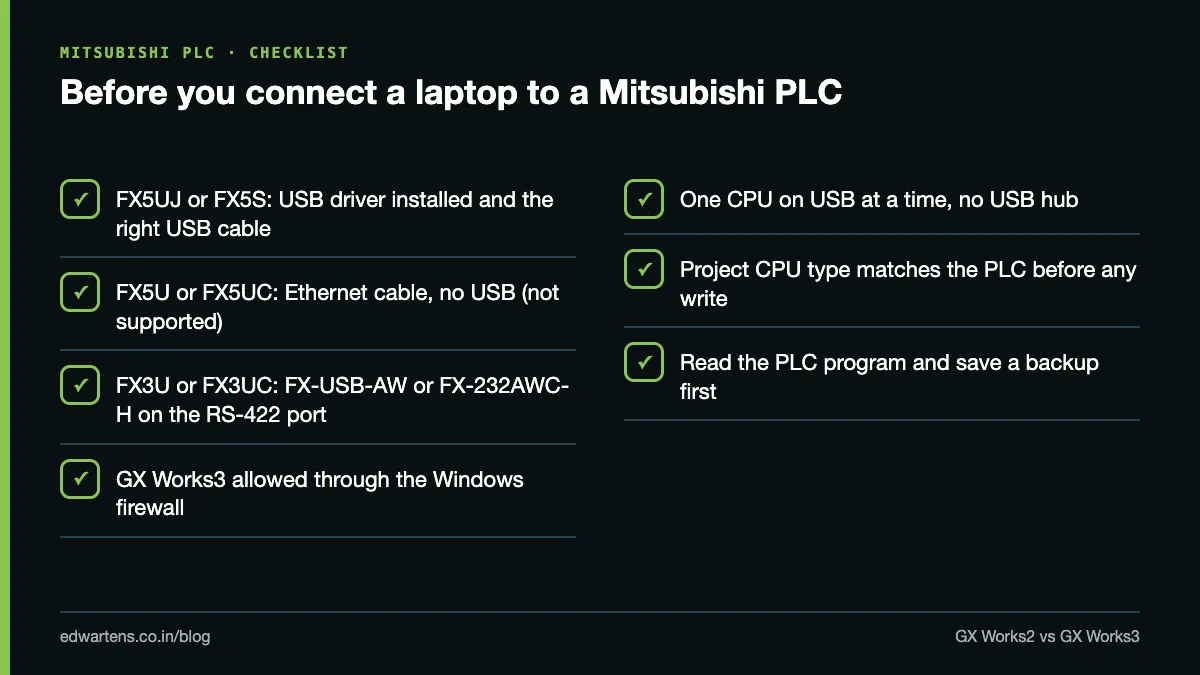
If GX Works3 times out over Ethernet, the manual's first suspect is the Windows firewall: allow GXW3.exe (installed by default in C:\Program Files (x86)\MELSOFT\GPPW3) for domain, private and public networks. Only one CPU can be on USB at a time, and connecting through a USB hub is not supported. Before you write anything, read the existing program from the PLC and save it; our guide on how to upload a program from a PLC covers that step for several brands.
Can you simulate a Mitsubishi PLC without hardware?
Yes. In GX Works3, select Debug, Simulation, Start Simulation. GX Simulator3 starts as a virtual PLC, the status bar shows "Simulation", and you write the program to it exactly as you would to a real CPU. The manual's list of simulator-supported modules includes FX5U, FX5UC and FX5UJ CPUs and a long list of iQ-R CPUs. GX Works2 has its own built-in simulation function, which Mitsubishi describes as part of the all-in-one package.
The simulator checks logic, not wiring or scan-time behaviour, so a program that works in simulation still needs a test on real I/O. Mitsubishi's own free video training (PLC Programming Basics: iQ-F Controllers, about 6 hours 50 minutes) is built so learners can follow along using the simulators in the free trial software. For more ways to practise without buying a PLC, see free PLC software to practise at home.
How to get GX Works2 and GX Works3 legally in India
Download Mitsubishi software only from Mitsubishi Electric. The Mitsubishi Electric India FA download area has a Software tab alongside manuals and catalogues, and Mitsubishi Electric India or an authorised distributor can supply a licence.
What Mitsubishi states about licensing:
- GX Works3 is a licensed product. Mitsubishi Electric's Americas selection guide lists single-user, 5-user, 10-user, unlimited and OEM licences. Model numbers and availability differ by region, so ask the Indian office for the local part number and price.
- A free trial version exists. Mitsubishi's European training pages tell learners to use "the free trial software" for their GX Works3 exercises. Trial terms (duration and limits) are set by Mitsubishi; read them on the download page rather than relying on forum posts.
- GX Works2 is supplied with GX Works3, per the transition handbook, which is convenient for anyone maintaining both FX3 and FX5 machines.
Avoid "cracked" installers and third-party download sites. Apart from the legal problem, a tampered engineering tool on a laptop that connects to production PLCs is a real security risk.
Which should you learn first in India?
Learn GX Works3 first if you are a fresher or switching into automation. New machines built around the FX5U and iQ-R use it, its label-based style transfers to Siemens TIA Portal and Rockwell Studio 5000, and Mitsubishi's free e-learning targets it. Learn GX Works2 second, because a large number of running machines in Indian plants still have FX3U and Q-series CPUs, and maintenance roles expect you to read and modify them.
If your first job is in maintenance at a plant with older Mitsubishi lines, reverse the order: you will open GX Works2 on day one. Either way, the ladder concepts carry over, and our guide to PLC programming languages explains ladder, FBD, ST and SFC in a brand-neutral way. For where Mitsubishi sits among other brands Indian employers use, read which PLC brands to learn in India.
For classroom work, our Mitsubishi PLC training in Bangalore page sets out what is covered, and admissions can tell you which Mitsubishi hardware your batch uses. To start free, take Mitsubishi GX Works3: MELSEC iQ-R and iQ-F and then Mitsubishi FX with GX Works2.
Frequently asked questions
Q: What is the Mitsubishi PLC programming software called?
A: The current tool is MELSOFT GX Works3, for the iQ-F (FX5), iQ-R and MX Controller families. GX Works2 programs the FX3, Q and L series, and GX Developer is the legacy tool both replaced.
Q: Can I program an FX3U with GX Works3?
A: No. GX Works3 does not support FX3 CPUs. Use GX Works2 for an FX3U, or convert the project in GX Works3 if you are replacing the FX3U with an FX5U.
Q: What is the difference between GX Works and GX Developer?
A: GX Developer is the older Mitsubishi tool. GX Works2 replaced it, reads GX Developer projects through Open other project, and can export back to GX Developer format.
Q: Which programming cable does the FX5U need?
A: An Ethernet cable. Mitsubishi's GX Works3 manual states that FX5U and FX5UC CPUs do not support the USB connection, so you connect through the built-in Ethernet port or a serial adapter.
Q: Is GX Works3 free?
A: No, GX Works3 is sold as a licence, but Mitsubishi offers a free trial version. Check the trial terms on Mitsubishi Electric's own download page.
Q: Does GX Works3 have a simulator?
A: Yes. Debug, Simulation, Start Simulation launches GX Simulator3, which supports FX5U, FX5UC, FX5UJ and iQ-R CPUs, so you can test logic without hardware.
Q: Where can I find the Mitsubishi PLC programming manual PDF?
A: On Mitsubishi Electric's own download pages. The GX Works3 Operating Manual is SH-081215ENG, and the FX3 to iQ-F transition handbook is JY997D66201.
Q: Should I learn GX Works2 or GX Works3 first?
A: GX Works3 first for new projects and transferable skills, then GX Works2 for maintenance of the many FX3U and Q-series machines still running in India.
Learn this, free
The courses that teach this
Every lesson, the written notes and the practice are free with an account. Only the certificate is optional and paid.


