Delta PLC Software: ISPSoft vs WPLSoft vs DIADesigner

The short answer
Delta's current PLC programming software is ISPSoft, which programs the DVP, AS and AH series, and DIADesigner, the newer tool for the AS series and the DVP-ES3, EX3, SV3 and SX3. WPLSoft is the older ladder editor for DVP PLCs only; Delta's own FAQ recommends installing ISPSoft instead. All of them need COMMGR, Delta's communication manager, to talk to the PLC. Delta distributes its PLC software free of charge through its official download centre. If you are choosing between ISPSoft and WPLSoft today, choose ISPSoft, unless your PLC is a newer model that only DIADesigner supports.
Watch: getting started with ISPSoft and WPLSoft
The video above is Introduction to Delta PLCs: Getting Started with ISPSoft & WPLSoft, Lesson 1 by plcgoods, embedded with thanks. EDWartens is not affiliated with the creator. It runs about 17 minutes and introduces the Delta PLC range and the two classic editors side by side. It is part of our free course Delta DVP PLC with ISPSoft, where the next lessons cover simulation with COMMGR and ladder programming. This guide adds the parts a video skips: which software each Delta CPU accepts according to Delta's own product pages, the official download route and licence terms, the simulator's limits, and the cable for each port.
What is the name of Delta PLC software?
Delta has three PLC editors and one utility you must know by name.
- WPLSoft is Delta's original Windows editor for the DVP series. It is ladder-centred and was the standard tool on DVP-ES, EX, SS and other early models.
- ISPSoft is the IEC 61131-3 development tool that replaced it. Delta's ISPSoft product page describes it as covering programming, hardware configuration, network configuration and project management for the DVP, AS and AH series.
- DIADesigner is part of Delta's DIAStudio suite. Delta's PLC product overview says DIADesigner is for the AS series and the DVP-ES3, EX3, SV3 and SX3, and supports LD, ST and SFC.
- COMMGR (Communication Manager) is not an editor. It holds the communication drivers (serial, USB, Ethernet, simulator) that ISPSoft and DIADesigner use to reach the PLC.
There is also DIADesigner-AX, a separate IEC 61131-3 tool for Delta's AX series motion controllers, described on the DIAStudio site. It is outside the scope of most DVP work.
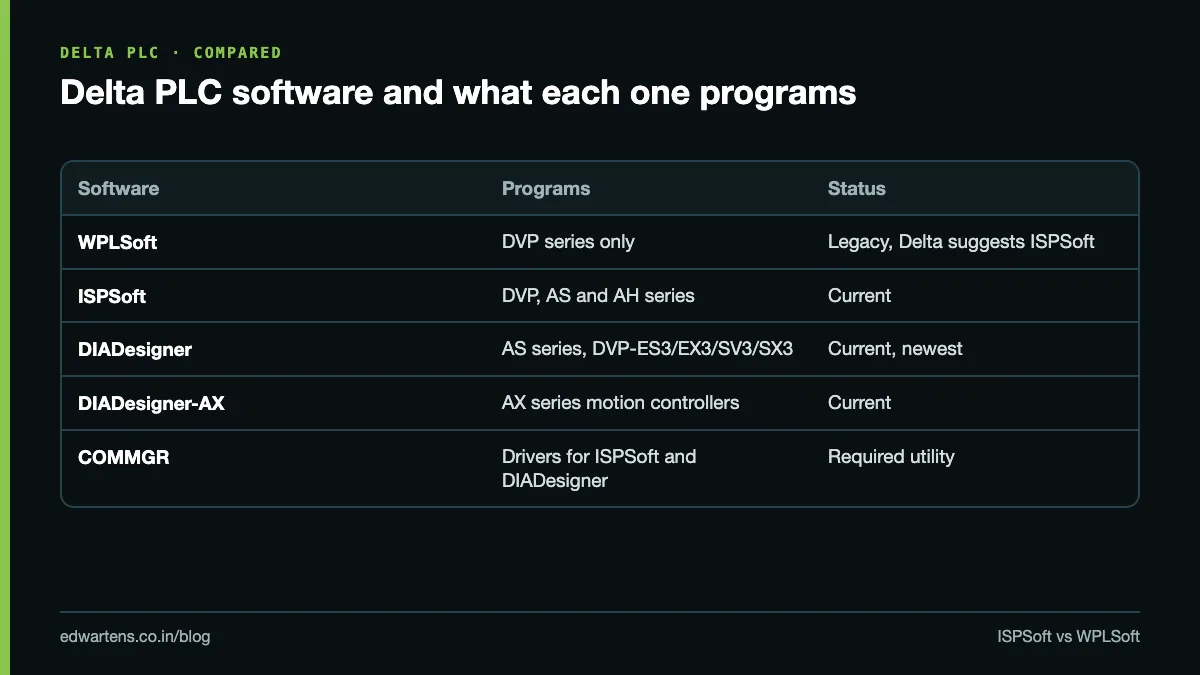
Notice what is missing from Delta's current PLC page: it lists only DIADesigner and ISPSoft under "Programming Software". WPLSoft still appears in Delta FAQs, but it is not presented as a current product.
ISPSoft vs WPLSoft: which should you use?
Delta answers this itself. Its FAQ on ISPSoft and WPLSoft calls both "editing software of Delta DVP series PLC", says ISPSoft supports ladder diagram, function blocks and other programming modes with modular, reusable program structure, and states that ISPSoft supports all DVP series PLCs. A second Delta FAQ is more direct: Delta suggests installing ISPSoft instead of WPLSoft because ISPSoft is the newer software with more functions.
Point | WPLSoft | ISPSoft |
|---|---|---|
PLCs supported | DVP series only | All DVP, plus AS and AH series |
Programming style | Ladder-centred, device addressing | IEC 61131-3 POUs, tasks, variables, function blocks |
Function blocks | No | Yes, including PLCopen motion FBs |
Hardware and network configuration | Not listed by Delta | Built in, per Delta's product page |
Simulator | Yes, for DVP | Yes, DVP and AH (via COMMGR) |
Operating system | Windows only | Windows only |
Delta's recommendation | Legacy | Install this one |
Use WPLSoft only in two situations: you maintain an old DVP machine whose original program was written in it and you want to keep the file untouched, or an older laptop in the maintenance room already has it. For anything new, ISPSoft is the better tool, and its structure (POUs, tasks, local variables) is the same idea you will meet in Siemens TIA Portal and Codesys-based platforms.
Where does DIADesigner fit?
Some newer CPUs push you beyond ISPSoft. Delta's product pages show the split clearly:
Delta CPU | Software Delta lists | Built-in ports Delta lists |
|---|---|---|
DVP-ES2 | ISPSoft (WPLSoft on older installs) | 1 RS-232, 2 RS-485 |
DVP-SE2 | ISPSoft V3.20 or later | USB 2.0, dual Ethernet, 2 RS-485, CAN |
DVP-ES3 | ISPSoft or DIADesigner | 2 RS-485, Ethernet protocols, CANopen |
DVP-ES3 EtherCAT model (ES3-TEC) | DIADesigner only | EtherCAT, 2 RS-485 |
DVP-SV3 | DIADesigner | Ethernet, USB, 2 RS-485, CAN |
AS series | ISPSoft (DIADesigner also supports AS) | Model dependent |
The data comes from Delta's pages for the DVP-SE2, DVP-ES3, DVP-SV3 and DVP-ES2. The practical rule: if the CPU name ends in 3 (ES3, EX3, SV3, SX3), check whether DIADesigner is required before you install anything. If it ends in 2 or has no number, ISPSoft is the tool.
Delta PLC software download: where to get it legally
Download only from Delta. The Delta Download Center holds ISPSoft, COMMGR, DIADesigner and the manuals, and the ISPSoft product page links straight to the PLC software section. Indian users can also reach the range through Delta Electronics India's industrial automation pages.
On licence status, Delta's own words are clear. Before a file downloads, Delta shows its download terms of use, which say the materials are licensed, not sold, and are "provided free of charge", under a non-exclusive, non-transferable and revocable licence. You must accept those terms yourself on Delta's site. For DIAStudio, Delta's launch announcement says the suite is "free for registration and download", so expect to create a Delta account for DIADesigner.
On "latest version": Delta updates ISPSoft regularly and the version number changes, so read the current release in the download centre rather than trusting a number from a blog. One hard requirement worth knowing is on the DVP-SE2 page: it needs ISPSoft V3.20 or later. Delta's ISPSoft page lists Windows as the supported operating system, and Delta's FAQ confirms there is no Linux or Mac version; use a Windows virtual machine if you work on a Mac.
Skip third-party "Delta PLC software free download" sites. The software is already free from Delta, so there is nothing to gain and real risk in an installer from elsewhere.
Delta PLC simulator: how to test without hardware
Both WPLSoft and ISPSoft include a simulator. Delta's simulator FAQ explains that once the simulator is switched on, you do not need to select a communication interface: upload, download and monitoring work against the virtual PLC. It supports timers and counters, but timing depends on your PC's speed.
Know the limits before you rely on it. Delta lists 57 instructions the DVP simulator does not support, including PID, PLSY, PWM, DRVI, DRVA, FROM, TO, MODRD and MODWR. That rules out testing high-speed pulse output, motion, special-module and Modbus logic in simulation. Delta states plainly that simulation results will not exactly match a real PLC and that you must still test on hardware.
For AH500 projects, simulation runs through COMMGR. Delta's AH500 simulation FAQ describes adding a driver in COMMGR with "AH500 Simulator" as the connection type, starting it, selecting that driver in ISPSoft's Communication Settings, downloading, and switching the simulator to RUN. ISPSoft can simulate one DVP driver at a time, or up to four drivers for the AH series. For more ways to practise at home, see our guide to free PLC software for practice.
Delta PLC programming cable: which one fits?
The cable depends on the port on your CPU, not the software.
- RS-232 mini-DIN port (DVP-ES2/EX2 and many older DVP models): Delta's cable FAQ introduces the UC-PRG020-12A, a USB-to-RS-232 cable whose PLC end provides a mini-DIN and a D-sub 9 connector, usable with both the slim DVP series and the AH500.
- Built-in USB (DVP-SE2, DVP-SV3 and other newer CPUs): a standard USB cable to the PLC's USB port. Install the driver from Delta's download centre if Windows does not create the port automatically.
- Ethernet (DVP-SE2, DVP-SV3, DVP-ES3, AS and AH CPUs with Ethernet): a normal LAN cable and an Ethernet driver in COMMGR. Your laptop must be able to reach the PLC's IP address.
- RS-485: used mainly for Modbus networks to drives and HMIs, not usually for first-time programming.
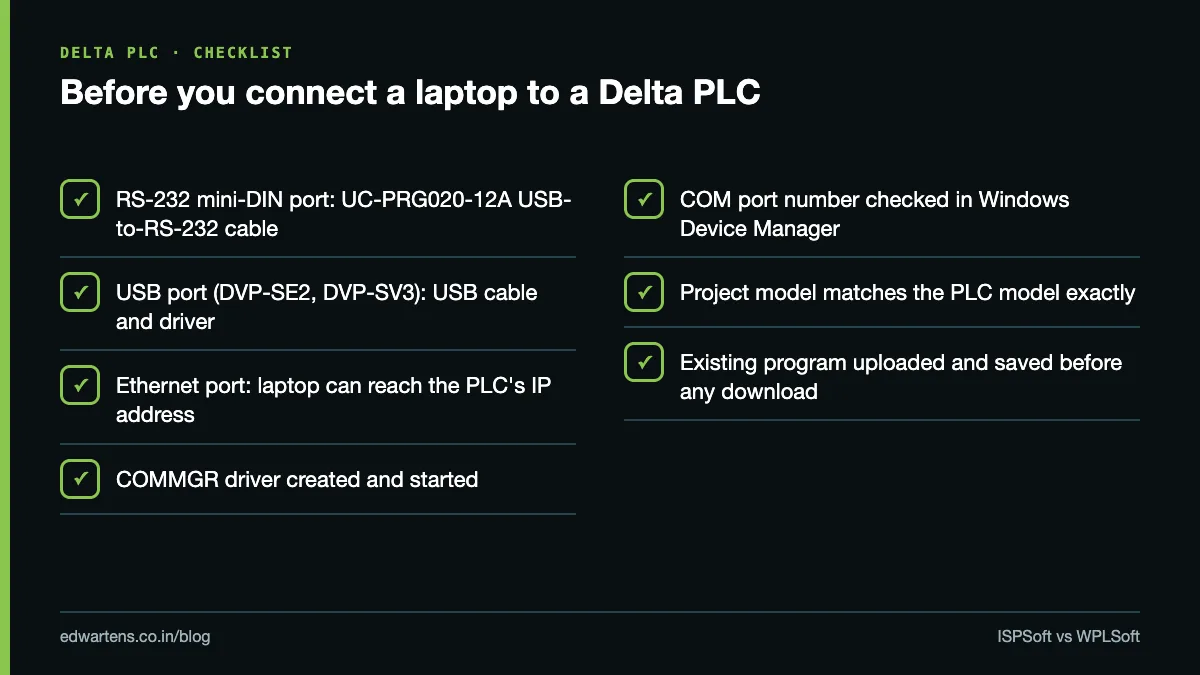
Many Indian panel builders use low-cost compatible USB-to-serial cables. They often work, but if COMMGR cannot find the PLC, check Device Manager for the COM port number first and test with a known-good cable before suspecting the program.
How to create your first project in ISPSoft
This is the workflow we use with beginners on a DVP-ES2 or in the simulator. Menu labels can differ slightly between ISPSoft versions, so follow the names, not the exact pixel positions.
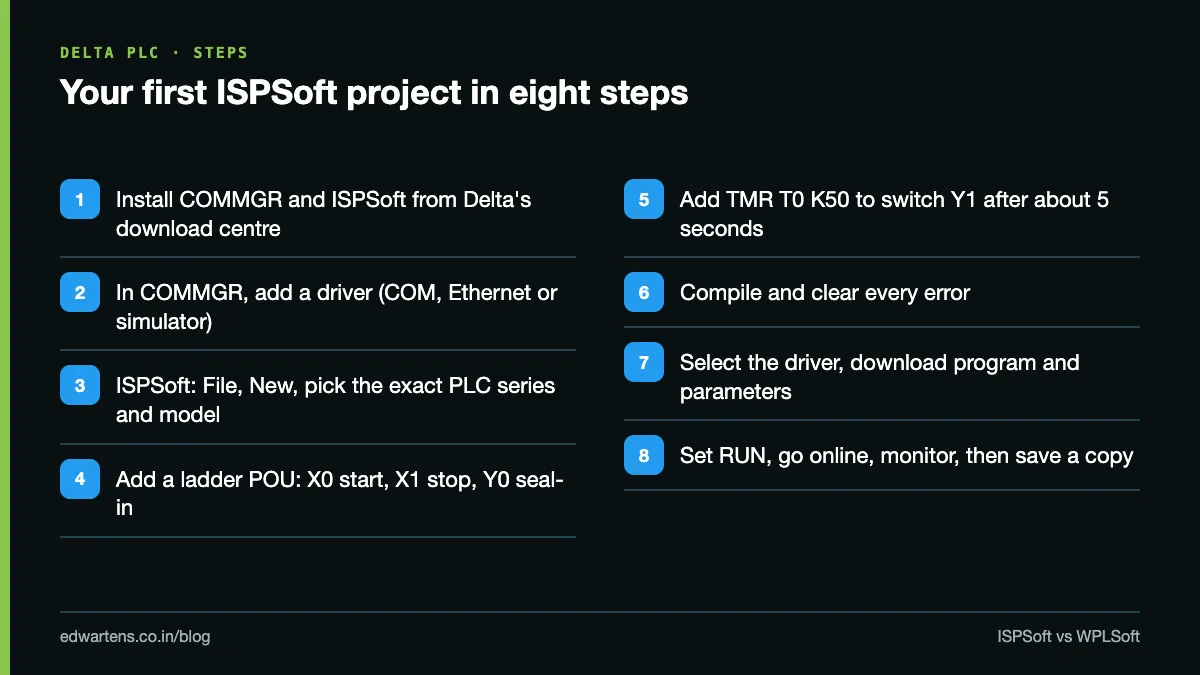
- Install COMMGR and ISPSoft from the Delta Download Center. ISPSoft cannot reach a PLC or the simulator driver without COMMGR.
- Create a driver in COMMGR. Click Add, give it a name, and choose the connection type: the COM port your cable created, Ethernet with the PLC's IP, or a simulator. Click Start.
- Create a new project in ISPSoft. Choose File, New, enter a project name, and select the controller series and model exactly as printed on the PLC (for example DVP-ES2/EX2). A wrong model is the most common reason a download fails.
- Add a program (POU) in ladder. Write a classic start-stop latch: a normally open contact X0 (start) in parallel with Y0, in series with a normally closed X1 (stop), driving coil Y0. DVP inputs and outputs are numbered in octal: X0 to X7, then X10.
- Add a timer to see it work. Use TMR T0 K50 after Y0 to switch on Y1. On the DVP, T0 to T199 count in 100 ms steps by default, so K50 is about 5 seconds; confirm the timer ranges in your model's programming manual.
- Compile. Fix every error and read the warnings; ISPSoft will not download a program that does not compile.
- Select the communication driver in Communication Settings (or switch on the simulator), then download the program and parameters to the PLC.
- Put the PLC in RUN and go online to monitor contacts and timer values live. Save the project, and keep a dated copy.
Before you download to a working machine, always read the existing program out of the PLC and save it. Our guide on how to upload a program from a PLC covers that step, and PLC data types and addressing across brands explains how Delta's X, Y, M, T, C and D devices map to other brands.
Which Delta software should you learn?
Learn ISPSoft. It programs every DVP model as well as the AS and AH series, it teaches the POU and task structure used by IEC 61131-3 tools, and Delta itself recommends it over WPLSoft. Add DIADesigner once you work with the AS series or the third-generation DVP CPUs. Keep WPLSoft only as a maintenance tool for old files.
Delta PLCs are common on small machines and control panels across Indian MSME plants: packaging, plastics, textiles and special-purpose machines. That makes Delta a sensible second brand after Siemens for anyone targeting machine builders and panel shops. For how Delta compares with Siemens, Rockwell and Mitsubishi in Indian job demand, read which PLC brands to learn in India and our guide to 14 PLC brands.
For classroom work, our Delta PLC training in Bangalore page sets out what is covered, and admissions can tell you which Delta hardware your batch uses. To start free, take Delta DVP PLC with ISPSoft.
Frequently asked questions
Q: What is the name of Delta PLC programming software?
A: ISPSoft is the main tool for DVP, AS and AH PLCs, and DIADesigner is the newer tool for the AS series and the DVP-ES3, EX3, SV3 and SX3. WPLSoft is the older DVP-only editor.
Q: Is Delta PLC software free?
A: Yes. Delta's download terms say its materials are provided free of charge under a non-exclusive, revocable licence, and DIAStudio is free after registration.
Q: ISPSoft or WPLSoft: which is better?
A: ISPSoft. Delta's own FAQ suggests installing ISPSoft instead of WPLSoft because it is newer, has more functions and supports all DVP series PLCs.
Q: Does Delta PLC software have a simulator?
A: Yes, both WPLSoft and ISPSoft have one, but it does not support instructions such as PID, PLSY, DRVI or FROM/TO, so always test on real hardware.
Q: What is COMMGR in Delta?
A: COMMGR is Delta's communication manager. It holds the serial, USB, Ethernet and simulator drivers that ISPSoft and DIADesigner use to connect to a PLC.
Q: Which cable is used to program a Delta DVP PLC?
A: For the RS-232 mini-DIN port on models like the DVP-ES2, Delta offers the UC-PRG020-12A USB-to-RS-232 cable. Newer CPUs such as the DVP-SE2 and DVP-SV3 have built-in USB and Ethernet.
Q: Does ISPSoft run on Windows 11 or a Mac?
A: Delta lists Windows only and confirms there is no Mac or Linux version. Check the current release notes in the Delta Download Center for the exact Windows versions supported.
Q: Where can I download the Delta PLC programming manual PDF?
A: From the Delta Download Center on deltaww.com, under the PLC section, after accepting Delta's download terms.
Learn this, free
The courses that teach this
Every lesson, the written notes and the practice are free with an account. Only the certificate is optional and paid.


