

Electrical · Free online course
Earthing and Lightning Protection Design
Design an earthing system and lightning protection that pass inspection: TN, TT and IT systems, soil resistivity by the Wenner method, rod, plate and strip electrodes to IS 3043 and BS 7430, conductor sizing with the adiabatic equation, IEEE 80 touch and step voltage and grid design, bonding, the IEC 62305 risk assessment, air terminals and the rolling sphere, SPD selection, special cases and testing.
- 13 modules
- 11h 33m of video
- Intermediate
- English
- ₹0, free
- Lab practice in your browser

₹0Free for good
Worth ₹6,999 by length and depth against classroom training. It has always been free; that is not a former price.
No card. Checkout takes a minute and gives you a receipt.
Certificate ₹599, optional. The course is free either way.
Overview
About Earthing and Lightning Protection Design
Design an earthing system and lightning protection, from soil resistivity and touch voltage to air terminals and surge protection.
Earthing and Lightning Protection Design is a free, self-paced online course from EDWartens for electrical design, MEP, substation and maintenance engineers who design, check and test earthing and lightning protection in India, the Gulf and worldwide. It has 13 modules and 11h 33m of video lessons, with written notes, a practice task per module, a practical project and a final assessment of 15 questions (pass mark 60%). Learning costs nothing and needs only a free account. The optional EDWartens Certificate of Completion, verifiable by code, is a one-off ₹599 inclusive of GST for learners in India; it is not a vendor credential. Updated 1 November 2026.
Who it is for: Electrical design, MEP, substation and maintenance engineers who design, check and test earthing and lightning protection in India, the Gulf and worldwide
This course includes
- 11h 33m of video lessons
- 13 modules with written notes and diagrams
- One final assessment: 15 questions, pass mark 60%
- Ask-an-engineer support from practising engineers
- Lifetime access, the course does not expire
- Optional verifiable certificate when you finish
- Step 1 of 3
Learn the 13 modules
11h 33m of video lessons, written notes and a practice task per module, at your own pace.
- Step 2 of 3
Pass the final assessment
15 questions drawn from every module, pass mark 60%, 3 attempts.
- Step 3 of 3
Take the certificate, if you want it
Optional, paid once, only if you choose it. The course stays free either way.
See the certificate and its price
A look inside


From the lessons

Why we earth: system earthing, protective earthing, TN, TT and IT
by Railway Engineering Insights

Earth electrodes: rod, pipe, plate and strip calculations (IS 3043 and BS 7430)
by Railway Engineering Insights

Touch and step voltage: the shock model behind IEEE 80
by Railway Engineering Insights

Equipotential bonding in buildings and plants
by John Ward (jwflame)

Air terminals, rolling sphere, protection angle and down conductors
by Railway Engineering Insights

Special cases: solar PV, telecom towers, tanks and hazardous areas
by Axis Electricals
Lesson frames belong to the creators named in the Credits and are shown from YouTube.
What you learn
What you will be able to do
By the end you will be able to:
- Identify TN, TT and IT systems and measure soil resistivity
- Calculate earth electrode resistance and size earthing conductors
- Check touch and step voltages for an earth grid to IEEE 80
- Run a lightning risk assessment and place air terminals
- Select surge protective devices and test the finished system
How it works
How this course works
Watch the lessons
Short video lessons, one module at a time, at your own pace.
Read the notes
Open the Reading tab for the written notes and diagrams of the module.
Practise in the 3D labOptional
Try the module in the free 3D lab, in your browser.
Check yourself
Answer the questions to see what stuck before you move on.
Final assessment
Pass the final once you have been through the modules.
Certificate, if you want oneOptional
Optional, with a page anyone can use to verify it.
Syllabus
Course content, module by module
In order, at whatever pace suits you. Each module ends with a practice task that builds on the last.
- Modules
- 13
- Video lessons
- 39
- Of video
- 11h 33m
- Final questions
- 15
- 01
Why we earth: system earthing, protective earthing, TN, TT and IT
3 lessons · 36m - 02
Soil resistivity: the Wenner test and reading the results
2 lessons · 29m - 03
Earth electrodes: rod, pipe, plate and strip calculations (IS 3043 and BS 7430)
3 lessons · 1h 17m - 04
Sizing earth conductors: the adiabatic equation
2 lessons · 21m - 05
Touch and step voltage: the shock model behind IEEE 80
2 lessons · 33m - 06
Earth-grid design to IEEE 80: resistance, GPR, mesh and step voltage
4 lessons · 1h 10m - 07
Equipotential bonding in buildings and plants
3 lessons · 45m - 08
Lightning physics and the IEC 62305 risk assessment
3 lessons · 2h 5m Final assessment · 15 questions, pass mark 60%
3D lab
Practise in the 3D lab
Choose surge protectors, isolators and earthing for a solar array from its voltages and cable runs, the same choices a protection design makes.
- Select cables, fuses, isolators and surge protectorsSolar and EV labOpen in the lab (opens in a new tab): Select cables, fuses, isolators and surge protectors
Optional. Skip it whenever you like: it never blocks your progress or your certificate.
Project
The course project
Optional practice that ends in the kind of job the course prepares you for, with the documents that go with it.
About 16 hours
Earthing and lightning protection design for a factory building: soil data to electrodes, risk, LPS layout and SPD schedule
Design the earthing and lightning protection of a single-storey packaging factory. Turn a Wenner survey into a design resistivity. Size the ring and rod electrodes and the main earthing conductor. Plan the bonding. Run the IEC 62305-2 risk assessment and choose the LPS class. Lay out the air termination and down conductors with the separation distance. Write the SPD schedule and the test plan. Bring it together in a design report. A complete sample pack shows each document for the same building.
- 4documents in the pack
- 8steps to follow
- 8things to hand in
- 16 hof work, at your pace
Sample document pack, 4 documents, filled in for the scenario
- ReportEarthing and lightning protection design report, production building
- ReportLightning risk assessment to IEC 62305-2 (2010 edition), production building
- RegisterSPD schedule, production building
- Test reportSoil resistivity survey and earth resistance test record
Read inside the course and download as a workbook. The project is optional practice, marked when you submit it; the certificate needs only the modules and the final assessment.
Tools
Software, hardware and lessons
Software
A spreadsheet for every calculation (LibreOffice Calc is free); you build the IS 3043 and IEEE 80 sheets yourself in the modules. A free online IEC 62305-2 risk calculator is used to check the hand risk assessment, and LibreCAD (free) or any CAD tool can draw the layouts. ETAP, CDEGS and similar packages are mentioned but not required.
Hardware
None. An earth tester is shown in the videos; you do not need one.
Who it is for
Intermediate. For electrical design, MEP, substation and maintenance engineers, and final-year electrical students. You should know Ohm's law, three-phase basics and what a fault current is; the Electrical Design Engineering course is the natural step before this one.
Video lessons by
- Railway Engineering Insights
- Engr. Ahmed / Khadija Academy
- Rashid iqubal
- Axis Electricals
- John Ward (jwflame)
- Smart Educare
- Mohamad Nassereddine
- ABB Learning
- Bentley EasyPower Software
- CITEL
- AEMC Instruments
- Megger US
Independent creators, credited in full under Credits.
Software you need
What to download, where from, what it costs and how to install it. Every link goes to the maker's own site, never a mirror.
Nothing to install
A spreadsheet is enough for every earthing, grid and risk calculation; a free online IEC 62305-2 calculator and LibreCAD are optional.
Optional
Useful, not needed to finish the course.
- 01Free
LibreOffice
The Document Foundation
- Runs on
- Windows 10 or 11, macOS 11 or newer (Intel or Apple silicon), Linux
- Account
- None needed
- Size
- up to 1.5 GB of disk space on Windows
LibreOffice is free, open-source software under the Mozilla Public License 2.0, for any use including business. Calc is its spreadsheet.
Steps
- 1.Open the LibreOffice download page.
- 2.Check the page has picked your operating system, then select Download.
- 3.Run the installer (administrator rights are needed on Windows).
- 4.Start LibreOffice Calc for spreadsheet work.
- 5.Save as .xlsx if you need to share files with Excel users.
- Choose the latest main version unless your organisation asks for the older, more conservative release.
Official download pagelibreoffice.org
Checked against each maker's own page on 27 September 2026. Trial lengths and editions change; the maker's page is the final word.
What you walk away with
Your certificate for Earthing and Lightning Protection Design
Finish the course, pass the final, and this is the document with your name on it.
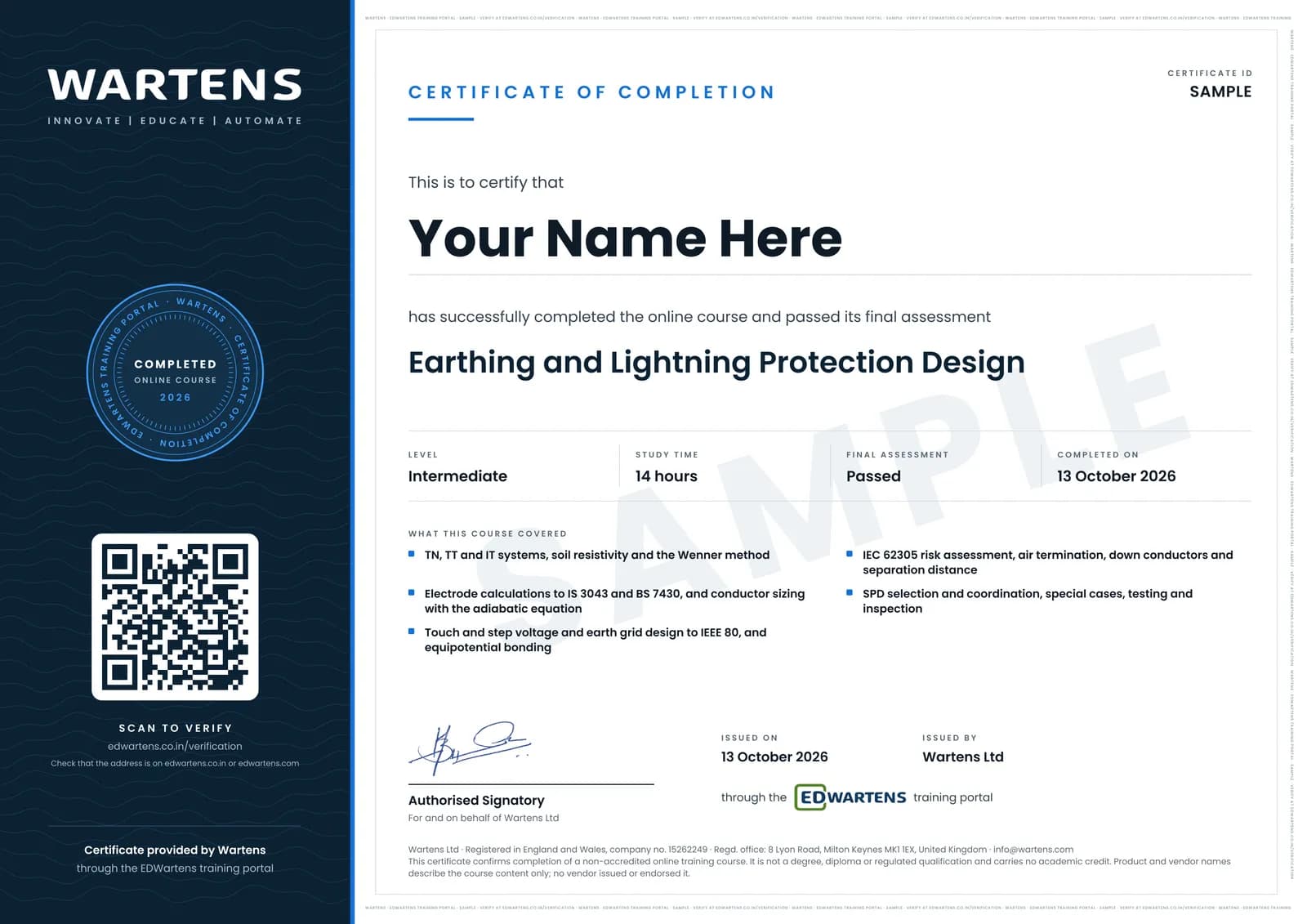
Verifiable by anyone
Adds to LinkedIn in one click
QR code on the certificate
Names what you can do
A permanent link
Earned, not attended
Learning is free. The certificate is optional.
Add it now and pay only when you have finished the course, or come back for it later. One-off, US$28.99, with a receipt.
Issued by Wartens Ltd (England and Wales, company no. 15262249) through the EDWartens training portal, as a Certificate of Completion for this self-paced course. Sold in India by Wartens Automation Private Limited. It is not a vendor certification, a university award or a CPD-accredited activity, and it does not certify competence on live equipment. Delivered electronically; see the refund policy.
Practise what you learn in the free 3D lab
Technical work is judged on what you can do: wiring, commissioning, finding a fault. Doing a task yourself teaches more than watching it a second time, and a lab lets you try it safely before you meet real equipment. It does not replace working on real hardware.
- Practise safely, so a mistake costs nothing.
- The lab checks your work like a site test, so you know when it is right.
- Free, in your browser, with nothing to install.
Why learn with EDWartens
What you get with this course.
- Free from the first lesson to the final assessment.
- Practice in a free 3D lab in your browser, with nothing to install.
- Video lessons with written notes and a project.
- An optional certificate that anyone can verify online.
FAQ
Common questions
Who is this earthing and lightning protection course for?
It is for electrical design, MEP, substation and maintenance engineers and final-year electrical students who design, check or maintain earthing and lightning protection, including those on industrial, commercial and utility projects in India and the Gulf. You should know Ohm's law, three-phase basics and what a fault current is.
Is the course free to learn?
Yes. Every module, the notes, the worked problems, the project and the final assessment are free. Only the certificate is paid, if you want one.
Which standards does it cover?
IS 3043 and BS 7430 for electrodes, IEC 60364-5-54 for protective conductors, IEEE 80 for substation touch and step voltage and grid design, IEEE 81 for testing, and IEC 62305 (adopted in India as IS/IEC 62305) for lightning risk, the LPS and SPDs. The notes paraphrase the standards and show which edition a calculation uses; buy the editions your project cites.
Do I need ETAP or other earthing software?
No. Every calculation is done by hand or in a spreadsheet you build, and every worked number was checked. A free online risk calculator is used to check the IEC 62305-2 assessment. Go on to the ETAP Power System Analysis course to see a grid study in software.
How long does the Earthing and Lightning Protection Design course take?
About 21 hours of video, notes and practice at your own pace, of which about 14 hours is video. The optional factory project takes about 16 hours more.
What certificate does the Earthing and Lightning Protection Design course give?
An EDWartens Certificate of Completion, issued when you pass the 15-question final at 60 percent, with a number anyone can verify on our site. It is not a licence or a certificate from BIS, IEEE, IEC or any electrical authority, and it does not authorise you to sign off an installation where a licensed person is required.
What should I take before this course?
The Electrical Design Engineering course covers loads, cables and breakers and is the natural step before this one. After it, go on to Substation Design, Protection Relays or Hazardous Areas, which build on the earthing, fault clearing and bonding taught here.
What job does earthing and lightning protection design lead to?
It covers the earthing and lightning work of an electrical design engineer at a consultant or EPC contractor, an MEP engineer on commercial buildings, and the testing and inspection a maintenance or commissioning engineer does on plants and substations.
Do I have to use the lab?
No. The lab is optional practice. You can skip it whenever you like, and it never blocks your progress, the final assessment or your certificate.
Is the lab free?
Yes. Every lab level for this course opens in your browser, free, with nothing to install.
Is the Earthing and Lightning Protection Design course free in India, and what does the certificate cost?
Yes. Learning costs ₹0 in India: every module, the written notes, the practice tasks and the final assessment, with no card and no trial period. The only paid item is the optional EDWartens Certificate of Completion, ₹599 including GST for this intermediate course, paid in rupees through Razorpay, and only if you want it after passing the final assessment.
What topics does the Earthing and Lightning Protection Design course cover, module by module?
The Earthing and Lightning Protection Design course has 13 modules. It opens with "Why we earth: system earthing, protective earthing, TN, TT and IT", goes through "Soil resistivity: the Wenner test and reading the results", "Touch and step voltage: the shock model behind IEEE 80", "Air terminals, rolling sphere, protection angle and down conductors" and "Testing, inspection and the design report" and ends with "Final Assessment". The full list with minutes is under "What you learn" on this page.
What can I do after the Earthing and Lightning Protection Design course?
After the Earthing and Lightning Protection Design course: Identify TN-S, TN-C-S, TT and IT systems and explain how each clears an earth fault; Turn a Wenner survey into a design soil resistivity; Calculate rod, pipe, plate and strip electrodes to IS 3043 and combine rods with the BS 7430 method. These are the practical outcomes the course is written around, and the final assessment of 15 questions checks them.
What software and hardware do I need for the Earthing and Lightning Protection Design course, and does it cost anything?
For the Earthing and Lightning Protection Design course, software: A spreadsheet for every calculation (LibreOffice Calc is free); you build the IS 3043 and IEEE 80 sheets yourself in the modules. A free online IEC 62305-2 risk calculator is used to check the hand risk assessment, and LibreCAD (free) or any CAD tool can draw the layouts. ETAP, CDEGS and similar packages are mentioned but not required. Hardware: none. An earth tester is shown in the videos; you do not need one. The course itself is free.
Is the Earthing and Lightning Protection Design course suitable for me, and what level is it?
Earthing and Lightning Protection Design is rated intermediate. Intermediate. For electrical design, MEP, substation and maintenance engineers, and final-year electrical students. You should know Ohm's law, three-phase basics and what a fault current is; the Electrical Design Engineering course is the natural step before this one. It is written for electrical design, MEP, substation and maintenance engineers who design, check and test earthing and lightning protection in India, the Gulf and worldwide, and has 11h 33m of video lessons at your own pace.
Which jobs use the skills from the Earthing and Lightning Protection Design course?
Skills from the Earthing and Lightning Protection Design course (for example: identify TN-S, TN-C-S, TT and IT systems and explain how each clears an earth fault) are used in electrical design engineer work. The course gives you practical evidence of the skill; it does not promise a job, and employers decide on experience and interview.
All course factsHide course facts
- Price
- ₹0, free for good. No trial, no card. Comparable classroom training of this length costs about ₹6,999.
- Who it is for
- Electrical design, MEP, substation and maintenance engineers who design, check and test earthing and lightning protection in India, the Gulf and worldwide
- Format
- 13 self-paced modules, 11h 33m of video, written notes, a practice task per module and one final assessment.
- Level
- Intermediate. Intermediate. For electrical design, MEP, substation and maintenance engineers, and final-year electrical students. You should know Ohm's law, three-phase basics and what a fault current is; the Electrical Design Engineering course is the natural step before this one.
- Brand
- Vendor-neutral
- Software
- A spreadsheet for every calculation (LibreOffice Calc is free); you build the IS 3043 and IEEE 80 sheets yourself in the modules. A free online IEC 62305-2 risk calculator is used to check the hand risk assessment, and LibreCAD (free) or any CAD tool can draw the layouts. ETAP, CDEGS and similar packages are mentioned but not required.
- Hardware
- None. An earth tester is shown in the videos; you do not need one.
- Certificate
- Optional EDWartens Certificate of Completion, ₹599 inclusive of GST for learners in India, verifiable by code. Not a vendor credential.
- Video lessons by
- Railway Engineering Insights, Engr. Ahmed / Khadija Academy, Rashid iqubal, Axis Electricals, John Ward (jwflame), Smart Educare, Mohamad Nassereddine, ABB Learning, Bentley EasyPower Software, CITEL, AEMC Instruments, Megger US (independent creators, credited below)
- Language
- English
- Last updated
- 1 November 2026
Pairs well with
 Electrical · FreeETAP Power System Analysis: Load Flow, Short Circuit, Protection, Arc Flash and Stability
 PLC programming · FreeSiemens TIA Portal
 PLC programming · FreeSiemens TIA Portal in Three Hours
 PLC programming · FreeTIA Portal: Build a Machine
More free courses: Free electrical design and control panel courses · Free power system and ETAP courses
Classroom course, Bangalore
Industrial automation course in Bangalore
The Automation Engineer Program (AEP) covers PLC, SCADA, HMI, drives, measuring instruments, PID basics and control panel design, taught in person at our Electronic City centre.
Credits
Who made the video lessons
The video lessons in this course were created by the people below, not by EDWartens. Every lesson streams from its creator's own YouTube channel; EDWartens neither hosts nor sells that footage, and the creators are not affiliated with EDWartens and do not endorse this course. What EDWartens wrote is the study plan, the notes, the practice tasks and the assessments.
- Railway Engineering Insightsthe Earthing and Bonding lecture series (definitions, earth resistance, the shock model, surface material, conductor sizing, rod resistance, dedicated electrodes, earth resistance testing) and the three External Lightning Protection System lectures (air termination, protection angle, rolling sphere)
- Engr. Ahmed / Khadija Academythe Earthing Design Course lessons on factors affecting soil resistivity, vertical earthing electrodes and multiple electrodes to BS 7430
- Rashid iqubalthe beginner lesson on SPD types, working and selection
- Axis Electricalsthe lessons on TT, IT and TN systems, substation earthing design steps, bonding versus earthing, the rolling sphere method, lightning protection for rooftop PV and the basics of lightning protection and earthing
- SCIENTIAthe lesson on how TN, TT and IT systems protect against indirect contact
- Circuit Masterclassthe lesson on soil resistivity testing by the Wenner method
- JPElectricthe lesson on the adiabatic equation
- Graham Mackiethe lesson on protective conductor size selection with the adiabatic equation
- Smart Educarethe two lessons on earthing grid design in Excel to IEEE 80
- Mohamad Nassereddinethe lecture on substation earth grid resistance calculation to IEEE 80
- John Ward (jwflame)the lesson on main protective equipotential bonding
- Pecos Hankthe high-speed footage explaining how lightning works
- CIKIT Electricals and Technologiesthe lecture on lightning protection risk analysis to IS/IEC 62305-2
- ABB Learningthe webinar on the major changes in IEC 62305:2024
- Bentley EasyPower Softwarethe webinar on bonded and isolated lightning protection for explosive areas
- CITELthe clips on Type 1 and Type 2 SPD installation rules and on lightning protection zones
- Square D by Schneider Electricthe lesson on surge protective device types
- ELEK Softwarethe guide to earthing design and modelling for renewable energy projects
- iFluids Engineeringthe explanation of API RP 545 lightning protection for aboveground storage tanks
- AEMC Instrumentsthe demonstration of the simplified fall-of-potential (62 percent) method
- Megger USthe demonstration of a fall-of-potential test with a DET2/3 ground tester
If you are one of these creators and would like a lesson removed or credited differently, write to info@edwartens.co.in.