PLC Projects for Final Year Students: 15 Ideas With I/O

The short answer
A good PLC final-year project controls a real process with roughly 8 to 30 I/O, runs a sequence with interlocks, uses timers and counters, ideally reads one analog signal, and handles faults instead of only the happy path. The 15 ideas below are grouped by branch: star-delta starters and duty/standby pumps for EEE, parking and traffic systems for ECE, level and temperature loops for instrumentation, and pick-and-place or filling lines for mechanical and mechatronics. A Siemens LOGO!, S7-1200, Delta DVP or Mitsubishi FX5U is enough hardware. OpenPLC on an Arduino or Raspberry Pi suits a tight budget, and PLCSIM with Factory I/O covers you if you have no hardware at all.
Watch: a PLC car parking project in OpenPLC
The video above is Car Parking Lot Automation PLC Tutorial in OpenPLC Software by Instrumentation Tools, embedded with thanks. EDWartens is not affiliated with the creator. It runs about 11 minutes and is one of the lessons in our free OpenPLC: IEC 61131-3 on Arduino, ESP32 and Raspberry Pi course. It works through a parking lot program in OpenPLC, the counter-based logic at the heart of project 6 below. What a tutorial cannot give you is the specification, the wiring, the fault handling, the report and the viva preparation, and that is what this guide adds.
What makes a good PLC project for final year?
A final-year project is judged on whether you understood and built something, not on how impressive the title sounds. A two-pump station you can defend for twenty minutes scores better than an "Industry 4.0 smart factory" you copied from a report.
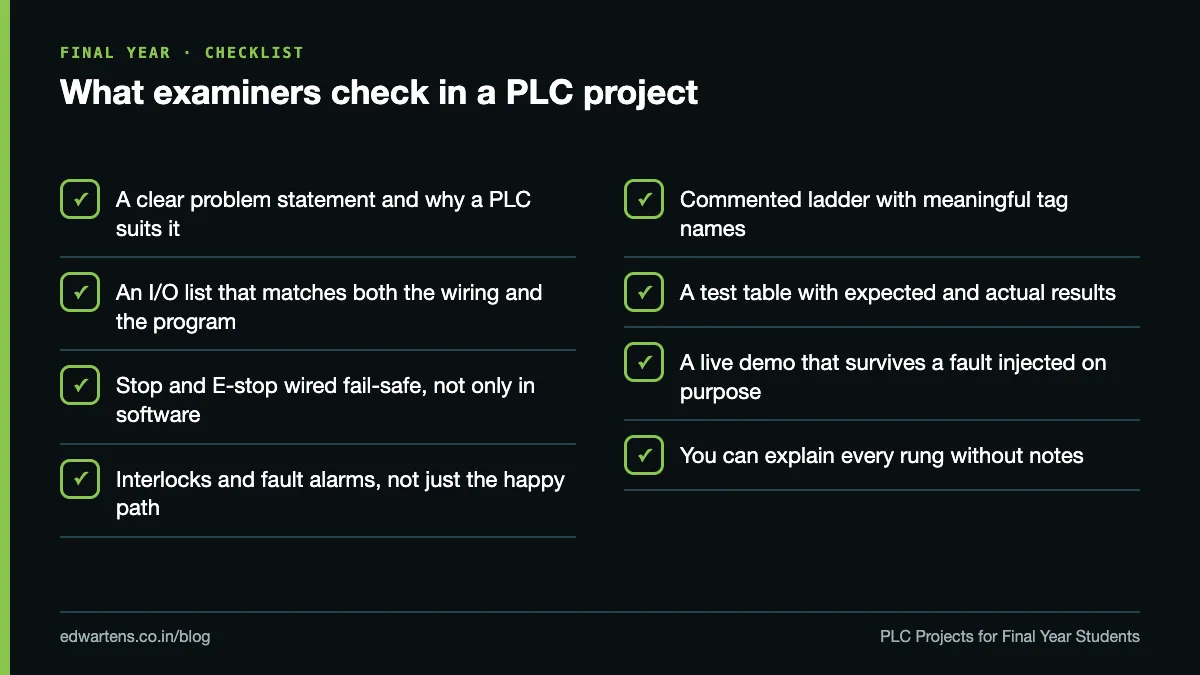
Use these five tests before you commit to an idea:
- It controls a real process. Something an Indian plant, building or utility actually runs: a pump house, a motor starter, a conveyor, a tank.
- It has a sequence, not just logic gates. Steps that happen in order, with conditions to move from one step to the next.
- It has interlocks and faults. What stops it, what happens on a trip, what happens when power returns.
- The I/O fits your hardware. Count inputs and outputs first, then choose the PLC. Not the other way round.
- You can demo it in ten minutes. Including one fault you inject on purpose in front of the examiner.
A mini project (usually third year) can be one machine function in simulation: a traffic junction or a car park counter. A major project should add at least two of these: real wiring, an analog signal, an HMI or web screen, communication with another device, or a documented fault-handling scheme. Ask your guide early whether a simulation-only major project is acceptable at your university, because rules differ between universities and departments.
15 PLC project ideas for final year students
I/O counts below are for the version we describe (DI digital inputs, DO digital outputs, AI analog inputs, AO analog outputs). Yours will change with the features you add, which is fine as long as the report matches what you built.
# | Project | Branch | Level | What it controls | I/O (approx.) | Suggested PLC |
|---|---|---|---|---|---|---|
1 | Star-delta starter with overload and phase-failure trip | EEE | Beginner | Induction motor through three contactors | 4 DI, 3 DO | LOGO!, Delta DVP |
2 | Mains and DG automatic changeover with load shedding | EEE | Intermediate | Two incomers, DG start, two load groups | 5 DI, 5 DO | S7-1200, Delta DVP |
3 | Duty/standby pumps with dry-run protection | EEE, Mech | Intermediate | Two pumps, sump and overhead tank | 7 DI, 3 DO | LOGO!, S7-1200 |
4 | Automatic power factor correction panel | EEE | Advanced | Four capacitor-bank contactors | 2 DI, 5 DO, 1 AI | S7-1200, FX5U |
5 | Street and campus lighting by time and daylight | EEE | Beginner | Three lighting zones | 3 DI, 3 DO | LOGO! |
6 | Car parking with slot count and FULL indication | ECE | Beginner | Entry and exit barriers, indicators | 4 DI, 4 DO | OpenPLC, Delta DVP |
7 | Four-way traffic junction with pedestrian and emergency override | ECE | Beginner to intermediate | 12 signal lamps plus 2 pedestrian lamps | 3 DI, 14 DO | S7-1200 with DO module, OpenPLC on Mega |
8 | Conveyor sorting by height or colour | ECE, Mech | Intermediate | Conveyor, sensors, pushers | 6 DI, 4 DO | S7-1200 with Factory I/O |
9 | Remote monitoring of a PLC over Modbus TCP | ECE | Advanced | Any project above plus a web or PC screen | Adds Ethernet | OpenPLC on Raspberry Pi, LOGO! 9 |
10 | Tank level control with PID | EIE | Advanced | Pump on a VFD or a control valve | 3 DI, 2 DO, 1 AI, 1 AO | S7-1200 |
11 | Two-ingredient batch mixing and draining | EIE, Chemical | Intermediate | Two inlet valves, agitator, drain valve | 5 DI, 4 DO | S7-1200, Delta DVP |
12 | Oven or water-bath temperature control | EIE | Intermediate | Heater through a solid-state relay | 2 DI, 2 DO, 1 AI | S7-1200, FX5U |
13 | Pneumatic pick-and-place with a step sequence | Mech, Mechatronics | Intermediate | Two cylinders and a gripper | 7 DI, 4 DO | FX5U, S7-1200 |
14 | Bottle filling and capping line | Mech | Intermediate | Conveyor, fill valve, capping cylinder | 6 DI, 4 DO | Delta DVP, S7-1200 |
15 | Automated storage and retrieval (simulated) | Mech, Mechatronics | Advanced | Stacker crane in Factory I/O | Set by the scene's tag list | S7-1200 with PLCSIM and Factory I/O |
PLC projects for EEE and electrical engineering students
1. Star-delta starter. Start in star, switch to delta after a timer, trip on overload or phase failure. The examiner will ask why star and delta contactors need an electrical interlock as well as a software one (a welded contactor ignores your program) and how you chose the changeover time.
2. Mains and DG changeover. Voltage-monitoring relays tell the PLC which source is healthy; the PLC starts the DG, waits for it to stabilise, then closes its contactor and sheds non-essential loads. Expect: "What stops both incomers closing together?" The honest answer is a mechanical interlock plus a software check of contactor feedback.
3. Duty/standby pumps. Float switches in the sump and overhead tank, a dry-run cut-out, automatic changeover to the standby pump on a trip, and alternation so both pumps share running hours. This is the most realistic beginner project in the list, because almost every apartment block and factory in India has one. A sample I/O list for it is in the report section below.
4. Power factor correction. A PF transducer gives a 4 to 20 mA signal; the PLC switches capacitor steps in and out with time delays so capacitors can discharge before reconnection. Expect questions on why the delay exists and on analog scaling.
5. Lighting control. A photocell relay and the PLC's real-time clock switch three zones, with a manual override. Simple, but add a lamp-failure input or an energy log to lift it above a mini project.
PLC projects for ECE and electronics students
6. Car parking. Entry and exit sensors drive an up/down counter, the barrier opens only when a slot is free, and a FULL lamp lights at capacity. Expect: "What if two cars pass the sensor back to back?" (edge detection and sensor placement) and "What happens to the count after a power cut?" (retentive memory).
7. Traffic junction. Our portfolio projects guide tells job seekers to avoid traffic lights because every course does them. For a final-year project it is acceptable if you add something real: a pedestrian request, an emergency-vehicle override, night-mode flashing amber, and a lamp-failure alarm. The 14 outputs also make it a good reason to use an Arduino Mega with OpenPLC or a DO expansion module.
8. Sorting conveyor. Sort parts by height or colour into lanes. Factory I/O ships a Sorting Station scene that separates green and blue items with a vision sensor, plus Sorting by Height scenes, so you can build the logic before the hardware exists.
9. Remote monitoring. Add Modbus TCP to any project and show live values on a PC or browser. Siemens LOGO! 9 supports Modbus TCP/IP and MQTT directly and has an integrated web server. This is the right home for the "IoT" word in your title, because you can show the data actually moving.
PLC projects for instrumentation (EIE) students
10. Level control with PID. A level transmitter (4 to 20 mA) into an analog input, PID in the PLC, output to a VFD or control valve. Factory I/O's Level Control scene lets you tune the loop before you plumb a tank. Expect questions on P, I and D, on scaling, and on what the loop does when the transmitter fails.
11. Batch mixing. Fill ingredient A to a level, then B, mix for a set time, drain, repeat. It teaches step sequences and recipe values. Expect: "What happens if the drain valve sticks?"
12. Temperature control. An RTD or thermocouple through a transmitter or temperature module, a heater through an SSR on a transistor output, on/off control with hysteresis first, PID second. Compare the two in your results chapter with real logged data.
PLC projects for mechanical and mechatronics students
13. Pick-and-place. Two pneumatic cylinders with reed switches and a gripper, run as a numbered step sequence. Expect: "How does the machine recover if air pressure drops halfway?" A good answer includes a homing routine.
14. Filling and capping. Bottle detection, fill by time or by level sensor, capping, and a reject for a missing cap. Counters give you production figures for the results chapter.
15. Automated warehouse. Too expensive to build, ideal to simulate. Factory I/O includes an Automated Warehouse scene. Use it as a major project only if your guide accepts simulation, and add a store/retrieve recipe and an HMI.
Which PLC hardware should a student use?
Start with what your college lab already has. If you must buy, choose by I/O count and software access, not by brand loyalty. We have not listed prices because they change often and vary by distributor; ask an authorised distributor for a current student quote.
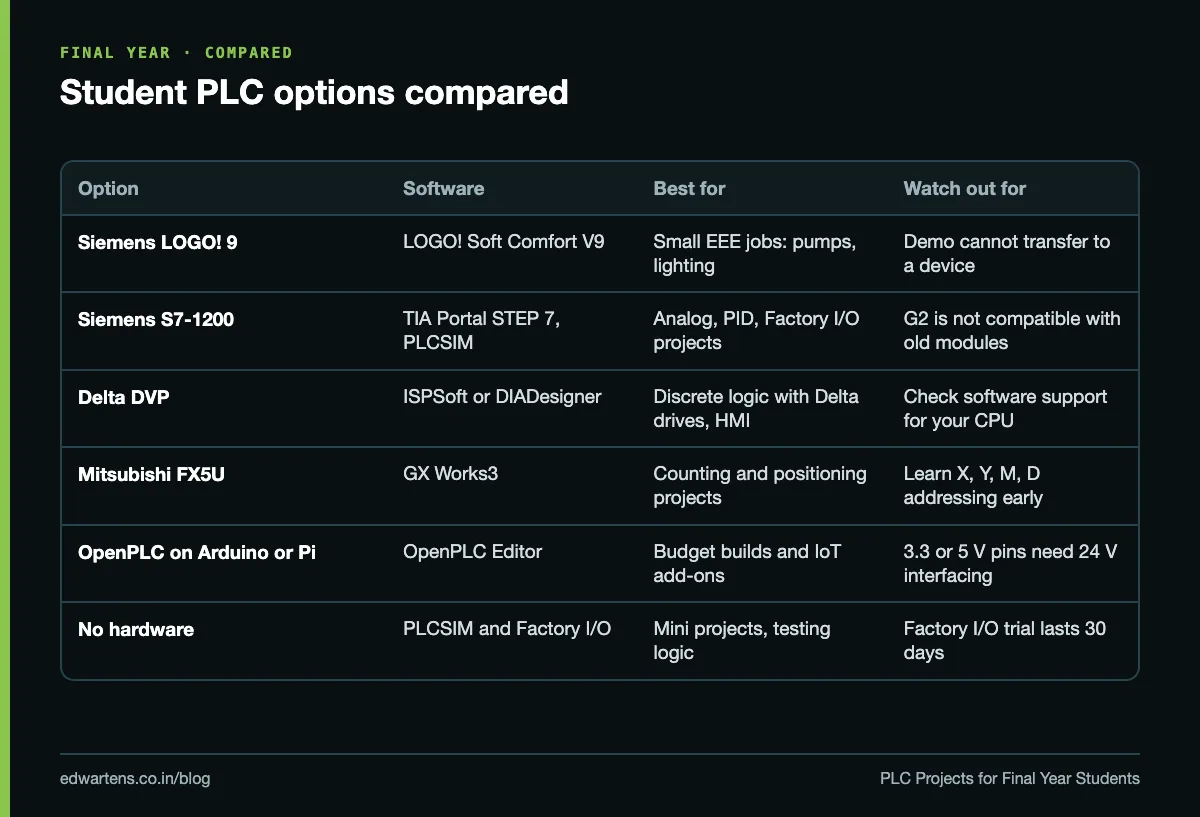
Option | What it is | Software | Watch out for | Official specs |
|---|---|---|---|---|
Siemens LOGO! 9 | Logic module; up to 64 DI, 60 DQ, 16 AI, 16 AQ per system with expansion | LOGO! Soft Comfort V9; the free demo simulates but cannot transfer to a device | LOGO! 8 expansion modules are not hardware-compatible with LOGO! 9 | |
Siemens S7-1200 | Compact PLC; the CPU 1214C has 14 DI and 10 DO on board and takes up to 8 signal modules | TIA Portal STEP 7 with PLCSIM | The new G2 generation is not hardware-compatible with older S7-1200 modules | |
Delta DVP | Standard (ES2, ES3) and slim (SS2, SE2, SV3) CPUs with expansion modules; links to Delta drives, servos and HMIs over industrial networks | ISPSoft, or DIADesigner for ES3, EX3, SV3 and SX3 | Check which software supports your CPU before you start | |
Mitsubishi FX5U (iQ-F) | All-in-one power supply, CPU and I/O with high-speed counters, positioning outputs and Ethernet | GX Works3 | Learn the device addressing (X, Y, M, D) early | |
OpenPLC | Open-source IEC 61131-3 editor and runtime; board list includes Arduino Uno, Mega, ESP32 and Raspberry Pi | OpenPLC Editor with a built-in simulator | Board pins are 3.3 V or 5 V: 24 V sensors need opto-isolated or relay interfaces |
Three honest notes. First, the S7-1200 figures come from the original S7-1200 System Manual; check the G2 data sheet if your lab has the new generation. Second, OpenPLC's runtime page says "If it can run Linux, it can run OpenPLC Runtime", which makes a Raspberry Pi a capable controller for a project, but an Arduino on a breadboard is not an industrial PLC and your viva should say so. Third, the editor's board list is visible in the OpenPLC Editor repository if you need to cite it.
How to do a PLC project without hardware
Simulation is how most engineers write and test logic before they touch a panel. Our guide to learning PLC programming without hardware covers the options in depth; here is the project route.
- Write the logic in TIA Portal and run it in S7-PLCSIM. Use your college licence or the trial.
- Install Factory I/O. According to the Factory I/O installation guide, if no licence is found it starts a 30-day full-feature trial, which needs an internet connection. Time your trial so it does not expire before demo day.
- Pick the right edition. The S7-PLCSIM driver page lists the Siemens Edition or Ultimate Edition as a requirement, and says you must use a TIA Portal template project when connecting to PLCSIM V13 to V21.
- Map the tags. Sensors write into I memory and actuators read from Q memory, from address 0 by default, with up to 256 bool inputs and 256 bool outputs. Analog values exchanged as WORD scale 0 to 10 V to 0 to 27648.
- Start from a built-in scene. Sorting by Height, Level Control, Filling Tank, Pick & Place, Elevator and Automated Warehouse all map onto projects in the table.
- Record the run. A screen recording of the machine working, and of a fault you inject, is strong evidence for the report and a backup if the demo laptop misbehaves.
Our Factory I/O and TIA Portal setup tutorial walks through the connection step by step.
Other routes: the OpenPLC Editor has a PLC simulator built in, LOGO! Soft Comfort's free demo simulates LOGO! programs offline, and Factory I/O's Modbus TCP/IP Server driver (Modbus & OPC Edition or Ultimate Edition, default port 502) lets a soft PLC such as CODESYS drive the scenes. Our list of free PLC software to practise at home compares them.
How to write a PLC project report
Most universities give you a template for the front matter. The technical chapters are where marks are won.
- Abstract. One paragraph: the problem, the PLC used, what you built, and one measured result.
- Introduction and problem statement. Why this process needs automation and why a PLC rather than a relay panel or a microcontroller.
- Literature survey. Cite vendor manuals and standards (IEC 61131-3 for the languages) rather than random blog posts.
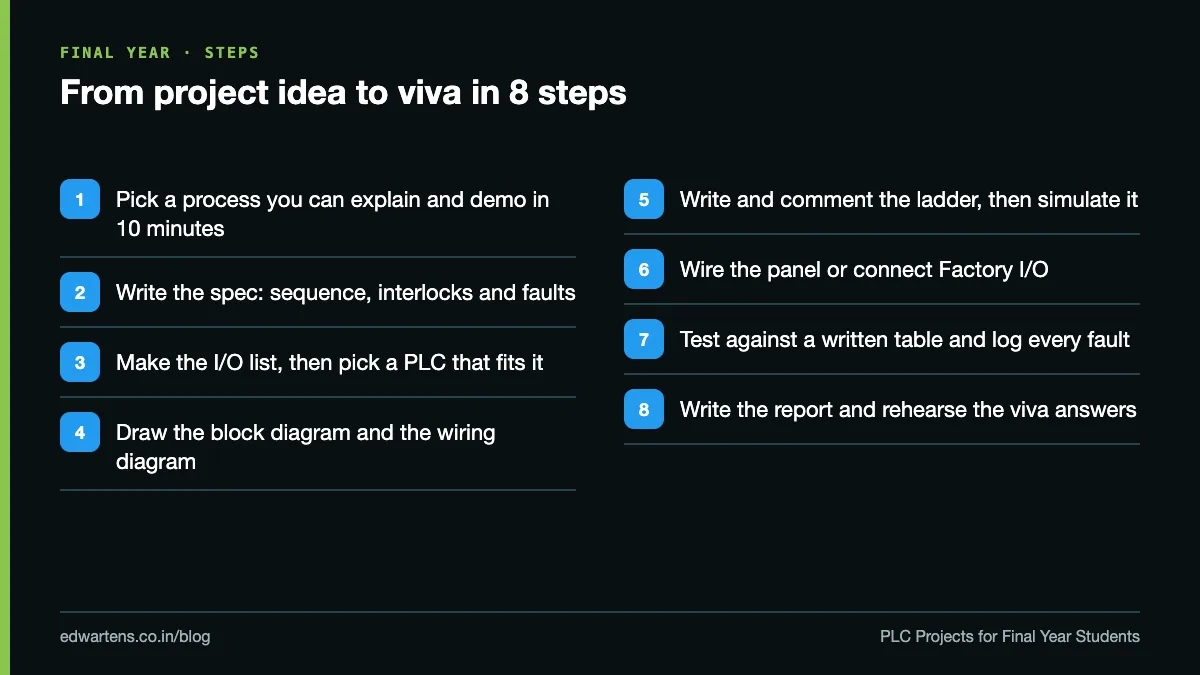
- Block diagram. Field inputs, PLC, outputs, power supply, HMI or PC. One page, labelled.
- Hardware description and I/O list. A table of every input and output with its address, as in the example below.
- Wiring diagram. Power, control and PLC I/O wiring, including how Stop and E-stop are wired.
- Software. Flowchart or step sequence first, then the ladder with a comment on every rung. The 20 ladder logic examples with solutions show the patterns examiners expect to see.
- Testing. A test table: condition applied, expected result, actual result, pass or fail.
- Results and discussion. Measured cycle times, counts, logged temperatures or levels, and what went wrong.
- Conclusion, future scope, references and appendix (full program printout, data sheets).
Here is a sample I/O list for project 3, using S7-1200 style addresses:
Tag | Address | Type | Description |
|---|---|---|---|
Sump_Low | I0.0 | DI, NC float | Sump empty, stop pumps (dry-run protection) |
OHT_Low | I0.1 | DI | Overhead tank low, start duty pump |
OHT_High | I0.2 | DI | Overhead tank full, stop pump |
P1_Trip | I0.3 | DI, NC | Pump 1 overload trip |
P2_Trip | I0.4 | DI, NC | Pump 2 overload trip |
Auto_Sel | I0.5 | DI | Auto/manual selector |
Reset_PB | I0.6 | DI, NO | Fault reset |
P1_Run | Q0.0 | DO | Pump 1 contactor |
P2_Run | Q0.1 | DO | Pump 2 contactor |
Alarm | Q0.2 | DO | Fault lamp or hooter |
PLC project viva questions to prepare
- Why a PLC and not a microcontroller? Industrial-rated I/O, isolation, a deterministic scan, standard languages, and a technician can maintain it.
- What is the scan cycle, and what is your scan time? Read inputs into the process image, execute the program, write outputs. Know where your software shows the cycle time.
- Why is the Stop button wired normally closed? A broken wire must stop the machine, not leave it running.
- Should the E-stop go through the PLC? No. It should cut power through a hard-wired circuit or safety relay; the PLC only monitors it. Siemens' S7-1200 System Manual tells users to always install an emergency stop circuit.
- What happens after a power cut? Which values are retentive, and why the machine must not restart on its own.
- TON, TOF or TONR: why that timer?
- Are your inputs sinking or sourcing, and are your sensors PNP or NPN?
- How did you scale the 4 to 20 mA signal? Raw counts to engineering units, and what a reading below 4 mA means.
- How did you test it? Point to the test table and one fault you found.
- What would make it industrial? Enclosure, safety relay, HMI, alarm list, documentation and spares.
Mistakes that cost marks
- A copied report. Examiners ask about decisions. If you did not make them, it shows within minutes.
- Choosing the PLC before counting the I/O. Then discovering in month three that you need four more outputs than the CPU has.
- A 24 V sensor wired straight into an Arduino pin. It damages the board and tells the examiner you skipped the interfacing chapter.
- A title that promises more than the demo shows. If "IoT" is in the title, the examiner expects to see data leave the PLC.
- A demo that depends on a trial licence or Wi-Fi you have not checked that morning.
Learning the skills before you start
If you have not programmed a PLC yet, do it before you choose a project, not after. Our free Siemens TIA Portal course covers the basics, TIA Portal: Build a Machine is a complete machine project, TIA Portal with Factory I/O covers virtual commissioning, and LOGO! 8 and S7-200 SMART suits smaller EEE projects. Students who want hands-on wiring on PLC training panels can look at our PLC training for freshers or our classroom PLC training in Bangalore at Electronic City.
Frequently asked questions
Q: Which PLC is best for a final year project?
A: The one your college lab already has, then whichever fits your I/O count and gives you software access. A Siemens S7-1200 suits analog, PID and Factory I/O projects; a LOGO!, Delta DVP or Mitsubishi FX5U suits smaller discrete projects.
Q: Can I do a PLC project without buying a PLC?
A: Yes, with S7-PLCSIM and Factory I/O, the OpenPLC Editor's simulator or the LOGO! Soft Comfort demo. Check with your guide whether a simulation-only major project is accepted at your university.
Q: Is an Arduino with OpenPLC a real PLC?
A: It runs IEC 61131-3 programs and works well for learning and projects, but the board itself is not industrial-rated. Use opto-isolated or relay interfaces for 24 V field devices and say this openly in your viva.
Q: What are good PLC based projects for electrical engineering?
A: Star-delta starters, mains and DG changeover, duty/standby pumps, automatic power factor correction and lighting control. Each controls real electrical equipment and leads to the questions EEE examiners ask.
Q: Where can I get PLC based projects PDF free download?
A: Use vendor manuals, Factory I/O's sample projects and our free courses to learn, then write your own report. A downloaded report describes someone else's decisions, and the viva will expose that.
Q: How many I/O should a final-year PLC project have?
A: Roughly 8 to 30 is a workable range: enough for a real sequence and interlocks, small enough to wire, test and explain. Adding one analog input usually adds more value than adding ten more digital ones.
Q: Are PLC mini projects different from major projects?
A: A mini project can be one function, such as a traffic junction or a car park counter, often in simulation. A major project should add real wiring, analog control, an HMI or communication, and documented fault handling.
Learn this, free
The courses that teach this
Every lesson, the written notes and the practice are free with an account. Only the certificate is optional and paid.


