

AI and machine learning · Free online course
Microsoft Azure AI Fundamentals (AI-901) Exam Preparation
Preparation for Microsoft's AI-901 exam, built on the skills measured as of 15 April 2026: AI workloads and responsible AI, how generative models work and how to choose and deploy one, Microsoft Foundry projects and the model catalogue, prompts and a Python chat client, a single agent, text analysis, speech, vision and image generation, and information extraction with Content Understanding. Preparation for the exam, not the Microsoft certification itself.
- 12 modules
- 7h 57m of video
- Beginner
- English
- ₹0, free
- Lab practice in your browser

₹0Free for good
Worth ₹4,499 by length and depth against classroom training. It has always been free; that is not a former price.
No card. Checkout takes a minute and gives you a receipt.
Certificate ₹499, optional. The course is free either way.
Overview
About Microsoft Azure AI Fundamentals (AI-901) Exam Preparation
Prepare for Microsoft's AI-901 exam: AI workloads, responsible AI, Foundry, prompts, a first agent, speech and vision.
Microsoft Azure AI Fundamentals (AI-901) Exam Preparation is a free, self-paced online course from EDWartens for engineers, IT and OT staff, graduates and students preparing for Microsoft's AI-901 Azure AI Fundamentals exam in India, the Gulf and worldwide. It has 12 modules and 7h 57m of video lessons, with written notes, a practice task per module, a practical project and a final assessment of 15 questions (pass mark 60%). Learning costs nothing and needs only a free account. The optional EDWartens Certificate of Completion, verifiable by code, is a one-off ₹499 inclusive of GST for learners in India; it is not a vendor credential. Updated 1 November 2026.
Who it is for: Engineers, IT and OT staff, graduates and students preparing for Microsoft's AI-901 Azure AI Fundamentals exam in India, the Gulf and worldwide
This course includes
- 7h 57m of video lessons
- 12 modules with written notes and diagrams
- One final assessment: 15 questions, pass mark 60%
- Ask-an-engineer support from practising engineers
- Lifetime access, the course does not expire
- Optional verifiable certificate when you finish
- Step 1 of 3
Learn the 12 modules
7h 57m of video lessons, written notes and a practice task per module, at your own pace.
- Step 2 of 3
Pass the final assessment
15 questions drawn from every module, pass mark 60%, 3 attempts.
- Step 3 of 3
Take the certificate, if you want it
Optional, paid once, only if you choose it. The course stays free either way.
See the certificate and its price
A look inside


From the lessons

The AI-901 exam: what it measures, what changed from AI-900, and how to prepare
by Microsoft Learn
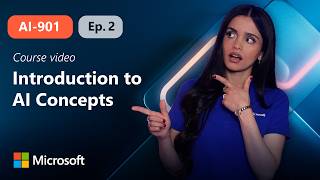
AI concepts, AI workloads and the six principles of responsible AI
by Microsoft Learn

How generative AI models work: tokens, embeddings, choosing a model and deployment settings
by Microsoft Learn

Microsoft Foundry: resources, projects, the model catalogue and deployments
by Microsoft Learn

Prompts and a lightweight chat client with the Foundry SDK in Python
by Microsoft Learn

Building and testing a single agent in Foundry
by Microsoft Mechanics
Lesson frames belong to the creators named in the Credits and are shown from YouTube.
What you learn
What you will be able to do
By the end you will be able to:
- Match a scenario to an AI workload and a responsible AI principle
- Explain tokens, embeddings and model parameters
- Create a Foundry project, deploy a model and test it
- Call a model from a Python chat client
- Build and test a single agent
How it works
How this course works
Watch the lessons
Short video lessons, one module at a time, at your own pace.
Read the notes
Open the Reading tab for the written notes and diagrams of the module.
Practise in the 3D labOptional
Try the module in the free 3D lab, in your browser.
Check yourself
Answer the questions to see what stuck before you move on.
Final assessment
Pass the final once you have been through the modules.
Certificate, if you want oneOptional
Optional, with a page anyone can use to verify it.
Syllabus
Course content, module by module
In order, at whatever pace suits you. Each module ends with a practice task that builds on the last.
- Modules
- 12
- Video lessons
- 20
- Of video
- 7h 57m
- Final questions
- 15
- 01
The AI-901 exam: what it measures, what changed from AI-900, and how to prepare
2 lessons · 12m - 02
AI concepts, AI workloads and the six principles of responsible AI, with lab practice:
2 lessons · 35m - 03
How generative AI models work: tokens, embeddings, choosing a model and deployment settings
1 lesson · 27m - 04
Microsoft Foundry: resources, projects, the model catalogue and deployments
1 lesson · 53m - 05
Prompts and a lightweight chat client with the Foundry SDK in Python, with lab practice:
1 lesson · 41m - 06
Building and testing a single agent in Foundry, with lab practice:
2 lessons · 28m - 07
Text analysis: key phrases, entities, sentiment and summarisation
2 lessons · 1h 9m - 08
Speech: recognition, synthesis and spoken prompts
2 lessons · 47m Final assessment · 15 questions, pass mark 60%
3D lab
Practise in the 3D lab
Practise the ideas behind the exam topics in the AI Workbench: fairness, prompts with limits, a simple agent and answers that come from supplied facts.
- Prompt to specAI Workbench, about 25 minOpen in the lab (opens in a new tab): Prompt to spec
- Answers with sourcesAI Workbench, about 25 minOpen in the lab (opens in a new tab): Answers with sources
- A safe agentAI Workbench, about 30 minOpen in the lab (opens in a new tab): A safe agent
- Fairness checkAI Workbench, about 30 minOpen in the lab (opens in a new tab): Fairness check
Optional. Skip it whenever you like: it never blocks your progress or your certificate.
Project
The course project
Optional practice that ends in the kind of job the course prepares you for, with the documents that go with it.
About 10 hours
A datasheet desk: Content Understanding extracts motor ratings and a Foundry agent answers spec questions
Build a small assistant for a procurement engineer. A Content Understanding analyzer pulls six rating fields with confidence from motor datasheet PDFs, and low-confidence values go to a person. A single Foundry agent then answers questions from the checked datasheets, says when a fact is not there, and declines off-topic requests. Test it with twelve questions and write it up.
- 4documents in the pack
- 8steps to follow
- Laboptional: in the 3D lab
- 7things to hand in
- 10 hof work, at your pace
Do it in the lab: 5 steps.
Sample document pack, 4 documents, filled in for the scenario
- URSRequirement: motor datasheet desk trial
- RegisterField register: three motor datasheets
- Test reportAgent test record: twelve questions
- Risk registerRisk register: datasheet desk trial
Read inside the course and download as a workbook. The project is optional practice, marked when you submit it; the certificate needs only the modules and the final assessment.
Tools
Software, hardware and lessons
Software
An Azure subscription: an Azure free account, or Azure for Students where you qualify. The Microsoft Foundry portal in the browser, Python 3 with the azure-ai-projects, azure-identity, azure-ai-textanalytics and azure-cognitiveservices-speech packages, the Azure CLI for sign-in, and Visual Studio Code, all free. Some exercises can be followed in the portal only. Delete resources you no longer use, because some Foundry features are billed by use.
Hardware
A computer with a browser; a microphone for the speech module.
Who it is for
Beginner. For engineers, IT and OT staff, graduates and students starting with AI on Azure. The exam expects basic Python (variables, functions, lists, dictionaries) and familiarity with Azure resources; no machine learning or AI experience is needed.
Video lessons by
- Microsoft Learn
- John Savill's Technical Training
- Microsoft Mechanics
- Azure Innovation Station | Azure AI Agents
- Dani Kahil
Independent creators, credited in full under Credits.
Software you need
What to download, where from, what it costs and how to install it. Every link goes to the maker's own site, never a mirror.
An Azure free account, or Azure for Students, is needed for the Foundry, agent, speech and Content Understanding exercises; delete resources after each module. Python runs the short SDK clients; the Azure CLI (az login) signs you in. The concept modules need only a browser.
Required
- 01Free trial: 30 days of credit, some services free for 12 months
Azure free account
Microsoft, in the browser
- Runs on
- Any modern web browser
- Account
- A Microsoft account, a phone number and a credit or debit card for identity checks
New customers get credit to use within 30 days, free monthly amounts of 20+ popular services for 12 months, and 65+ always-free services. The card is only for identity checks: Microsoft does not charge it, though a temporary one-dollar (or equivalent) hold may appear. You are not charged unless you upgrade.
Steps
- 1.Open the Azure free account page and click Try Azure for free.
- 2.Sign in with a Microsoft account or create one.
- 3.Verify your phone number and enter a card for identity verification.
- 4.Accept the agreement and open the Azure portal.
- 5.Set a budget alert in Cost Management before starting labs.
- Students at eligible universities can use Azure for Students instead, which needs no card.
Open Azure free accountazure.microsoft.comAlternatives
- Azure for Students: Credit for 12 months with no credit card, for full-time university students using a school email. Renews each year while you are a student.
- 02Free
Python
Python Software Foundation
- Runs on
- Windows (not Windows 7 or earlier), macOS and Linux. Windows builds for x64, 32-bit and Arm64.
- Account
- None needed
Python is free, open source software. You can use it for learning and for commercial work at no cost.
Steps
- 1.Open python.org/downloads and click the download button for your system.
- 2.On Windows, run the Python install manager (or the classic 64-bit installer) you downloaded.
- 3.If you use the classic installer, tick "Add python.exe to PATH" on the first screen, then click Install Now.
- 4.Open a new Command Prompt or Terminal and run: python --version (on Windows you can also run: py --version).
- 5.Install packages with pip, for example: python -m pip install requests
- pip comes with Python. Run it as python -m pip so it always matches the Python you are using.
- Python.org now recommends the Python install manager on Windows. If it offers to add its folder to PATH, say yes so the python command works everywhere.
- Make a virtual environment for each project: python -m venv .venv
Official download pagepython.orgAlternatives
- Anaconda Distribution: Python with 600+ data science packages and Jupyter already included.
Optional
Useful, not needed to finish the course.
- 03Free
Visual Studio Code
Microsoft
- Runs on
- Windows 64-bit (supported Windows client versions), macOS (latest and two previous releases), Linux (Ubuntu 20.04, Debian 10, RHEL 8, Fedora 36 or later)
- Account
- None needed
- Size
- Less than 200 MB download, under 500 MB installed
Free to download and use. Extensions from the Marketplace each have their own licence.
Steps
- 1.Open code.visualstudio.com/download.
- 2.Pick the installer for your system (on Windows, the User Installer is fine).
- 3.Run the installer. On Windows, tick "Add to PATH" if it is offered.
- 4.Open VS Code and install the extensions your course uses, for example the Python extension.
- Hardware needs are small: a 1.6 GHz processor and 1 GB of RAM.
- On Windows, the "Open with Code" options in the installer let you open folders from File Explorer.
Official download pagecode.visualstudio.com
Checked against each maker's own page on 27 September 2026. Trial lengths and editions change; the maker's page is the final word.
What you walk away with
Your certificate for Microsoft Azure AI Fundamentals (AI-901) Exam Preparation
Finish the course, pass the final, and this is the document with your name on it.
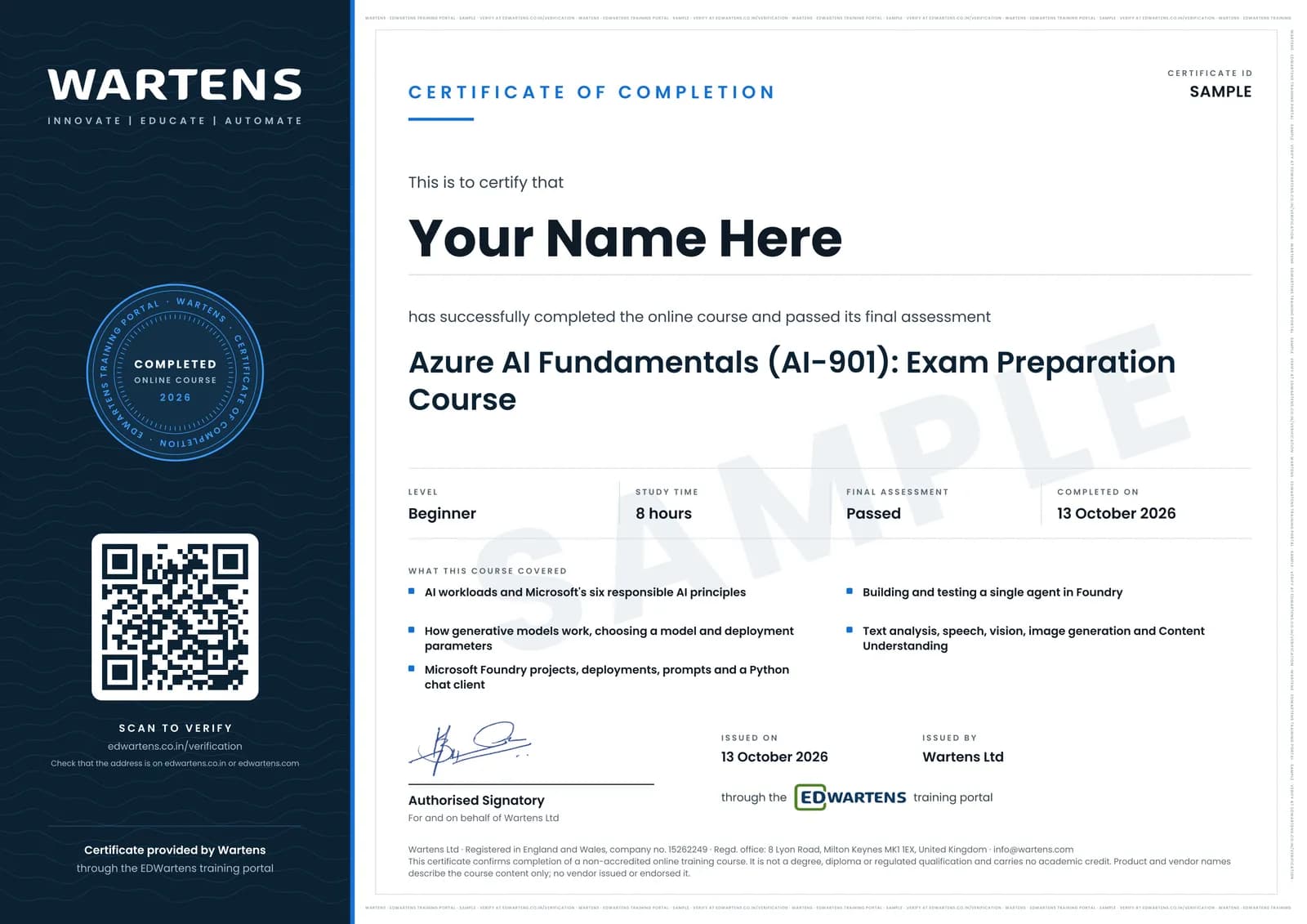
Verifiable by anyone
Adds to LinkedIn in one click
QR code on the certificate
Names what you can do
A permanent link
Earned, not attended
Learning is free. The certificate is optional.
Add it now and pay only when you have finished the course, or come back for it later. One-off, US$23.99, with a receipt.
Issued by Wartens Ltd (England and Wales, company no. 15262249) through the EDWartens training portal, as a Certificate of Completion for this self-paced course. Sold in India by Wartens Automation Private Limited. It is not a vendor certification, a university award or a CPD-accredited activity, and it does not certify competence on live equipment. Delivered electronically; see the refund policy.
Practise what you learn in the free 3D lab
Technical work is judged on what you can do: wiring, commissioning, finding a fault. Doing a task yourself teaches more than watching it a second time, and a lab lets you try it safely before you meet real equipment. It does not replace working on real hardware.
- Practise safely, so a mistake costs nothing.
- The lab checks your work like a site test, so you know when it is right.
- Free, in your browser, with nothing to install.
Why learn with EDWartens
What you get with this course.
- Free from the first lesson to the final assessment.
- Practice in a free 3D lab in your browser, with nothing to install.
- Video lessons with written notes and a project.
- An optional certificate that anyone can verify online.
FAQ
Common questions
Is this the Microsoft Azure AI Fundamentals certification?
No. This is a free preparation course for Microsoft's AI-901 exam. The Azure AI Fundamentals credential is awarded only by Microsoft after you pass its proctored AI-901 exam, which you book and pay for with Microsoft on Microsoft Learn. EDWartens is not affiliated with Microsoft, and the EDWartens certificate is a certificate of completion for this course.
Who is this AI-901 preparation course for?
Engineers, IT and OT staff, graduates and students who want a first Microsoft AI credential, including those in companies worldwide that run on Microsoft. The exam expects basic Python and familiarity with Azure resources; no AI experience is needed.
What changed from AI-900 to AI-901?
AI-900 retired on 30 June 2026 and Azure AI Fundamentals now requires AI-901. The new exam is more hands-on: implementing AI solutions with Microsoft Foundry is 55 to 60 percent of it, it expects Python, and it adds generative and agentic AI and Content Understanding. An AI-900 certification already earned stays valid.
What does the AI-901 exam measure?
Two skill areas, as measured on 15 April 2026. The first is identifying AI concepts and capabilities (40 to 45 percent). The second is implementing AI solutions by using Microsoft Foundry (55 to 60 percent). Check the study guide on Microsoft Learn before you book, because Microsoft updates the outline.
Is the course free to learn?
Yes. Every module, the notes, the worked problems, the project and the final assessment are free. Only the EDWartens certificate is paid, if you want one. The Microsoft exam is booked and paid for separately with Microsoft.
Do I need an Azure subscription?
For the hands-on modules, yes: an Azure free account, or Azure for Students if you are eligible, is enough. The concept modules and the notes need only a browser. Delete resources after each module so nothing keeps running.
How long does the Microsoft Azure AI Fundamentals course take?
About 13 hours of video, notes and practice at your own pace, of which about 8 hours is video, most of it Microsoft Learn's own AI-901 series. The optional datasheet project takes about 10 hours more.
What should I take next?
Go on to the Azure AI Apps and Agents Developer (AI-103) Exam Preparation course for the associate-level developer exam. Or take AI Agents and MCP for Engineers and Generative AI and LLM Foundations for deeper hands-on work.
Do I have to use the lab?
No. The lab is optional practice. You can skip it whenever you like, and it never blocks your progress, the final assessment or your certificate.
Is the lab free?
Yes. Every lab level for this course opens in your browser, free, with nothing to install.
Is the Microsoft Azure AI Fundamentals course free in India, and what does the certificate cost?
Yes. Learning costs ₹0 in India: every module, the written notes, the practice tasks and the final assessment, with no card and no trial period. The only paid item is the optional EDWartens Certificate of Completion, ₹499 including GST for this beginner course, paid in rupees through Razorpay, and only if you want it after passing the final assessment.
What topics does the Microsoft Azure AI Fundamentals course cover, module by module?
The Microsoft Azure AI Fundamentals course has 12 modules. It opens with "The AI-901 exam: what it measures, what changed from AI-900, and how to prepare", goes through "AI concepts, AI workloads and the six principles of responsible AI", "Prompts and a lightweight chat client with the Foundry SDK in Python", "Speech: recognition, synthesis and spoken prompts" and "Exam technique and a full cram review of AI-901" and ends with "Final Assessment". The full list with minutes is under "What you learn" on this page.
What can I do after the Microsoft Azure AI Fundamentals course?
After the Microsoft Azure AI Fundamentals course: Map your study to the AI-901 skills measured as of 15 April 2026 and their weights; Match scenarios to AI workloads and to Microsoft's six responsible AI principles; Explain tokens, embeddings, temperature and top-p, and choose a model and deployment type. These are the practical outcomes the course is written around, and the final assessment of 15 questions checks them.
What software and hardware do I need for the Microsoft Azure AI Fundamentals course, and does it cost anything?
For the Microsoft Azure AI Fundamentals course, software: An Azure subscription: an Azure free account, or Azure for Students where you qualify. The Microsoft Foundry portal in the browser, Python 3 with the azure-ai-projects, azure-identity, azure-ai-textanalytics and azure-cognitiveservices-speech packages, the Azure CLI for sign-in, and Visual Studio Code, all free. Some exercises can be followed in the portal only. Delete resources you no longer use, because some Foundry features are billed by use. Hardware: A computer with a browser; a microphone for the speech module. The course itself is free.
Is the Microsoft Azure AI Fundamentals course suitable for me, and what level is it?
Microsoft Azure AI Fundamentals is rated beginner. Beginner. For engineers, IT and OT staff, graduates and students starting with AI on Azure. The exam expects basic Python (variables, functions, lists, dictionaries) and familiarity with Azure resources; no machine learning or AI experience is needed. It is written for engineers, IT and OT staff, graduates and students preparing for Microsoft's AI-901 Azure AI Fundamentals exam in India, the Gulf and worldwide, and has 7h 57m of video lessons at your own pace.
Which jobs use the skills from the Microsoft Azure AI Fundamentals course?
Skills from the Microsoft Azure AI Fundamentals course (for example: map your study to the AI-901 skills measured as of 15 April 2026 and their weights) are used in AI engineer work. The course gives you practical evidence of the skill; it does not promise a job, and employers decide on experience and interview.
All course factsHide course facts
- Price
- ₹0, free for good. No trial, no card. Comparable classroom training of this length costs about ₹4,499.
- Who it is for
- Engineers, IT and OT staff, graduates and students preparing for Microsoft's AI-901 Azure AI Fundamentals exam in India, the Gulf and worldwide
- Format
- 12 self-paced modules, 7h 57m of video, written notes, a practice task per module and one final assessment.
- Level
- Beginner. Beginner. For engineers, IT and OT staff, graduates and students starting with AI on Azure. The exam expects basic Python (variables, functions, lists, dictionaries) and familiarity with Azure resources; no machine learning or AI experience is needed.
- Brand
- Vendor-neutral
- Software
- An Azure subscription: an Azure free account, or Azure for Students where you qualify. The Microsoft Foundry portal in the browser, Python 3 with the azure-ai-projects, azure-identity, azure-ai-textanalytics and azure-cognitiveservices-speech packages, the Azure CLI for sign-in, and Visual Studio Code, all free. Some exercises can be followed in the portal only. Delete resources you no longer use, because some Foundry features are billed by use.
- Hardware
- A computer with a browser; a microphone for the speech module.
- Certificate
- Optional EDWartens Certificate of Completion, ₹499 inclusive of GST for learners in India, verifiable by code. Not a vendor credential.
- Video lessons by
- Microsoft Learn, John Savill's Technical Training, Microsoft Mechanics, Azure Innovation Station | Azure AI Agents, Dani Kahil (independent creators, credited below)
- Language
- English
- Last updated
- 1 November 2026
Pairs well with
 PLC programming · FreeSiemens TIA Portal
 PLC programming · FreeSiemens TIA Portal in Three Hours
 PLC programming · FreeTIA Portal: Build a Machine
 Instrumentation · FreeInstrumentation for PLC Engineers
More free courses: Free AI courses for engineers · Free AI certification exam preparation courses
Classroom course, Bangalore
PLC training in Bangalore
The Automation Engineer Program (AEP) is our classroom course in PLC programming and industrial automation, taught in person at our Electronic City centre.
Credits
Who made the video lessons
The video lessons in this course were created by the people below, not by EDWartens. Every lesson streams from its creator's own YouTube channel; EDWartens neither hosts nor sells that footage, and the creators are not affiliated with EDWartens and do not endorse this course. What EDWartens wrote is the study plan, the notes, the practice tasks and the assessments.
- Microsoft Learnthe AI-901 Introduction to AI in Azure video series, a preview and fourteen episodes (AI concepts, Foundry, generative AI and agents, text analysis, speech, computer vision and information extraction, each as concepts and as hands-on in Azure) and the responsible AI principles episode
- John Savill's Technical Trainingthe AI-901 study cram used for the full review before the exam
- Microsoft Mechanicsthe explainer on Foundry Agent Service and Microsoft Agent Framework
- Azure Innovation Station | Azure AI Agentsthe walkthrough of building an agent from scratch in Microsoft Foundry
- Dani Kahilthe beginner overview of Document Intelligence and Content Understanding in Foundry Tools
If you are one of these creators and would like a lesson removed or credited differently, write to info@edwartens.co.in.