Robotics · Free · ₹0
Physical AI: Teach a Robot Arm with LeRobot
Teach a robot arm by showing it, not by programming points: imitation learning, LeRobot and its datasets on the Hugging Face Hub, PushT and ALOHA in simulation, ACT and diffusion policies, the SO-101 arm, teleoperation and recording, training and honest evaluation, SmolVLA and vision-language-action models, Isaac Sim and sim-to-real, and the safety rules that keep learned control out of safety functions.

Inside the course


From the lessons

From programmed robots to learned skills: what physical AI is
IBM Technology

Imitation learning: behaviour cloning and why it drifts
RAIL

ACT: action chunking with transformers, explained
Hugging Face
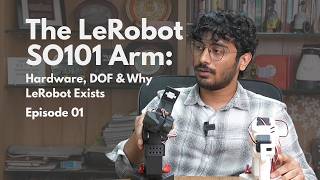
SO-101 hardware: motors, assembly and calibration (optional)
e-Yantra

Training on real data, deploying and evaluating
Trelis Research

Isaac Sim and sim-to-real: an overview (optional, needs an RTX GPU)
NVIDIA
Lesson frames belong to the creators named in the Credits below and are shown from YouTube.
What you will learn
Explain how a learned policy differs from a taught-point robot program; load and inspect LeRobot datasets from the Hub; explain behaviour cloning, distribution shift and action chunking; evaluate a pretrained policy in the PushT simulator and train ACT on a simulated task; choose between ACT, diffusion and SmolVLA for a task and GPU; assemble, set up and calibrate an SO-101, teleoperate it and record demonstrations; train, deploy and evaluate a policy with an honest success rate; describe sim-to-real transfer and domain randomisation; and write the risk assessment that keeps a learned policy away from safety functions.
- Explain how a learned policy differs from a taught-point robot program, and where each belongs
- Load LeRobot datasets from the Hugging Face Hub and read their observations and actions
- Explain behaviour cloning, compounding error and why action chunking and diffusion help
- Evaluate a pretrained policy in the PushT simulator and train ACT on a simulated ALOHA task, with no hardware
- Choose between ACT, diffusion and SmolVLA for a task, a GPU and a number of demonstrations
- Set up, calibrate and teleoperate an SO-101 arm and record clean demonstrations (optional hardware path)
- Train, deploy and evaluate a policy with a written protocol and an honest 95 percent interval
- Explain sim-to-real transfer and domain randomisation, and keep learned control out of safety functions under ISO 10218:2025
The course project · about 16 hours
Train and honestly evaluate a learned policy on PushT, with an optional SO-101 pick-and-place
Evaluate a pretrained diffusion policy on the PushT simulator as a baseline, train your own diffusion and ACT policies on the same data within a fixed GPU budget, evaluate each on 100 episodes with a written protocol, report success rates with 95 percent intervals, and write a recommendation that says only what the numbers support. Optionally repeat the evaluation on an SO-101 pick-and-place.
Sample document pack, 5 documents, filled in for the scenario
- PlanStudy plan: learned policies in simulation before a bench trial
- ProcedureEvaluation procedure for learned policies on PushT
- Test reportPushT evaluation of four policies
- Risk registerBench risk register for the optional SO-101 trial
- ReportRecommendation on learned policies for the kitting enquiry
Read inside the course and download as a workbook. The project is optional practice, marked when you submit it; the certificate needs only the modules and the final assessment.
Course content
13 modules · 37 lessons · 10h 30m
In order, at whatever pace suits you. Each module ends with a practice task that builds on the last.
- 01From programmed robots to learned skills: what physical AI is4 lessons31m
- 02The LeRobot stack and datasets on the Hugging Face Hub2 lessons42m
- 03Imitation learning: behaviour cloning and why it drifts3 lessons59m
- 04Simulation first: gym environments and PushT on Colab2 lessons28m
- 05ACT: action chunking with transformers, explained2 lessons1h 9m
- 06Diffusion policy and choosing a policy2 lessons1h 14m
- 07SO-101 hardware: motors, assembly and calibration (optional)3 lessons27m
- 08Teleoperation and recording demonstrations3 lessons35m
Requirements
- Who it is for
- Intermediate. For robotics, mechatronics and automation engineers and students who can run a Python notebook. No machine learning background is needed beyond what the course explains; Python for AI and Engineering Data is a good course to take first if Python is new.
- Software
- LeRobot (open source, Apache 2.0, version 0.6 line in October 2026) with Python 3.12 and PyTorch, Google Colab for a free GPU, the PushT and ALOHA simulation environments, and the Hugging Face Hub. Isaac Sim is free but optional and needs an RTX GPU. What to download, and how
- Hardware
- None required: every module has a simulation-only path that runs on Colab. Optional: an SO-101 leader and follower arm kit with two USB cameras, and an NVIDIA GPU with 8 GB or more for local training. Isaac Sim needs a recent RTX GPU with about 16 GB of memory.
Software you need
What to download, where from, what it costs and how to install it. Every link goes to the maker's own site, never a mirror.
LeRobot installs with pip (pip install lerobot, plus the pusht, aloha or feetech extras) and needs Python 3.12 or later. The simulation path runs entirely on Colab. Isaac Sim is optional and needs an RTX GPU.
Required
- 01Free, GPU time not guaranteed
Google Colab
Google, in the browser
- Runs on
- Any modern web browser
- Account
- A free Google account
Colab is free to use. In the free version GPUs and TPUs are heavily restricted and not guaranteed, sessions can run for at most 12 hours, and idle sessions are stopped. Paid plans give more reliable access.
Steps
- 1.Open colab.research.google.com and sign in with your Google account.
- 2.Click New notebook (or open the notebook your course links to).
- 3.For a GPU, choose Runtime, then Change runtime type, then pick a GPU if one is offered.
- 4.Type code in a cell and press Shift and Enter to run it.
- Save a copy to your Google Drive so your changes are kept.
- Files on the runtime are deleted when the session ends. Save outputs to Drive.
Open Google Colabcolab.research.google.com
Optional
Useful, not needed to finish the course.
- 02Free
Python
Python Software Foundation
- Runs on
- Windows (not Windows 7 or earlier), macOS and Linux. Windows builds for x64, 32-bit and Arm64.
- Account
- None needed
Python is free, open source software. You can use it for learning and for commercial work at no cost.
Steps
- 1.Open python.org/downloads and click the download button for your system.
- 2.On Windows, run the Python install manager (or the classic 64-bit installer) you downloaded.
- 3.If you use the classic installer, tick "Add python.exe to PATH" on the first screen, then click Install Now.
- 4.Open a new Command Prompt or Terminal and run: python --version (on Windows you can also run: py --version).
- 5.Install packages with pip, for example: python -m pip install requests
- pip comes with Python. Run it as python -m pip so it always matches the Python you are using.
- Python.org now recommends the Python install manager on Windows. If it offers to add its folder to PATH, say yes so the python command works everywhere.
- Make a virtual environment for each project: python -m venv .venv
Official download pagepython.orgAlternatives
- Anaconda Distribution: Python with 600+ data science packages and Jupyter already included.
- 03Free
Git
Git project (git-scm.com)
- Runs on
- Windows (x64 and ARM64), macOS, Linux
- Account
- None needed
Git is free and open source software. Use it for any purpose at no cost.
Steps
- 1.Open git-scm.com/downloads and choose your system.
- 2.On Windows, download the x64 Setup (or ARM64 Setup) and run it. The default choices are fine for most learners.
- 3.Open a new terminal and run: git --version
- 4.Set your name: git config --global user.name "Your Name"
- 5.Set your email: git config --global user.email "you@example.com"
- On Windows you can also install with: winget install --id Git.Git -e --source winget
- A portable version (no installer) is offered for PCs where you cannot install software.
Official download pagegit-scm.com - 04Free
Visual Studio Code
Microsoft
- Runs on
- Windows 64-bit (supported Windows client versions), macOS (latest and two previous releases), Linux (Ubuntu 20.04, Debian 10, RHEL 8, Fedora 36 or later)
- Account
- None needed
- Size
- Less than 200 MB download, under 500 MB installed
Free to download and use. Extensions from the Marketplace each have their own licence.
Steps
- 1.Open code.visualstudio.com/download.
- 2.Pick the installer for your system (on Windows, the User Installer is fine).
- 3.Run the installer. On Windows, tick "Add to PATH" if it is offered.
- 4.Open VS Code and install the extensions your course uses, for example the Python extension.
- Hardware needs are small: a 1.6 GHz processor and 1 GB of RAM.
- On Windows, the "Open with Code" options in the installer let you open folders from File Explorer.
Official download pagecode.visualstudio.com
Checked against each maker's own page on 27 September 2026. Trial lengths and editions change; the maker's page is the final word.
Physical AI: Teach a Robot Arm with LeRobot at a glance
Physical AI: Teach a Robot Arm with LeRobot is a free, self-paced online course from EDWartens for robotics, mechatronics and automation engineers and engineering students in India, the Gulf and worldwide who want to teach robot arms from demonstrations, with or without hardware. It has 13 modules and 10h 30m of video lessons by Hugging Face, NVIDIA, IBM Technology and others, with written notes and worked problems, a practical project with a document pack and a 15-question final assessment (pass mark 60%). Learning is free with an account; an optional certificate with a public verification code is issued when you pass. Last updated 27 September 2026.
All course factsHide course facts
- Price
- ₹0, free for good. No trial, no card. Comparable classroom training of this length costs about ₹5,999.
- Who it is for
- Robotics, mechatronics and automation engineers and engineering students in India, the Gulf and worldwide who want to teach robot arms from demonstrations, with or without hardware
- Format
- 13 self-paced modules, 10h 30m of video, written notes, a practice task per module and one final assessment.
- Level
- Intermediate. Intermediate. For robotics, mechatronics and automation engineers and students who can run a Python notebook. No machine learning background is needed beyond what the course explains; Python for AI and Engineering Data is a good course to take first if Python is new.
- Brand
- Vendor-neutral
- Software
- LeRobot (open source, Apache 2.0, version 0.6 line in October 2026) with Python 3.12 and PyTorch, Google Colab for a free GPU, the PushT and ALOHA simulation environments, and the Hugging Face Hub. Isaac Sim is free but optional and needs an RTX GPU.
- Hardware
- None required: every module has a simulation-only path that runs on Colab. Optional: an SO-101 leader and follower arm kit with two USB cameras, and an NVIDIA GPU with 8 GB or more for local training. Isaac Sim needs a recent RTX GPU with about 16 GB of memory.
- Certificate
- Optional EDWartens Certificate of Completion, verifiable by code. Not a vendor credential.
- Video lessons by
- Hugging Face, NVIDIA, IBM Technology, Google for Developers, RAIL, e-Yantra, Welch Labs, Trelis Research, Articulated Robotics, exida, Ilia, Phospho AI, Sanjiban Choudhury, Aleksandar Haber PhD, Foundation Models For Robotics, Trossen Robotics, Robraintics, Trushant Adeshara, Pius Lim, Shane Reetz, Lightwheel, Learning Automation (independent creators, credited below)
- Language
- English
- Last updated
- 27 September 2026
A shareable EDWartens certificate
Finish every module and pass the final assessment, and the optional EDWartens certificate is yours. It carries a unique verification code on a public page anyone can check, so it stands up when a recruiter looks it up. See it below.
The course itself stays free whether or not you ever buy one.
Stuck? Ask a practising engineer
A free course usually means a comment section and hope. This one does not. Every module has an Ask-your-trainer panel that reaches the same engineers who teach our paid programme: people who commission panels for a living, not moderators.
Pairs well with
 Robotics · FreeFANUC Robot Programming with the Teach Pendant and ROBOGUIDEFrom jogging and frames to TP programs, registers, branching, offsets, pick-and-place, ROBOGUIDE simulation, palletising, error recovery and PLC integration.
 Robotics · FreeABB Robot Programming with RobotStudio and RAPIDRobotStudio from install to a running pick-and-place: stations, jogging, the FlexPendant, frames, paths, RAPID, collision checking, signals, physics, sharing and RobotStudio Cloud.
 Robotics · FreeKUKA Robot Programming with KUKA.Sim, smartPAD and WorkVisualSimulation in KUKA iiQWorks.Sim (formerly KUKA.Sim), KRL structure and programming on the smartPAD, WorkVisual configuration, fieldbus and PLC integration, safety, advanced KRL, backups and the new KRC5 micro with iiQKA.OS.
 Robotics · FreeUniversal Robots Cobot Programming with PolyScopeCollaborative robots the way integrators use them: the UR family, tool and payload setup, the safety configuration, PolyScope programs, pick-and-place and palletising, force and blends, URSim, URScript, RTDE, sockets, PROFINET and real machine-tending and vision applications.
More free courses: Free industrial robot programming courses
Learner reviews
No reviews yet
Reviews here are written only by learners who have finished every module of Physical AI: Teach a Robot Arm with LeRobot, and they are published exactly as written. Finish the course and yours will be the first.
Common questions
Who is this physical AI and LeRobot course for?
It is for robotics, mechatronics and automation engineers and engineering students who want to move from programming robots point by point to teaching them from demonstrations. Robot programmers from FANUC, ABB, KUKA or Universal Robots backgrounds, and ROS 2 users, will find it a natural next step.
Do I need a robot arm to take the course?
No. Every module has a simulation-only path: the PushT and ALOHA simulators run on a free Google Colab GPU, and real-robot datasets, including SO-101 ones, are on the Hugging Face Hub to train on. The SO-101 modules are optional and show what to do if you buy or build an arm later.
What do I need to know first?
You should be able to run a Python notebook and follow a command line. The course explains the machine learning it uses. If Python is new, take Python for AI and Engineering Data first; for classical robot software, ROS 2 Robot Programming with Python complements this course.
Which software does it use?
LeRobot, Hugging Face's open-source robot learning library (version 0.6 line in October 2026, Python 3.12 or later), with PyTorch, Google Colab and the Hugging Face Hub. Isaac Sim appears in one optional module and needs an RTX GPU. LeRobot changes quickly, so the notes give the current commands and tell you to check the release notes.
Is the course free to learn?
Yes. Every module, the notes, the worked problems, the project and the final assessment are free, and all the software used is free. The certificate is optional.
How long does the Physical AI: Teach a Robot Arm with LeRobot course take?
About 17 to 18 hours of video, notes and practice at your own pace, of which about 10.5 hours is video. The optional PushT project takes about 16 hours more, most of it waiting for training runs.
Is a learned policy safe to use on a factory robot?
Only for task decisions, inside the robot's rated safety configuration and a proper risk assessment. A learned policy is never allowed to be a safety function. The safety module covers ISO 10218-1 and -2 (2025 editions), why protective stops and speed limits must be rated hardware, and how to run a first test safely.
What certificate does the Physical AI: Teach a Robot Arm with LeRobot course give?
An EDWartens certificate of completion, issued when you finish the modules and pass the 15-question final at 60 percent, with a number anyone can verify on our site. It is not a certification from Hugging Face, NVIDIA or any robot maker, none of whom is affiliated with EDWartens.
Is the Physical AI: Teach a Robot Arm with LeRobot course free in India, and what does the certificate cost?
Yes. Learning costs ₹0 in India: every module, the written notes, the practice tasks and the final assessment, with no card and no trial period. The only paid item is the optional EDWartens Certificate of Completion, ₹559 including GST for this intermediate course, paid in rupees through Razorpay, and only if you want it after passing the final assessment.
Is there classroom robotics training in India as well?
Yes. EDWartens India runs the Automation Engineer Program (AEP), a classroom programme at its Electronic City centre in Bangalore with hands-on PLC, SCADA, HMI and drives hardware. This free course is separate and fully online; it is a good way to try the subject before deciding on classroom training. Details are at edwartens.co.in/courses/aep.
What you walk away with
Your certificate for Physical AI: Teach a Robot Arm with LeRobot
Finish the course, pass the final, and this is the document with your name on it.

Verifiable by anyone
Adds to LinkedIn in one click
QR code on the certificate
Names what you can do
A permanent link
Earned, not attended
Learning is free. The certificate is optional.
Add it now and pay only when you have finished the course, or come back for it later. One-off, US$28.99, with a receipt.
Issued by EDWartens India (Wartens Automation Private Limited) as a Certificate of Completion for this self-paced course. It is not a vendor certification, a university award or a CPD-accredited activity, and it does not certify competence on live equipment. Delivered electronically; see the refund policy.
Credits
Who made the video lessons
The video lessons in this course were created by the people below, not by EDWartens. Every lesson streams from its creator's own YouTube channel; EDWartens neither hosts nor sells that footage, and the creators are not affiliated with EDWartens and do not endorse this course. What EDWartens wrote is the study plan, the notes, the practice tasks and the assessments.
- Hugging Facethe LeRobot research presentations on ALOHA and ACT and on Diffusion Policy, the LeRobot tutorials on assembling the SO-100, recording a dataset and evaluating a policy, the LeLab introduction and the shirt-folding recap in the final module
- NVIDIAhow robots learn through training, simulation and real-world deployment, the next wave of physical AI, and narrowing the sim-to-real gap with Isaac Sim
- IBM Technologythe explainer on what physical AI is and how robots learn and adapt
- Google for Developersthe talk introducing LeRobot and why it lowers the entry barrier to AI for robotics
- RAILSergey Levine's UC Berkeley CS 285 lecture on imitation learning, part 1
- e-Yantrathe IIT Bombay series on the LeRobot SO-101 arm: hardware and degrees of freedom, leader-follower teleoperation, and an introduction to imitation learning
- Welch Labshow vision-language-action models work inside
- Trelis Researchtraining an ACT policy for the SO-101 with LeRobot end to end
- Articulated RoboticsIsaac Sim in under half an hour
- exidahazard analysis and risk assessment of collaborative robots
- Iliarunning AI robotics experiments at home with LeRobot and the SO-ARM100
- Phospho AIrepairing, merging and splitting LeRobot datasets
- Sanjiban Choudhurythe core concepts of imitation learning
- Aleksandar Haber PhDthe introduction to the Gymnasium interface with the Cart-Pole environment
- Foundation Models For Roboticstraining a behaviour-cloning policy on PushT with LeRobot, SmolVLA explained, and LeRobot asynchronous inference
- Trossen Roboticsthe ALOHA tutorial with Hugging Face LeRobot
- Robrainticswhy diffusion policy is changing robot learning
- Trushant AdesharaSO-101 motor configuration and calibration
- Pius LimACT against SmolVLA on the same SO-101
- Shane Reetzthe Sim-to-Real with NVIDIA Isaac series: building a home robot lab and an SO-101 workspace
- Lightwheelteleoperating the SO-101 in Isaac Sim with LeRobot, step by step
- Learning Automationsummaries of ISO 10218-1:2025 and ISO 10218-2:2025
If you are one of these creators and would like a lesson removed or credited differently, write to info@wartens.com.