

How Long Does It Take to Learn Microsoft Project?

The short answer
How long it takes to learn Microsoft Project depends on what you mean by learn. Opening a file, entering tasks and printing a Gantt chart takes one to two evenings. Building a schedule that is right takes about 12 hours of focused study and practice. That means calendars, dependencies, the critical path, resources, a baseline and progress updates. At three to five hours a week it is three to five weeks. Using it well on a live project takes months of real updates, because the hard part is the logic, not the buttons.
Software terms were checked on Microsoft's pages on 1 November 2026 (November 2026). Trial offers and plan names change, so read Microsoft's current pages before you buy or install anything.
Three levels and their honest timings
Level | You can | Typical time |
|---|---|---|
Viewer | Open a plan, read the Gantt chart, spot the critical tasks | 2 to 4 hours |
Builder | Create a plan from a scope, link tasks, set calendars, assign crews | 10 to 14 hours |
Controller | Baseline, update progress, read variance and earned value, hand over to P6 | Builder plus 3 to 5 weeks on a real or practice project |
Most site and planning engineers need the Builder level to be useful in their first job. The Controller level is what planning engineers are hired for. The timings assume you work on a Windows computer and practise each step yourself rather than only watching videos.
What takes the time
The software is easy to open. What takes time is understanding what it does behind the screen. Four ideas cost most learners the most hours.
- Task types. Fixed units, fixed duration and fixed work behave differently when you add a person.
- Dependencies. Finish-to-start, start-to-start, lags and leads change the dates in ways beginners do not expect.
- Constraints. A "Must start on" date can hide a broken logic link and make the critical path wrong.
- Resources. Overallocation and levelling move tasks, and the order Project uses is not obvious.
Here is a worked example of the first idea. A task needs 80 labour-hours and each person works 8 hours a day. With one person it takes 80 / 8 = 10 days. With two people and the effort-driven setting on, Project spreads the same 80 hours: 80 / (2 x 8) = 5 days. With three people it gives 80 / (3 x 8) = 3.33 days, and with four 2.5 days. If you switch effort-driven off, the work grows instead of the duration shrinking. Knowing which setting you have is the difference between a plan you trust and one you do not.
A worked example: finding the critical path
A critical path is the longest chain of linked tasks. Take six tasks, all finish-to-start, with durations in working days.
Task | Days | Follows | Early start | Early finish | Total slack |
|---|---|---|---|---|---|
A | 3 | none | 0 | 3 | 0 |
B | 5 | A | 3 | 8 | 0 |
C | 4 | A | 3 | 7 | 5 |
D | 6 | B | 8 | 14 | 0 |
E | 2 | B, C | 8 | 10 | 4 |
F | 3 | D, E | 14 | 17 | 0 |
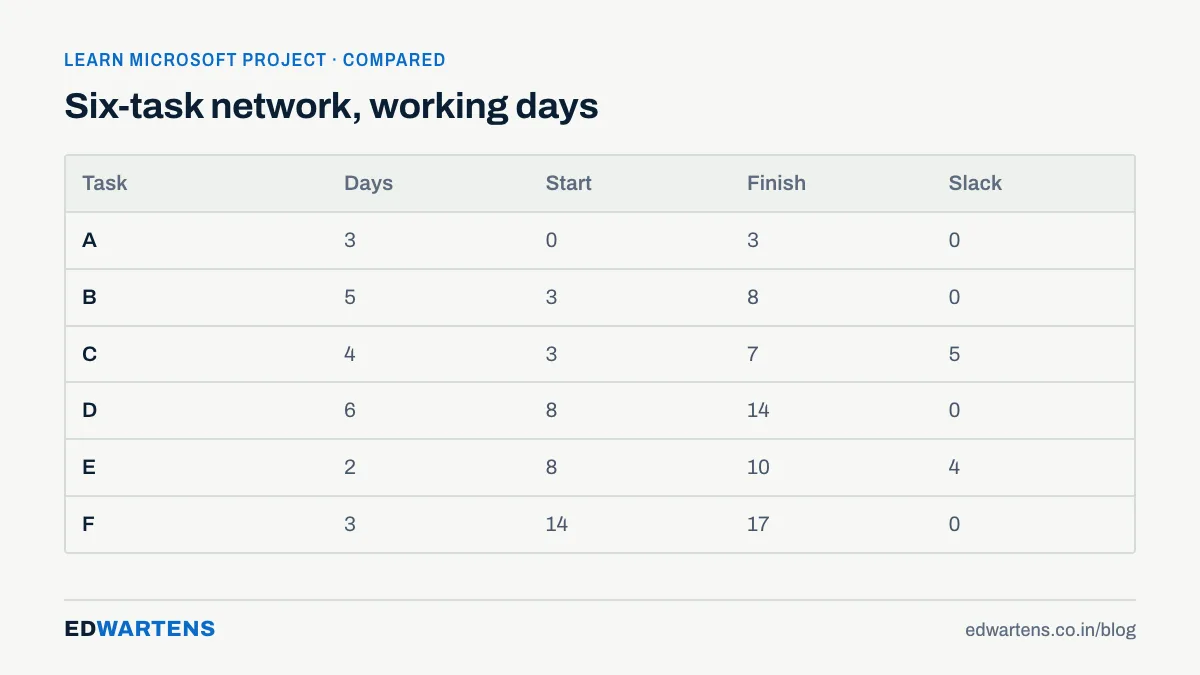
Task F finishes on day 17, so the project takes 17 days. The chain A, B, D, F has zero slack, so it is critical. Task C has 5 days of slack: it can run late by 5 days before it delays the end. Task E has 4. A learner who understands this table can read any schedule Project produces. Our course practises it on a construction programme, so you see the same numbers in the software.
Setting up your practice
You need a Windows computer for Microsoft Project desktop. As of the Microsoft Learn deployment guide for Project (updated 29 September 2026), the desktop client is available with a Planner and Project Plan 3 or Plan 5 subscription. Project Professional or Standard 2024 is sold as a one-time purchase through volume licensing. Microsoft's Planner and Project page describes the current plans and trials. Microsoft Project Online was announced to retire on 30 September 2026, and it is not what this course uses.
If you do not have a licence, ProjectLibre is a free, open-source program that opens .mpp files and covers the core scheduling steps: tasks, links, resources and baselines. It is not identical to Project, but it is enough to practise the logic. Mac users, who have no Project desktop, can use ProjectLibre.
A realistic study plan
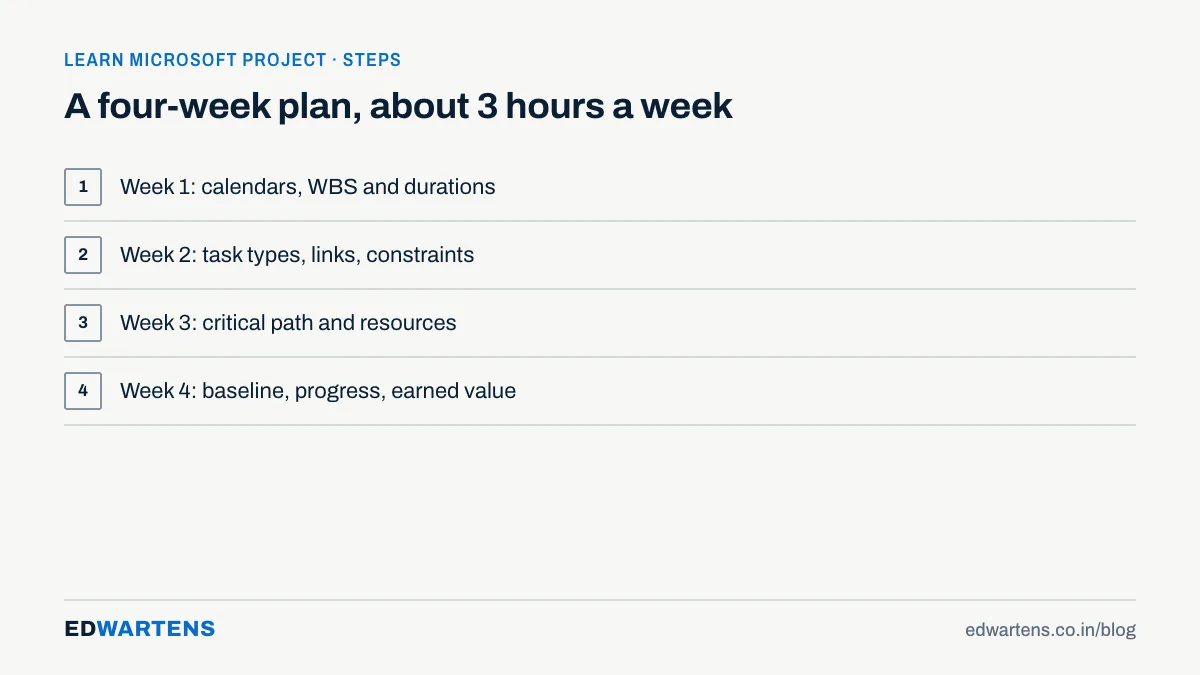
- Week 1, about 3 hours. Calendars, the work breakdown structure, summary tasks and durations.
- Week 2, about 3 hours. Task types, dependencies, lags, leads, constraints and deadlines.
- Week 3, about 3 hours. Critical path, slack, resources, assignments and levelling.
- Week 4, about 3 hours. Baseline, progress to a status date, variance and earned value.
At three hours a week that is four weeks, and at five hours a week about 2.4 weeks. Use a real-looking project to practise. A small warehouse build or a plant shutdown works well, because the logic is easy to check. For site teams in India, remember that large projects often also use Primavera P6, so learn how to hand a Project file over as XML.
Mistakes that cost the most hours
Most lost time comes from habits, not gaps in knowledge. Typing dates into the Start and Finish columns is the biggest one. Project then adds a constraint behind your back, and the plan stops reacting when a predecessor moves. Enter durations and links instead, and let Project calculate the dates.
Another habit is skipping the calendar. If the project works six days a week, or has a shutdown, the default calendar gives wrong dates from the first task. Set the working time first, then build the plan.
Finally, many learners never save a baseline, so they cannot see how the plan has slipped. Save one as soon as the plan is agreed. Practising these three habits early saves several hours of rework later.
Learn it free on EDWartens
The Microsoft Project for Planning Engineers course follows this plan in 14 study modules and a final. It has about 8 hours of video from named creators and around 12 hours in total with notes, worked problems and practice. It is a free course with a verifiable certificate of completion, issued after the modules and a 15-question final passed at 60 percent. Anyone can check a certificate on the verification page.
It is not a Microsoft certification, and EDWartens is not affiliated with Microsoft. For a sense of the wider planning toolkit, see our post on using ChatGPT as a project manager and our timeline for learning SCADA, which uses the same stage-by-stage approach. Start with the planning course when you have a Windows computer or ProjectLibre ready.
Q: How many days does it take to learn Microsoft Project?
A: Basic use takes one or two evenings. A solid working level takes about 12 hours of study and practice. That covers dependencies, the critical path, resources and progress tracking, and it is three to five weeks at a few hours a week.
Q: Can I learn Microsoft Project in one week?
A: You can learn the screen and build a small plan in a week. The deeper topics, such as constraints, levelling and earned value, need more practice time than that.
Q: Is Microsoft Project hard for beginners?
A: The interface is not hard. The scheduling logic is where beginners struggle, so practise on a small plan and check each date by hand, as in the six-task table above.
Q: Is there a free way to practise Microsoft Project?
A: ProjectLibre is a free open-source program that opens .mpp files. Microsoft sets and changes its own trial terms, so read its current pages for Project desktop.
Q: Do I need Primavera P6 as well?
A: Many large projects use P6, and job adverts often name one tool. Learn the tool the advert names first, and learn to exchange files between the two.
Q: What certificate does the EDWartens course give?
A: A verifiable certificate of completion with a unique number and QR code. It is not a Microsoft certification.
If you would rather practise this on PLC training panels with an instructor, see our PLC course in Bangalore for the syllabus and duration.
Learn this, free
The courses that teach this
Every lesson, the written notes and the practice are free with an account. Only the certificate is optional and paid.


