Free SCADA Course Online With Certificate (2026)
The short answer
EDWartens runs six free online SCADA courses: Ignition, Siemens WinCC SCADA, Siemens WinCC Unified, Wonderware InTouch, FactoryTalk View SE and Citect/AVEVA Plant SCADA. Every module, practice task and the final assessment cost ₹0 with an account; the only paid item is an optional EDWartens Certificate of Completion (₹459 or ₹559 in India, including GST) with a public verification code. Pick WinCC for Siemens plants, FactoryTalk View SE for Rockwell plants and Ignition if you want to work for a system integrator or on IIoT projects.
What "free" and "certificate" actually mean here
Searches for a free SCADA course with a certificate mostly turn up paid courses. The government institutes run good ones, for example NIELIT Calicut's four-week Industrial Automation with PLC & SCADA at ₹4,500 and its Advanced SCADA-PLC & IIoT at ₹6,000, as listed on 1 Oct 2026. Those are fair prices for a structured batch. But they are not free.
Here is exactly how ours work, so there are no surprises:
- The learning is free. Video lessons, written notes, practice tasks and the final assessment cost nothing. You create an account so progress is saved and the assessment can be marked.
- The videos are by independent creators on YouTube, credited by name on each course page. EDWartens wrote the study plan, notes, practice tasks and assessments.
- The final assessment is 15 questions, 60% to pass, with three attempts.
- The certificate is optional. If you pass and want proof, you can buy an EDWartens Certificate of Completion with a verification code anyone can check: ₹459 for a beginner-level course, ₹559 for intermediate, including GST.
- It is not a vendor qualification. It is not a Siemens, Rockwell Automation, Inductive Automation or AVEVA credential, and you should never describe it as one on a resume. It shows you completed a structured course and passed its assessment.
The six courses compared
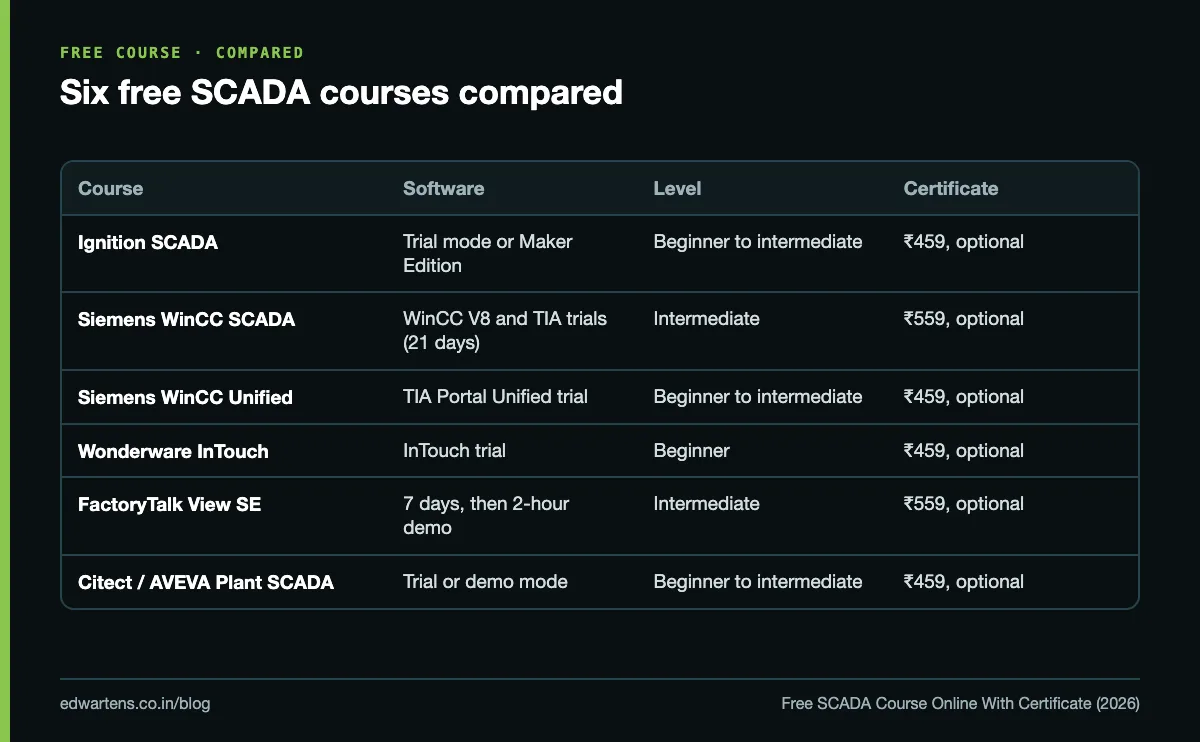
| Course | Software you need | Level | Study time | Certificate (India) |
|---|---|---|---|---|
| Ignition SCADA | Ignition trial mode (2-hour sessions that reset) or free Maker Edition for personal use | Beginner to intermediate | About 13 hours, 13 modules | ₹459 |
| Siemens WinCC SCADA | WinCC V8 trial (21 days); TIA Portal trial (21 days) for the Unified and Advanced modules | Intermediate | About 26 hours, 15 modules | ₹559 |
| Siemens WinCC Unified | TIA Portal with WinCC Unified (trial) and PLCSIM Advanced | Beginner to intermediate | About 20 hours, 11 modules | ₹459 |
| Wonderware InTouch | AVEVA/Wonderware InTouch trial | Beginner | Self-paced | ₹459 |
| FactoryTalk View SE | FactoryTalk View Studio: 7 days without activation, then two-hour demo sessions | Intermediate | About 16 hours, 11 modules | ₹559 |
| Citect / AVEVA Plant SCADA | AVEVA Plant SCADA in trial or demo mode | Beginner to intermediate | About 12 hours, 11 modules | ₹459 |
None of them needs a real PLC. Data comes from a Modbus or OPC UA simulator, PLCSIM, internal tags or, for FactoryTalk, an emulated controller.
What you build in each
### Ignition
You install the gateway, create and scale tags, connect OPC UA and Modbus TCP devices, and build a batching project in Designer with animation, buttons and alarms. You then log history to MySQL with transaction groups, build reports and email notifications, use MQTT for IIoT and work in Perspective, the web and mobile module. Ignition is the easiest to practise at home because trial mode never expires; it just needs a click every two hours. Our Ignition beginner's guide explains why it is spreading.
### Siemens WinCC SCADA
The largest of the six. It covers classic WinCC V7/V8 (drivers, tags, screens, faceplates, VBS scripting, alarms, tag logging, reports, User Archives, SQL and client-server), then WinCC Unified with JavaScript and plant objects, then WinCC Advanced practice with recipes and PLC interfacing. Plan your trial: 21 days goes quickly, so read the notes for a module before you start the clock.
### Siemens WinCC Unified
Siemens' current visualisation inside TIA Portal. You create Unified projects, build screens with templates and faceplates, configure alarms, trends and parameter sets, script in JavaScript and manage users and certificates. A good choice if you already work in TIA Portal; the free HMI course is good preparation.
### Wonderware InTouch
Written for beginners. You build a tag database, draw and animate a plant mimic, take safe operator input, configure alarms operators will act on, trend data, script what the wizards cannot do, and connect to a PLC (against a simulator) and diagnose the link when it drops.
### FactoryTalk View SE
Rockwell's site-level SCADA. You build local and network distributed applications, displays, global objects and parameterised pop-ups, reference Logix controllers through FactoryTalk Linx, configure FactoryTalk Alarms and Events, trend and log to SQL, and handle security, backup and redundancy. Honest warning: this is the hardest to practise without an employer's licence, because the software is paid and the emulator is too.
### Citect / AVEVA Plant SCADA
You install Plant SCADA, learn clusters and the I/O, alarm, trend and report servers, connect Modbus and OPC DA devices, model equipment, build genies and super genies, configure alarms, and write and debug Cicode.
Which SCADA should you learn first?
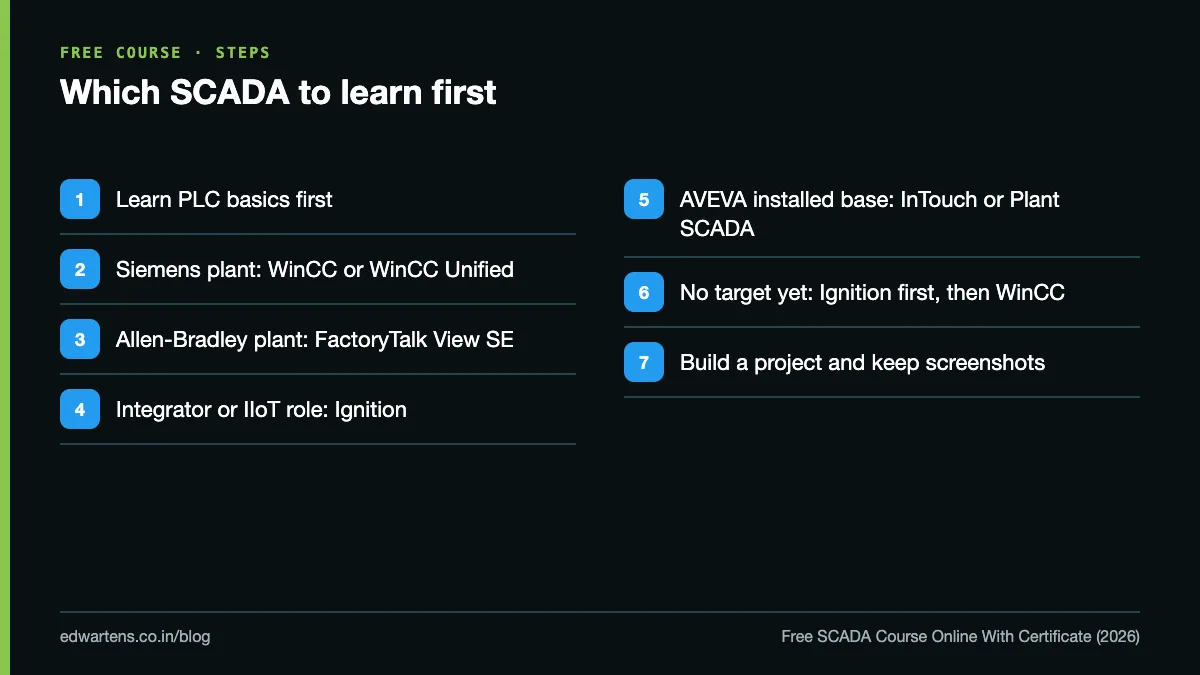
Learn the one used where you want to work. The concepts (tags, alarms, trends, scripting, client-server) transfer between all of them; the menus do not.
- You are targeting a plant that runs Siemens PLCs. Take WinCC SCADA, or WinCC Unified if the plant is on recent TIA Portal versions. Siemens PLCs are widely used in Indian plants, so this is a safe default.
- You are targeting a plant with Allen-Bradley PLCs, often US-owned FMCG, packaging or automotive sites. Take FactoryTalk View SE, after an Allen-Bradley PLC course.
- You want a system integrator, IIoT or data role. Take Ignition. It talks to every PLC brand, runs SQL and MQTT natively and is the easiest to demonstrate in an interview from your own laptop.
- The plant already runs AVEVA software (InTouch or Plant SCADA), common in process, utilities and older installed bases. Take the matching course.
- You have no target yet. Start with Ignition for the concepts, because it costs nothing to keep practising, then add WinCC.
Before you do any of them, you need PLC basics. If you have none, start with the free PLC training hub. For a deeper platform comparison, read WinCC vs FactoryTalk vs Ignition.
Free course, government institute or classroom?
| Free online course | Government institute (e.g. NIELIT) | Classroom programme (e.g. AEP) | |
|---|---|---|---|
| Cost | ₹0 to learn, certificate optional | Fee per course (₹4,500 to ₹6,000 for the NIELIT Calicut courses above) | Programme fee |
| Pace | Self-paced, any time | Fixed batch | Fixed batch, full time |
| Hardware | Simulators only | Lab access during the course | Real PLCs, panels, drives and SCADA stations |
| Best for | Learning a platform, checking your interest, a portfolio project | A structured short course with an institute certificate | Getting job-ready with hands-on hardware |
The free route has one real limit: you do not touch real panels. That is what the Automation Engineer Program at our Electronic City, Bangalore centre is for, covering PLC, SCADA, HMI, VFD, DCS and robotics on hands-on hardware.
How to make a free SCADA course count with an employer
- Build the project and keep it. Export the Ignition project or WinCC project, take screenshots of your screens, alarms and trends, and put them in a short portfolio. Our post on portfolio projects shows what interviewers look at.
- Describe what you built, not the certificate. "Built an Ignition batching screen with alarms and MySQL history logging" is worth more on a resume than any certificate line.
- Know the concepts cold. Alarm priorities and shelving, historian versus database logging, client-server redundancy, OPC UA. See alarm management with ISA-18.2.
- List the certificate honestly: "EDWartens Certificate of Completion, Ignition SCADA (verification code ...)".
Learn it free
Start with Ignition SCADA if you want something you can practise indefinitely, or Siemens WinCC SCADA if you are aiming at Siemens plants. The full catalogue of about 150 free courses is at /free-courses.
Frequently asked questions
Q: Is there a genuinely free SCADA course with a certificate?
A: Yes. All six EDWartens SCADA courses are free to learn and assess. The EDWartens Certificate of Completion is optional and costs ₹459 or ₹559 in India, including GST, depending on the course level.
Q: Is the certificate a Siemens or Rockwell certification?
A: No. It is an EDWartens Certificate of Completion with a public verification code. Vendor certifications are separate programmes run by the vendors.
Q: Do I need to buy SCADA software?
A: No. Each course uses a trial or free edition: Ignition trial mode or Maker Edition, the WinCC and TIA Portal 21-day trials, the InTouch and Plant SCADA trials, and FactoryTalk View Studio's activation grace period and demo mode.
Q: Which SCADA is best for a fresher in India?
A: WinCC if you are targeting Siemens plants, and Ignition if you want a system integrator or IIoT role. Learn the one your target employers use.
Q: Do I need a PLC to learn SCADA?
A: No. The courses use simulators, PLCSIM or internal tags for data. You do need PLC basics to understand what the SCADA is talking to.
Learn this, free
The courses that teach this
Every lesson, the written notes and the practice are free with an account. Only the certificate is optional and paid.