Free Robot Programming Course With Certificate

The short answer
EDWartens runs seven free robot programming courses: FANUC, ABB RobotStudio, KUKA, Universal Robots, Yaskawa Motoman, RoboDK and ROS 2. All are free to learn with an account and none needs a real robot, because each uses a simulator: URSim, KUKA iiQWorks.Sim Basic and ROS 2 are free outright, while ROBOGUIDE, RobotStudio, MotoSim and RoboDK run on trial or education licences. The optional EDWartens Certificate of Completion costs ₹459 in India (₹559 for ROS 2), including GST. It is not a FANUC, ABB or KUKA certification.
How these courses work
- Free to learn: video lessons from independent YouTube creators (named on each course page), plus notes, practice tasks and a final assessment written by EDWartens. You create an account so progress is saved.
- Assessment: 15 questions, 60% to pass, three attempts.
- Certificate: optional, with a public verification code. It shows you completed the course; it is not a manufacturer qualification. FANUC, ABB, KUKA and others run their own paid training and certification, usually funded by an employer.
The seven courses compared
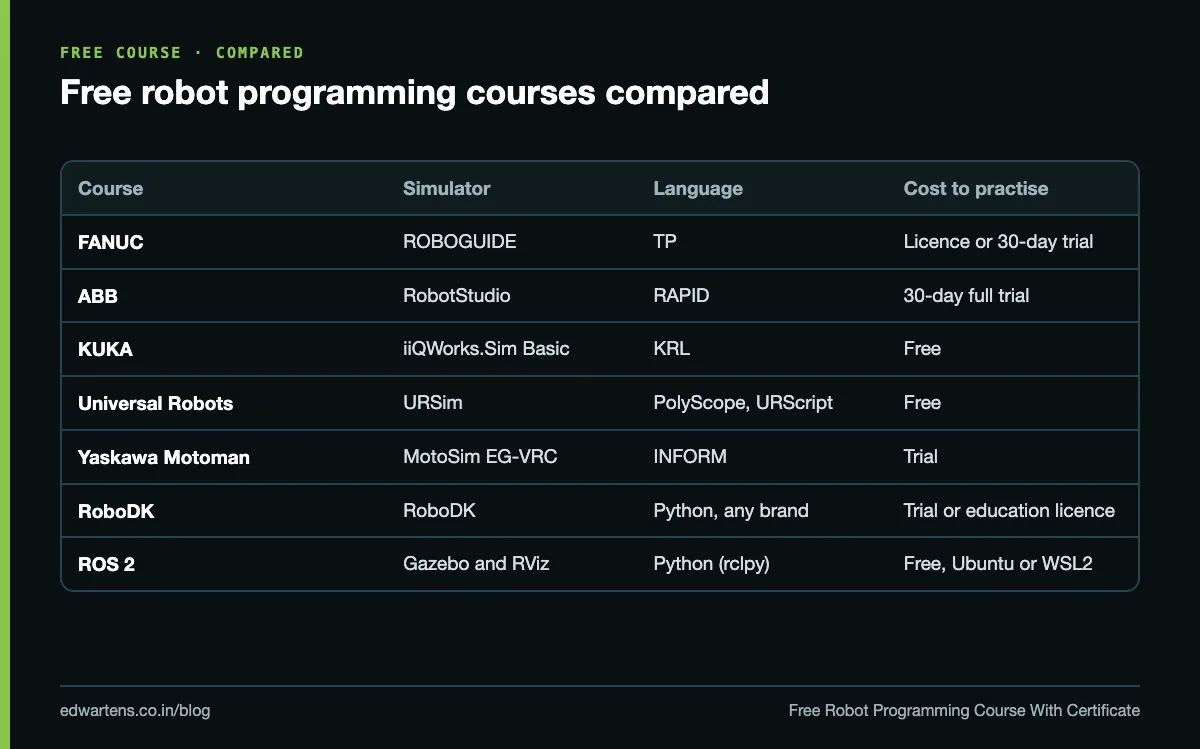
| Course | Simulator you need | Language you learn | Level | Certificate (India) |
|---|---|---|---|---|
| FANUC | ROBOGUIDE: a licence from work or college, or a 30-day trial FANUC grants on request through my.FANUC | TP (teach pendant) | Beginner to intermediate | ₹459 |
| ABB RobotStudio | RobotStudio: 30-day full trial; Basic mode afterwards runs the virtual controller only | RAPID | Beginner | ₹459 |
| KUKA | KUKA iiQWorks.Sim Basic (free) and WorkVisual (free with a my.KUKA account) | KRL | Beginner to intermediate | ₹459 |
| Universal Robots | URSim offline simulator (free) | PolyScope and URScript | Beginner to intermediate | ₹459 |
| Yaskawa Motoman | MotoSim EG-VRC (trial) | INFORM (pendant jobs) | Beginner to intermediate | ₹459 |
| RoboDK | RoboDK free trial or education licence | Python API, post-processed to any brand | Beginner to intermediate | ₹459 |
| ROS 2 with Python | Ubuntu with ROS 2, RViz and Gazebo (all free) | Python (rclpy) | Intermediate | ₹559 |
Two practical warnings. RobotStudio: once the 30-day trial ends, Basic mode no longer has the offline programming and simulation tools, so plan to finish the course inside the trial. ROS 2: you need a laptop with about 8 GB RAM and 30 GB free disk, and comfort with a Linux terminal; the notes read fine on a phone, the practicals do not.
What each course teaches
### FANUC
Start, jog and fault-reset a robot in T1, T2 and AUTO; teach tool and user frames; write TP programs with J, L and C motion, FINE and CNT; use registers, position registers, IF, SELECT and WAIT; build a pick-and-place with gripper confirmation and a fault path; simulate in ROBOGUIDE with DCS zones; recover from alarms; and drive the robot from a PLC over UOP signals. Our FANUC beginner's guide is a good preview.
### ABB RobotStudio
Build a station with a virtual controller, jog with the virtual FlexPendant, define tooldata and wobjdata, create targets and paths, write RAPID (MoveJ, MoveL, zones, speeds, Offs, procedures), check collisions and simulate signals and physics.
### KUKA
Build an iiQWorks.Sim cell to a running pick-and-place, define tools and bases, write PTP, LIN and spline motion, run in T1, AUTO and EXT, configure I/O and fieldbuses in WorkVisual, start the robot from a PLC through Automatic External, and configure safety monitoring.
### Universal Robots
Set up a cobot and run a risk assessment, configure TCP, payload and safety planes, write PolyScope programs with waypoints and force, build pick-and-place and palletising, and program URScript over RTDE and sockets. URSim being free makes this the easiest course to practise without limits.
### Yaskawa Motoman
Jog and program from the pendant with MOVJ, MOVL and MOVC, calibrate TCP and user frames, use variables, counters and I/O, build arc and spot welding jobs, back up controllers and program cells in MotoSim.
### RoboDK
Brand-neutral offline programming: build stations, create targets, simulate pick and place, check collisions, singularities, reach and cycle time, generate machining and curve-following paths, and post-process programs for real robots from many brands. Read our offline programming guide for where it fits.
### ROS 2 with Python
A different world from the industrial arms: install ROS 2, write publisher, subscriber and service nodes in Python, launch a robot, inspect it in RViz, read a lidar scan and drive a base to follow a wall, and understand how SLAM and navigation work. This is the path to mobile robots, AMRs and robotics R&D rather than a factory welding cell.
Which one suits you?
Choose by the job you want, not by which brand sounds best.
- Automotive body shops, welding and heavy handling. Industrial arms from FANUC, KUKA, ABB and Yaskawa are the established names in this work. Look at the adverts in your target city and learn the brand they name most.
- Electronics assembly, machine tending, small factories. Cobots fit here; start with Universal Robots, whose free URSim makes practice easy. See cobots vs industrial robots.
- System integrator or simulation engineer. RoboDK, plus one brand's own simulator, shows you can plan a cell before it is built.
- Mobile robots, warehouse automation, R&D or a startup. ROS 2 with Python.
- No target yet. Start with Universal Robots or ABB RobotStudio (finish inside the trial) for the core ideas: frames, TCP, targets, motion types, I/O. They transfer between brands; the syntax is the easy part. Our robot languages compared post shows how similar TP, RAPID, KRL and URScript really are.
Mechanical engineers often do well in robotics because frames, reach and payload are mechanical ideas. Electrical and ECE graduates bring the I/O and PLC handshake, which is where most commissioning time goes. Whatever your branch, learn robot safety with ISO 10218 early.
Your first program on a simulator
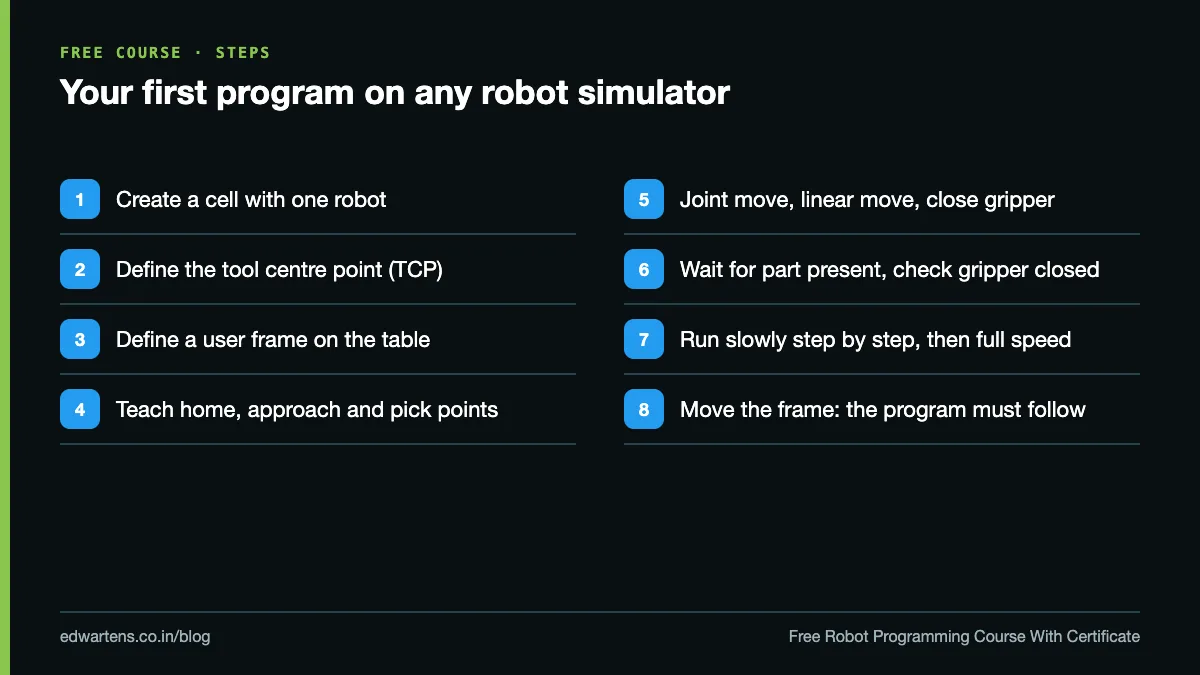
The same sequence works on every brand:
- Install the simulator and create a cell with one robot.
- Define the tool (TCP) for a simple gripper.
- Define a user frame or work object on the table.
- Teach a home position, an approach point and a pick point.
- Write the motion: joint move to approach, linear move to pick, close gripper, linear move back.
- Add a wait for a "part present" input and a gripper-closed check.
- Run it slowly, step by step, then at full speed in simulation.
- Move the user frame and confirm the whole program follows it.
Step 8 is the one interviewers ask about. If you understand why the program follows the frame, you understand robot programming.
Before you write "robot programming" on a resume
- Name the brand and the simulator: "ABB RobotStudio with a virtual IRC5 controller".
- Describe one cell you built, with its cycle time from the simulation.
- Be clear it was simulation, not a real robot. Interviewers respect honesty and will find out anyway.
- List the certificate correctly: "EDWartens Certificate of Completion, KUKA Robot Programming".
- Know the safety basics: modes, speed limits in T1, what an E-stop and a safeguard stop do.
Free online versus hands-on
A simulator teaches the logic, the frames and the language. It does not teach you how a real robot feels under the pendant, how a gripper misses a part, or how to recover a crashed cell. The robotics module of the Automation Engineer Program at our Electronic City, Bangalore centre adds hands-on hardware alongside PLC, SCADA and drives. Our industrial robotics training in Bangalore post explains the options, and World Robotics 2026: India's robot installations covers where the demand is coming from.
Learn it free
If you want the widest-used approach, start with FANUC Robot Programming if you can get ROBOGUIDE, or Universal Robots if you want a free simulator with no time limit. For brand-neutral skills, add RoboDK Offline Programming. Everything is at /free-courses.
Frequently asked questions
Q: Is there a free robot programming course with a certificate?
A: Yes. EDWartens runs free courses for FANUC, ABB, KUKA, Universal Robots, Yaskawa, RoboDK and ROS 2. Learning is free; the optional EDWartens Certificate of Completion costs ₹459 in India, or ₹559 for ROS 2, including GST.
Q: Is it a FANUC or ABB certification?
A: No. It is an EDWartens Certificate of Completion with a verification code. Manufacturer certifications are separate, paid programmes.
Q: Do I need a real robot?
A: No. Every course uses a simulator: ROBOGUIDE, RobotStudio, iiQWorks.Sim, URSim, MotoSim, RoboDK or Gazebo.
Q: Which robot simulator is completely free?
A: URSim for Universal Robots, KUKA iiQWorks.Sim Basic and WorkVisual, and ROS 2 with Gazebo are free. ROBOGUIDE, full RobotStudio, MotoSim and RoboDK need a trial, education or work licence.
Q: Which robot brand should I learn first in India?
A: The one named in the job adverts you are targeting. With no target yet, start with Universal Robots or ABB RobotStudio for the concepts, which transfer to every brand.
Learn this, free
The courses that teach this
Every lesson, the written notes and the practice are free with an account. Only the certificate is optional and paid.